
Introducing Screener on Kite web
Before you track or trade a stock, you usually have certain criteria in mind. You may be looking for stocks making sharp moves, trading near their 52-week highs, seeing high volumes in the F&O universe, or matching a particular fundamental filter.
Until now, this process often happened outside the trading platform. You would open a screener, scan the results, and return to Kite to check charts, fundamentals, or to place an order. Kite Screener brings this entire workflow into Kite.
You can choose a stock universe, apply custom filters or use ready-made presets, and narrow the market down to stocks that match your criteria. From there, you can review the stock, add it to your watchlist, view charts, create a GTT, place an order, and more—all in one place.
You can check out this video for a detailed walkthrough.
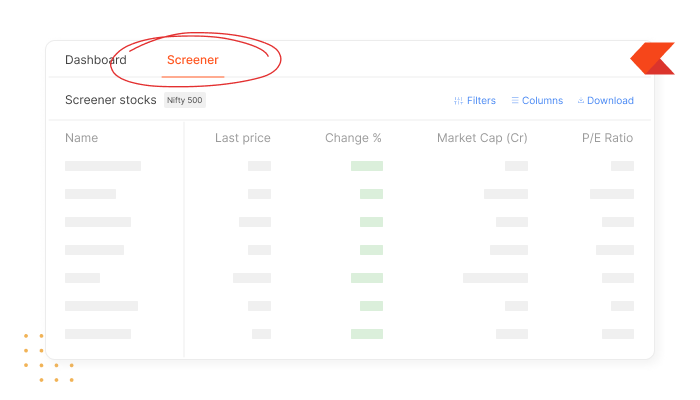
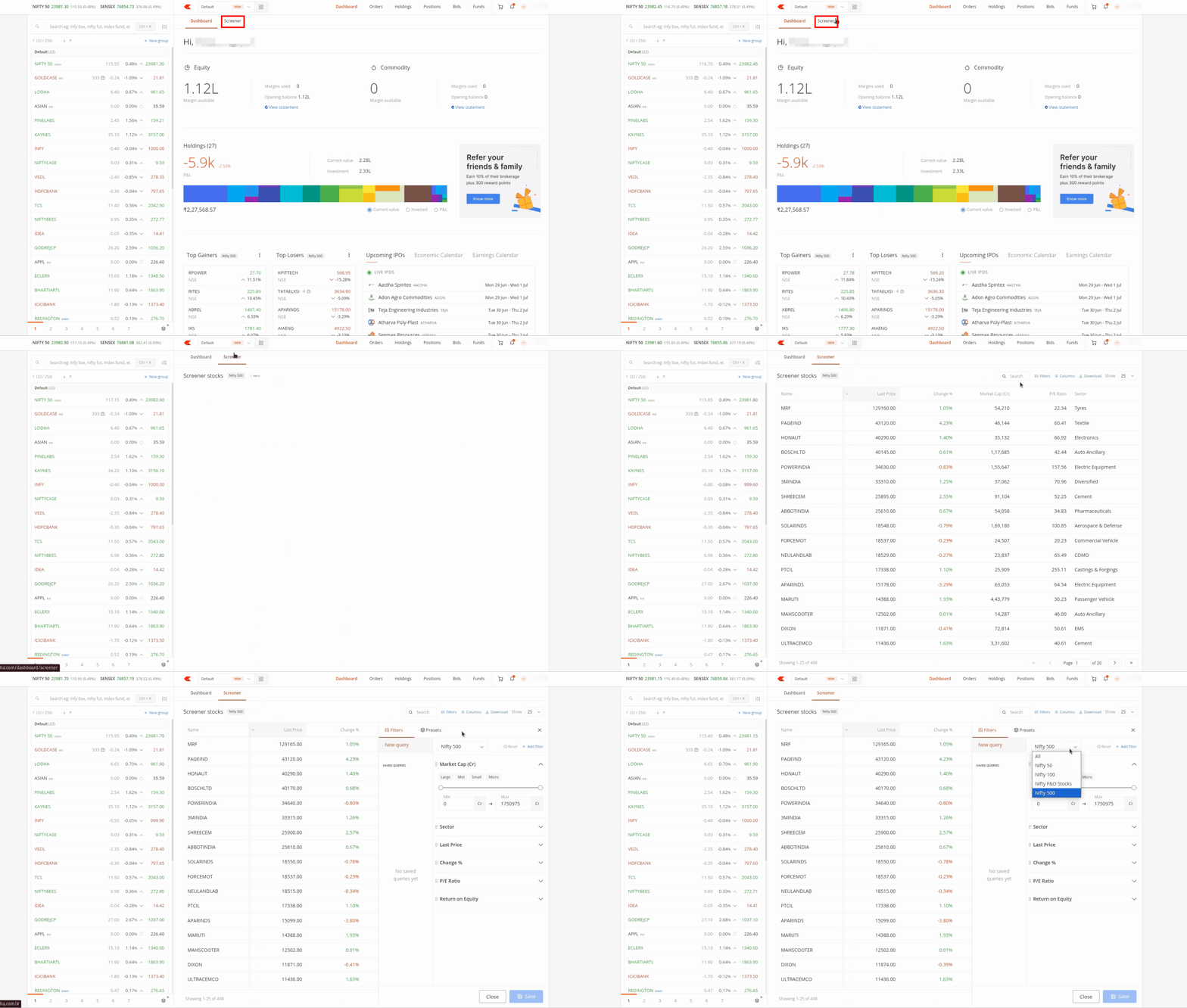
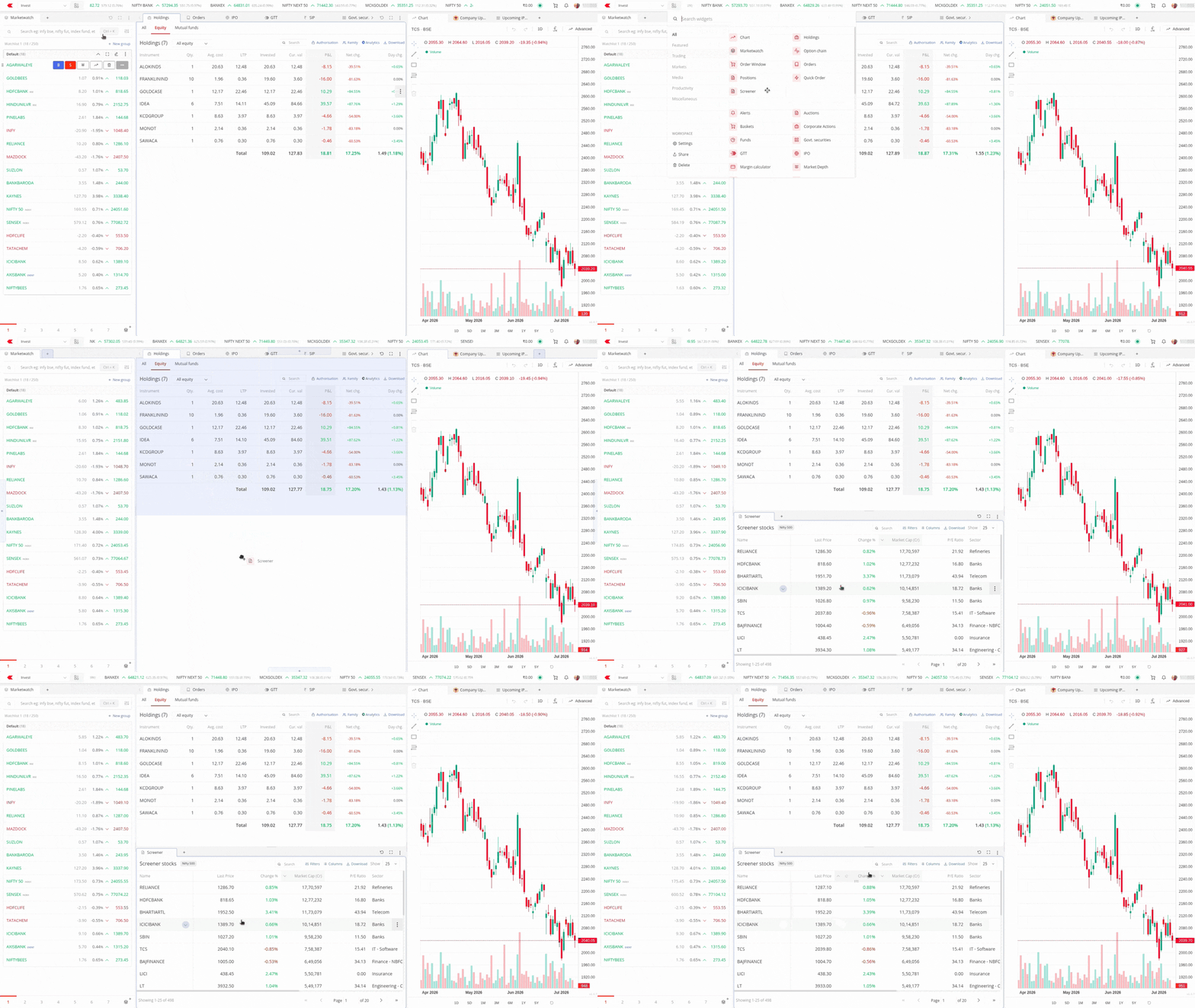
You can access the Screener from the new tab at the top of the Kite dashboard.
By default, it displays all stocks in the Nifty 500. You can change the stock universe to the Nifty 50, Nifty 100, Nifty 500, F&O stocks, or all available stocks.
The results table displays information such as the last traded price, percentage change, market capitalization, P/E ratio, sector, revenue growth, and profit growth.
You can sort, resize, reorder, or pin columns based on the metrics you want to view. You can also choose which columns are visible and download the current results as a spreadsheet. Along with this, if the stock is already in your holdings, you will see a small briefcase icon, which shows invested, current value and P&L.
Start with a preset
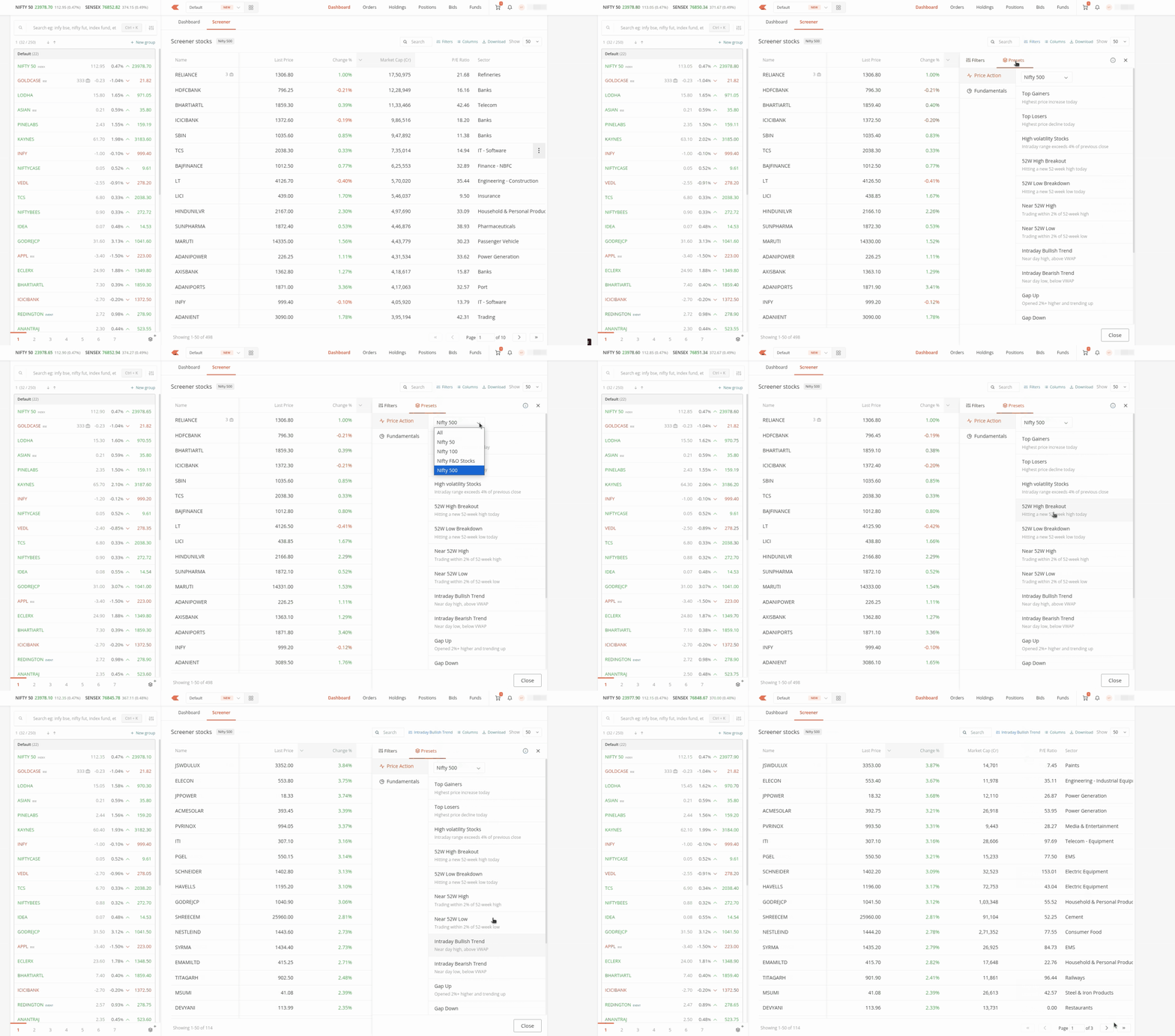
You can use ready-made presets to get started.
Price-action presets include top gainers, top losers, stocks near their 52-week highs or lows, gap-ups, gap-downs, high-volatility stocks, intraday trends, and the most active stocks.
Fundamental presets help you find companies based on characteristics such as growth, quality, valuation, low debt, dividends, and market capitalisation.
Select a preset, choose the stock universe, and the results update automatically. You can further customize the results shown by applying multiple filters as per your criteria. We’re also working on adding more data points in future updates.
Presets are predefined combinations of filters and should not be treated as stock recommendations.
Create your own screener
Custom filters allow you to create a screener based on your own criteria.
You can filter stocks using metrics such as:
- Market capitalisation
- Sector
- Price and percentage change
- P/E ratio
- Return on equity
- Debt-to-equity ratio
- Dividend yield
- Free cash flow
- Revenue and profit growth
- Volume and trade value
You can enter your own ranges or use quick options for common conditions such as gainers, losers, P/E ranges, and return-on-equity ranges.
The results update as you change the filters, so you can immediately see how each condition affects the list.
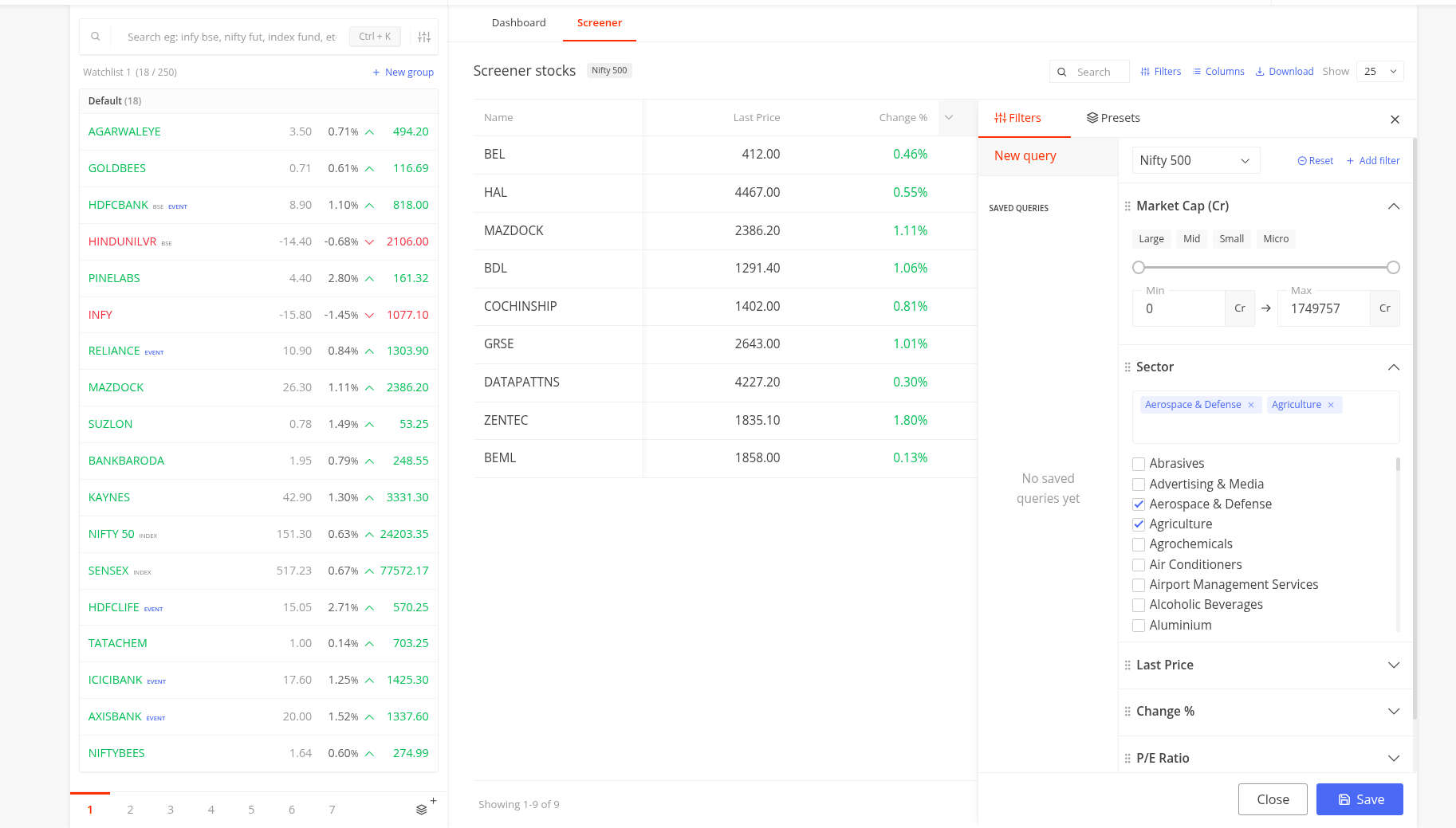
Once you have created a useful combination, you can save it under a custom name and reopen it later without rebuilding the screener.
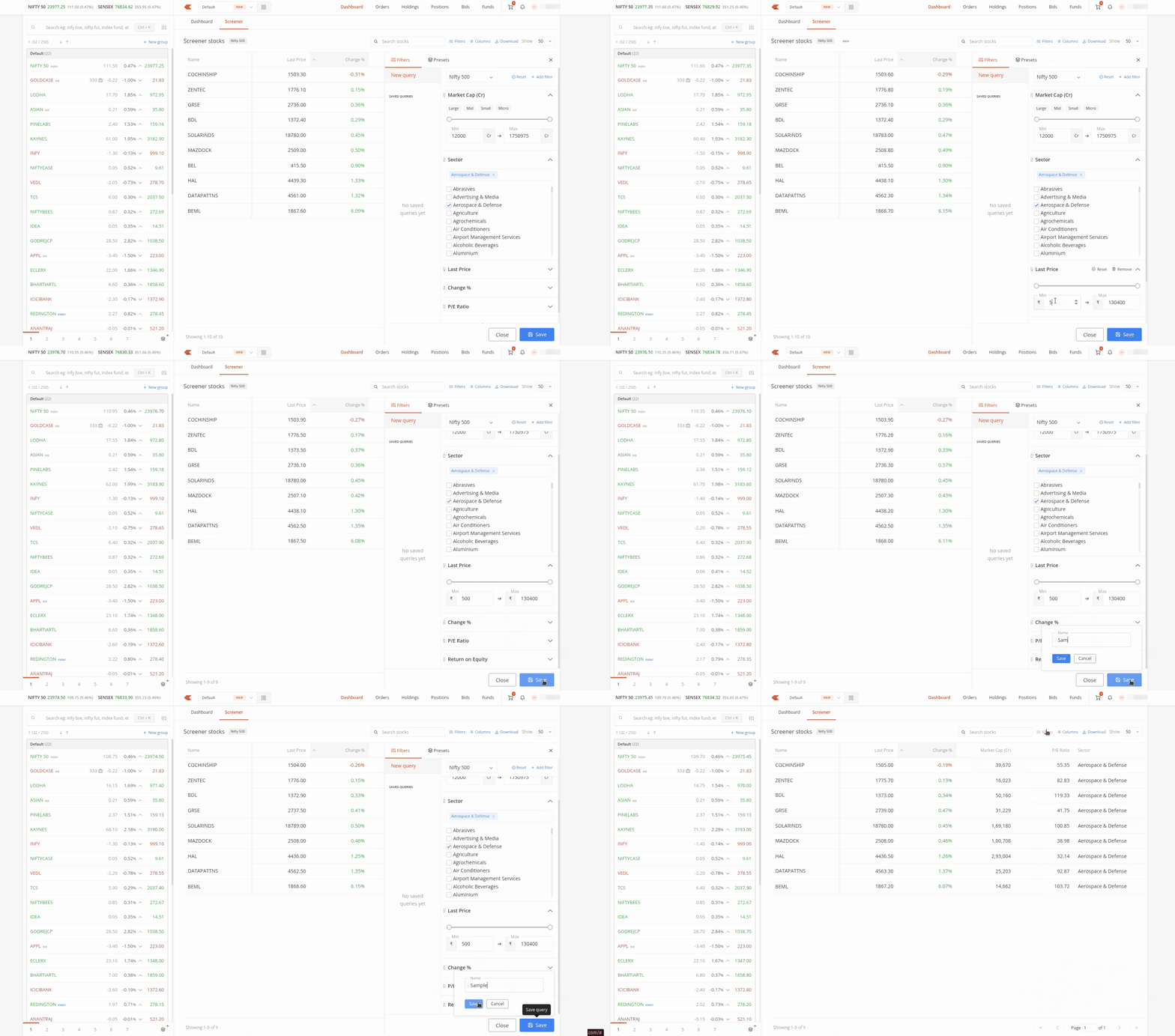
Review stocks from the results table
Once you find a stock that interests you, expand its row to see a snapshot of its market and financial data.
This includes information such as:
- Market capitalisation and sector
- P/E ratio and return on equity
- Debt-to-equity ratio and dividend yield
- Revenue and profit growth
- Price, volume, and buy and sell quantities
You can also see where the current price sits between the stock’s 52-week low and high.
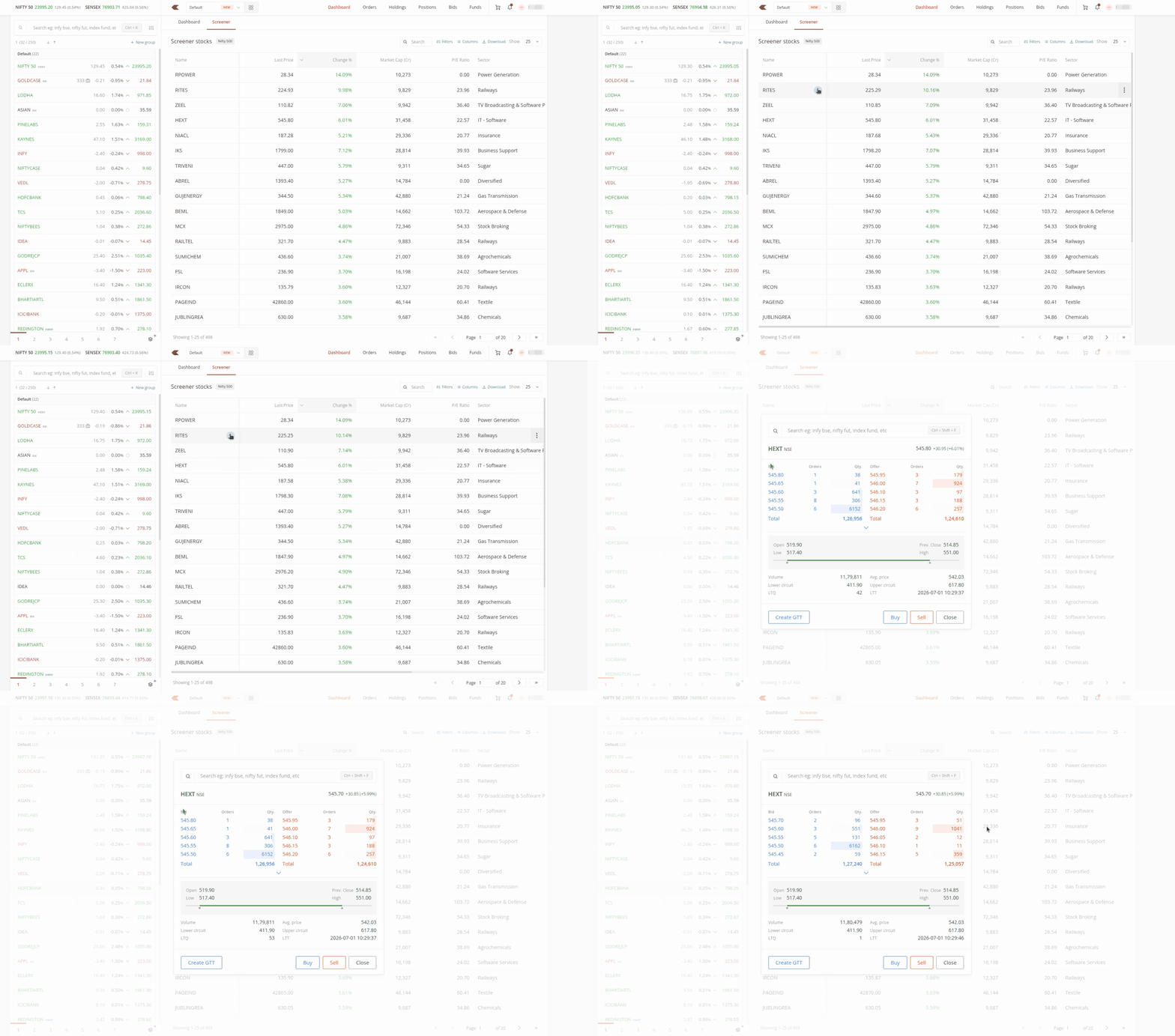
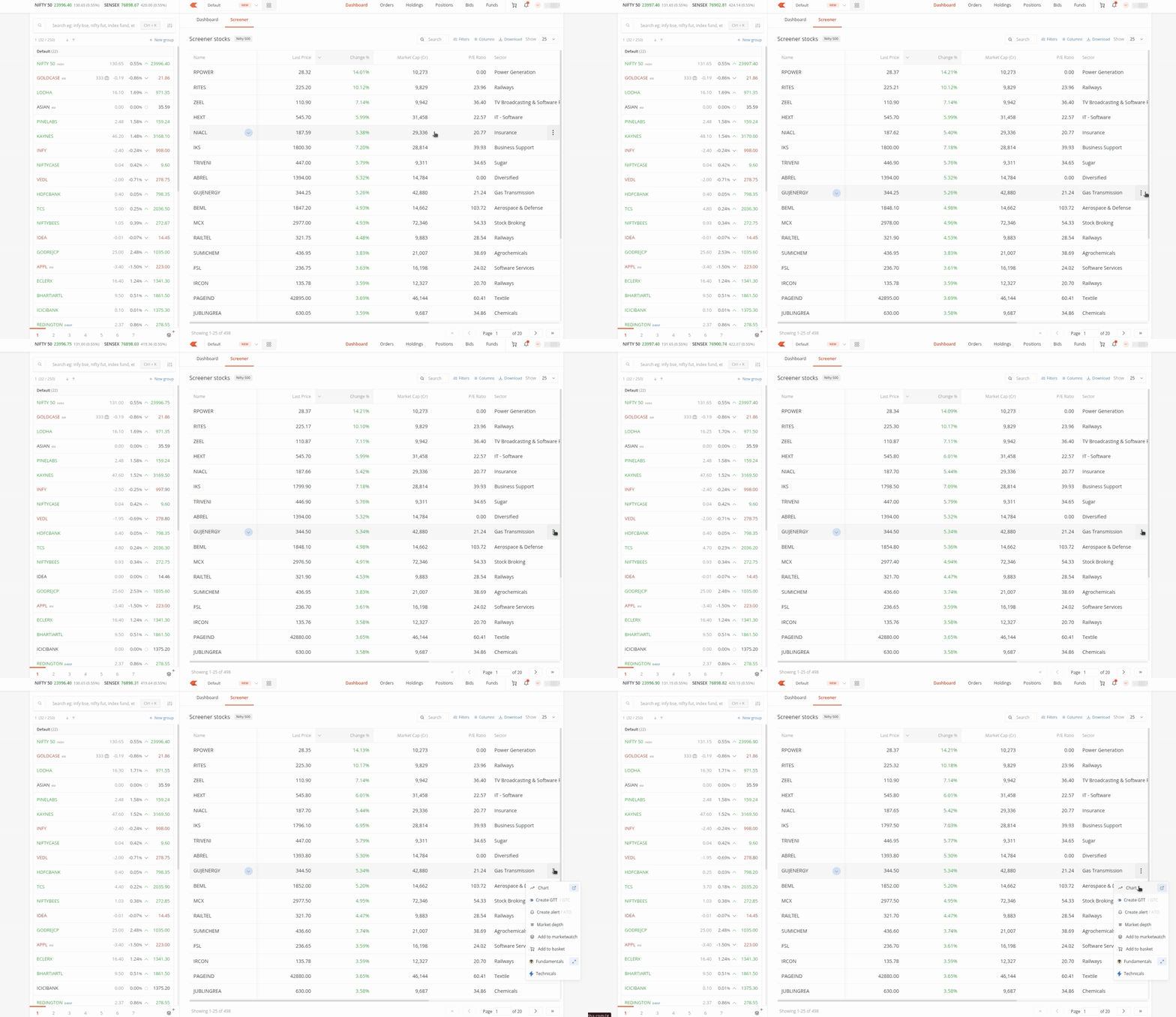
For a closer look, open the stock’s chart, option chain, market depth, fundamentals, or technicals directly from the Screener.
After reviewing a stock, you can:
- Add it to a watchlist or basket
- Set an alert
- Create a GTT
- View market depth
- Place a buy or sell order
This brings stock discovery, analysis, tracking, and order placement into one workflow.
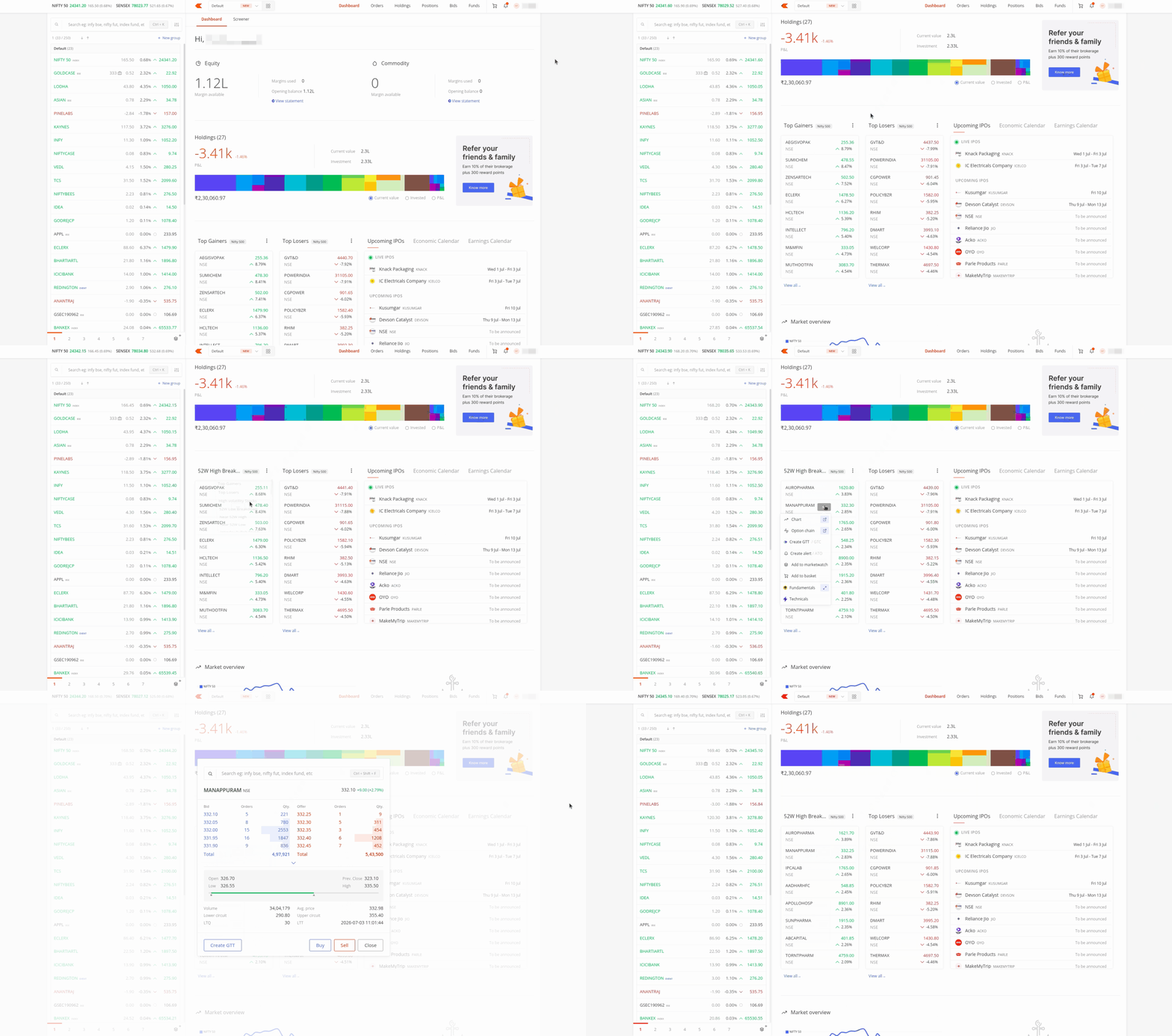
A preview of the Screener is also available on the Kite dashboard. It displays the top gainers and losers from the Nifty 500 by default, and can also switch to another preset.
You can also add Screener to your workspace in Kite Terminal Mode from widgets. Along with this, you can add the Screener Presets widget to get a quick overview of top gainers/losers, or change it to other criteria, such as high-volatility stocks, 52-week highs/lows, gap-up/gap-down, PE ratio, and more.
Note: Screener is currently available on Kite web and will soon be available on Kite app.

Did zerodha chances the column names and added download all ? My automated scripts are behaving different
Zerodha is elegant and easy to use, but it’s extremely slow when it comes to adding new features. I’d love to see a built-in technical scanner and the ability to import and export watchlists.
Very usable.
Please provide screener.in jeisa feature.
Nice App Great initiative Nice Upgradation Thank you
Great initiative
OK. I’m glad!
Great initiative
🙏
Thanks a Lot Please introduce Technical scanner also. It will be a huge boost for long term investments again
Hi Appasaheb, we’ve noted your feedback.
Data doesn’t seems to be accurate. For example,ROE of ICICIGI shows 0.00% in Screener Kite,but it shows actual ROE as 16.6% on Screener.in website.This is misleading,how do we rely on the data in kite if it displays this inaccuracy?
Hi Rajesh, please create a ticket at support.zerodha.com with details of the issue so we can check this.
Dear Product Team,
There is currently no SQL-style query box. Need to build screener by adding filters one by one, which is time consuming.
Create feature with a Query text box where one can paste expressions in one go.
powerful query-based screening is the expectation.
Regars,
Kunal Binnani
Don’t reply on this app purchase subscription like screener, stock scans
Hi Kunal, we’ve noted your feedback. We’re also working on bringing Kite Screener on APIs and MCP, which should help with this.
How to find own created screener to modify it or remove it.
Hi Modh, on the Screener page click on screener name in top right and then go to Filters to check your custom screeners.
Thanks Zerodha, While this is a start MVP for Kite Screener, please add exhaustive fundamental and technical attributes for screening. (screener.in / trendlyne / etc)
I like the part it is integrated with the Zerodha service, so can freely export compared to paywalld large-export features in screener/trendlyne.
Hi, we’re working on adding more data points. Thank you for your feedback.
The 52 Wk High and Low should be updated Post the Corporate Actions like Split, Bonus etc or else this leads to misinterpretation
Nice to know very smooth & this is rhe best option slow Learner like me
Thank you so much
Why did it take so long to build this basic feature?
good and useful tab with lots of functions ❤️
Excellent & very useful for trading. 👍👍🙏🙏
Very nice experience gaining new features is highly appreciated while we use can better explain our experience
Thanks
Its a great feature now, Waiting for AI analysis in kite
Niceéeeeeweeweeeeeeeepppppp
It will be a great help
Excellent app. Very helpful for new investors.
Great feature
Good 👍
Thank you so much it definitely help us.
Hello team,
It will great help if you provide peers names and their earning growth that will help in finding whos growth is highest
Hi Neetu, we’ve noted your feedback. Thanks.
Can we add much better technical screener like chartink?
Hi Ameer, we’ve noted your feedback. Currently, you can use Streak to filter stocks based on technicals: https://help.streak.tech/fn2gx7xweb98jt6xek2p89yg
Hello Team, This is a great feature and very helpful. Thank you for bringing it.
In the preset filters, you may add ”My Portfolio” option as well, that will provide all the important columns about the portfolio and we can do analysis right there in the Kite application itself. You can add some filters in the ”My Portfolio” stocks also.
Great job !
While providing the screener with the option to choose various parameters to display like PE ratio, market cap, profit growth, etc., etc is a fantastic add, would it be possible for Zerodha to allow selecting these parameters even for the holdings? I.e., provide an option Holding in addition to Nifty 50, Nifty 500, etc.
Hi Deepak, currently, if you screen for stocks and if it is already in your holdings, you will see a briefcase icon, indicating you are holding that company.
I like it
Thanks to zerodha.
Can u plz provide some filters in screener of day, weekly and monthly candile breakouts future.. helpfull for chart reading…
Hi, we’ve noted your feedback. Currently, you can use Streak to filter stocks based on technicals: https://help.streak.tech/fn2gx7xweb98jt6xek2p89yg
Thank you
How to use screener in mobile kite app
It would be great if there are technical parameters by which we can screen the stocks e.g based on rsi,moving average etc.
Hi Arvind, we’ve noted your feedback. Currently, you can use Streak to filter stocks based on technicals: https://help.streak.tech/fn2gx7xweb98jt6xek2p89yg
Hi Daniel, Screener will be availabe on Kite app soon. We’ll keep you posted.
When trying to download the screen it only downloads the current page not the entire list e.g. FNO stocks have a total of 3 pages I will have to do a download 3 times, please make it so that the entire list is downloaded.
Wow. Too good. This is great. I like how Zerodha keeps coming up with new features which makes it a great platform to trade. This new feature is really helpful as I used to use other platforms to filter the stocks. Keep it coming Zerodha team .
Good mechanisms.
Advising to show Face Value of each stock under portfolio or under ’ Fundamental ’.
Thankx zerodha for making a scanner in kite app
Please add Api or mcp support for screener
It is very very useful to us specially new traders.Many many thanks to all who are engaged in this helpful work.
Good service. Excellent. Thank you so much to Kite.
Make the scanner for breakout patterns..
if we need to behaviour of its future we have to search its future stock and then add tp watch list. it is very tredeous task and time consuming option, for stock trading time play very important role. some time wrong future stock get added and traded also. better just like there is a tab for option , similiarly add futures tab for each stocks. it will save and make trading happy.
Very nice feature. This feature will eliminate the reliance on other websites.
Thanks for addition of SCREENER on the kite itself. One more request, please add colouring facility for NOTES, which will also enable alot.
Excellent work
Good job
Very good
Excellent work
Good job
Best creation
Can you also provide a feature to import list of stocks into watchlist?
A much needed feature. Thanks to Zerodha team to include a screener with in kite.
One suggestion – Download option is working only for first 100 stocks even when the screener has returned more than 100 stocks. Basically, the download is working only for stocks appearing on first page of the results ignoring the remaining pages.
How can i check/adopt for my Holdings, so that i can take decision based on these metrics to average or exit……….
Good efforts made.Hope more easy ways will come in future for the benefit of your clients who are not techno savvy. Thank you.
Currently, if you screen for stocks and if it is already in your holdings, you will see a briefcase icon, indicating you are holding that company.
Good one 👍
hope it will help lot
Is this available for mobile app
Hi Anil, Screener will be available on Kite app soon. We’ll keep you posted.
Please could you add PEG ratio, Debt to equity ratio, ROCE & EV / EBITDA too.
Hi Dinesh, we’re working on adding more data points in future updates.
Great efforts Team, you are really improving your Kite dashboard day by day with new features, well done which enhance our experience 🙂
Does this feature available on API or MCP
Super this one is I have to look over the view market s and each and every moment also sir
Awesome feature, this will not only reduce hassle to open multiple windows , but also help to decide and place order quickly, soon the signal comes.
Please also add another feature to remember the drawing in the chart and if possible alerts on breaking of trendlines, like trading view, this will take the trading experience of Zerodha Kite to the next level.
IS there an API ? API would be a great addition or else you are not adding any value over screener which can be trusted as it has gone through several itterations and a mature product
This is NEAT and GOOD … the much Needed update …. THANKS :*
Is this feature available on API or MCP?
Very good initiative. It would be beneficial to the existing clients and will also attract New clients
Excellent
Good
Please bring complete screener features like chartink or trading view for technicals as well
Hi, it would have been greatly useful if this screener worked for minimum 52 week historical data and this data could be downloaded as .csv
Good
Great feature, I m waiting for long time
Good one. Please introduce Technical Scanner also.
It will help us really in taking decisions for exiting, adding or continuing. Great job.
Not at all.
It will help us really in taking decisions for exiting, adding or continuing. Great job.
It will help us really in taking decisions for exiting, adding or continuing.
Is this available on app?
Great! Will try it out . Thanks
Please introduce stock specific forums like moneycontrol forums where all zeroda users can chat and share knowledge
Great feature. Pls add technical based filters as well like rsi and stochastic rsi.
Hi Sagrika, we’ve noted your feedback.
If it is free of cost please provide.
Hi Satyanarayana, Screener is available at no extra cost.
Nice Programme
Good to know about the strategies
Nice
We should have this Screener applicable to our Portfolio as well. So that my exit and step up decisions easier. This serves the purpose best.
This is a very good idea may be a tab for existing stocks in portfolio.
Hi Vishwanath, if you screen for stocks and if it is already in your holdings, you will see a briefcase icon, indicating you are holding that company.
Wil let you know after SUCCESS .
Please try to provide this in kite mobile also, thank you.
Yes agreed 👍
Hi Girish, Screener will be available on Kite app soon.
Gooid
Useful
Thank you
Can not read such big detail, can we have link in application to reach the needful?
If zerodha under process in us stock market buying or selling?
Hi Venkatesan, we’re working on this.
What an excellent initiative. Thanks so much. Please get the old Cover order back too, which used to allow one to place trailing SL in the order itself.
Thanks again
Great zerodha
I want to receive daily High low, 52 week high low and how to see
Can this screener data access via API? (PAID)
Hello Zerodha Team,
Please add the Drag and drop SL and TP option to easy trading from the chart.
waiting for positive feedback from you.
Thank You!
Rinkesh
9867778655
Zerodha is improving sonice…how can connect…..
Pl give technical scanner
Nice trading app
Is the screener available in Android app of zerodhan.
Hi Sachin, Screener will be available on the app soon.
👍👍👍GOOD😀😀😀
How to use couldn’t understand
Hi Gopal, please watch the video shared in above post for walkthrough.
Great feature. Pls add technical based filters as well like rsi and stochastic rsi.
You come out with great ideas.
Very useful to investors.
It is a wonderful feature, thank for providing that, you are beating the market standards, Kudo’s to your team !!!
It would be great if you provide that feature as a full support to view as full screen on single monitor or dual monitor. currently the left pane where the watchlist is listed is occupying the screen 30 % hence won’t view on single screen monitor, we would happy you if you do as full screen view for Screener feature.
Thank you once again !!!
👍👍👍👍Good
Nice
Good initiatives
Yes I want
It seems very nice. Normally for stock analysis use to depend other web sites. Now if we receive all that facility zerodha it’s very good. Being an old customer who completed more than 10+ years it’s seems a good move from zerodha & Team.
I was waiting for this feature thank you.
I am waiting for bracket order as well for tention free trading.those who does not need bracket order donot provide but those need like myself please provide
Zerodha has included the major missing part on portal. Good to see screener on Zerodha. Very nice initiative. Hope you will do more up gradation to it. Keep it up. Best wishes..
Good implimentation
👍👍👍❤️
Great feature. Pls add technical based filters as well like rsi and stochastic rsi…plz add last day high low and last 52 weeks high and low structure….thnks zerodha
Yes
Good
Please explain in Hindi
What about on app? Most of the working professionals track on app. I am noticing that new features are not coming in app. Trailing stop loss is another good feature but available only on web.
Hi, Screener will be available on the app in coming updates. Trailing Stoploss is availabe in latest version of the app.
I was waiting for this.
Thanx
Please add etf 52 week low….
This scanner should be access in kite app to increase hassle free transaction
How to use screener to verify my existing photfoli
Excellent. This would be really helpful.
Please add it with mobile app also for more convenience.
Thanks.
Just Superb!
hi if i want original dashboard with details of margin used/ avilable/ cash margin available/ collatral margin how do i get that … with screener coming all that details have vanished
Hi Deepak, screener is a seperate tab on dashboard, and you can switch to dashboard to view these details.
I like this
Very good 👍
Is there any extra charges for this kite screener please inform me
There are no charges.
Great feature. Thanks.
Can you also give the option to limit the stock universe to any of the watchlists we have?
Okay sir thanks
Let’s start
Nice initiative
All filters require
Thanks
I AM INTERESTED THIS MAY SUPPORT TO MY WORK
Good initiative to have updated information on KITE portal I/r/o all parameters of each Equity
Howw xan I learn more about using screen graphs for investment decisions
good feature
1 is it free or does it hav a cost
2 screener is not showing in kite now,,, what to do so it shows up
rgds
deepak
Good &nice
Good
I am interested
Share me all your screener messages
Please notify me your screener
a lot of changes required in Screener, i am giving some samples below
0) searching problem (not search) 😴
1) all data require at Screener
2) this is joke, Screener not come in full screen like chart i can see in full screen
2) this is ridicules, when I download excel file it come only 100 nos list of share, for all stock excel download I have to repetition more than 60 time to download all stocks
3) ISIN or NSE Code / Symbol not show in downloaded excel file
AI has arrived but zerodha website and zerodha Kite android app is living in the 18th century 😴
Zerodha is very helpful to me.It is very easy to operate.
Verynice and interesting
good to see positives changes interface in recent months , trading view dash board , intra P&L , position grouping , now screener .. nice ..
See if you can provide configurable tool for systematic investment and exit .. even if this can be started with ETFs but one should have a facility to check EMA , RSI etc conditions for entry and exit .. and also it should have a facility to compare sector with base index like nifty 50 or 200 or 500 etc .. kind of Relative Strength to identify which sector or etf is doing well .. kind of momentum strategy to generate alpha .. this facility can pull in lot of investors too ..
Opened Zerodha account when your office was next to pride apartment and it was like a hot box.. 🙂
Please increase the no of parameters.
F
filers to be displayed by default and ratios can enter by users not predefined looks outdated
Good useful i want to me
a lot of changes required in
@zerodha
Screener only 1) searching problem (not search / filter) 2) Screener not come in full screen 3) all data require at Screener 4) ISIN / NSE Code missing in downloaded excel file 5) all stock excel download option missing, only 100 shares
Please add ITR filing feature tooo it makes July easier 😃
Ok
Thank you so much. This will definitely help us.
Good Afternoon….Thanks for the Useful update made by zerodha….Central pivot points is working on chart view on kite web but not in trading view.. kindly add this option to trading view chart also. Also provide the options like adding third party indicators.
Hi Gowri, we’ve recenrly added CPR to Trading View charts too. Please search CPR in indicators on Trading View charts.
Best creation
Fabulous job team, loving you so much.
Yes
I have given my e mail
Is the fundamental data available via kite API?
Thanks a Lot. Please introduce Technical scanner also. It will be a huge boost for long term investments.
please add in preset Previous day high/Low
Hi Ashish, we’ve noted your feedback. We’re working on adding more data sets in coming updates.
Good decision sir keep it up
Great feature 👍
Waiting since so long😁😁😁
Dear Product Team, While Zerodha keeps on bringing new features, one of the long pending request was having groupings in holding view or have more filters which can allow to group long term, short term stocks within single account. . Can you please look into it
BEST WISHES FOR FUTURE THANKS
Good