

Introducing updated Stock SIP experience on Kite web
Building a long-term portfolio is not only about choosing what to invest in. It also requires investing consistently over time.
In practice, every investment involves deciding when to invest, calculating how many shares fit within your budget, placing orders, and ensuring that sufficient funds are available. When markets become volatile, it can also be tempting to postpone an investment or skip it altogether.
A Systematic Investment Plan (SIP) helps make this process more systematic by allowing you to schedule recurring investments in the stocks, ETFs, or bonds you want to accumulate over time.
Kite already supports Stock SIPs, but the earlier process required you to first create an order basket and then link it to a SIP schedule. You also had to ensure that sufficient funds were available in your trading account before every installment.
We have now updated the Stock SIP experience on Kite web to make it easier to create, fund, and manage your SIPs.
With the updated experience, you can:
- Add instruments directly while creating a SIP.
- Choose between quantity-based and amount-based SIPs.
- Divide your investment amount across multiple instruments.
- Lock the allocation assigned to an instrument.
- Automate funding for amount-based SIPs using UPI Autopay.
Here’s how the new Stock SIP experience works
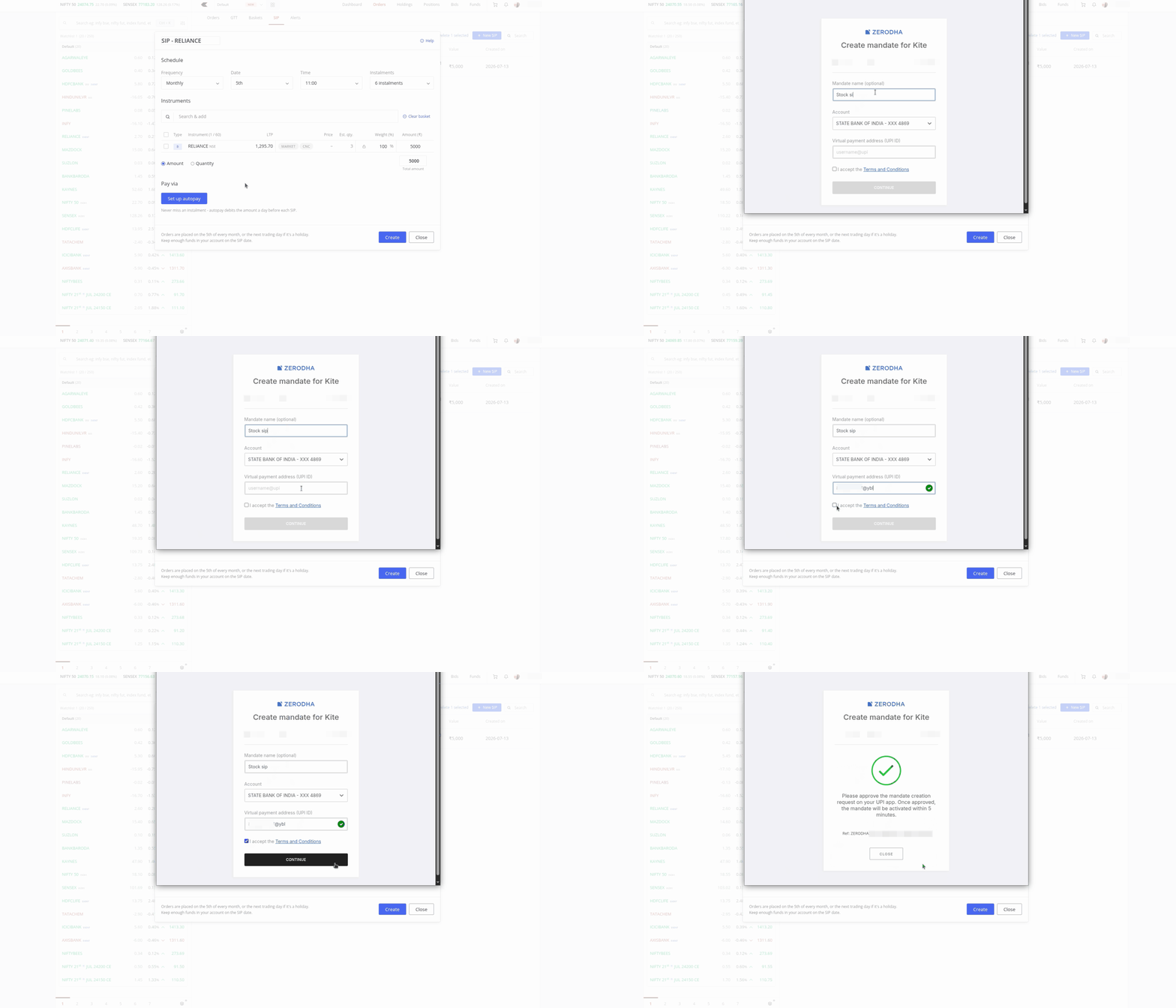
To create a Stock SIP on Kite web, go to Orders, select SIP, and click on New SIP.
You can also start one directly from your watchlist or holdings by opening More options for an instrument and selecting Start SIP.
You can choose whether the SIP should run daily, weekly, or monthly, select the date and time at which the orders should be placed, and decide how long it should continue.
Once the schedule is set, you can search for and add the stocks, ETFs, or bonds in which you want to invest.
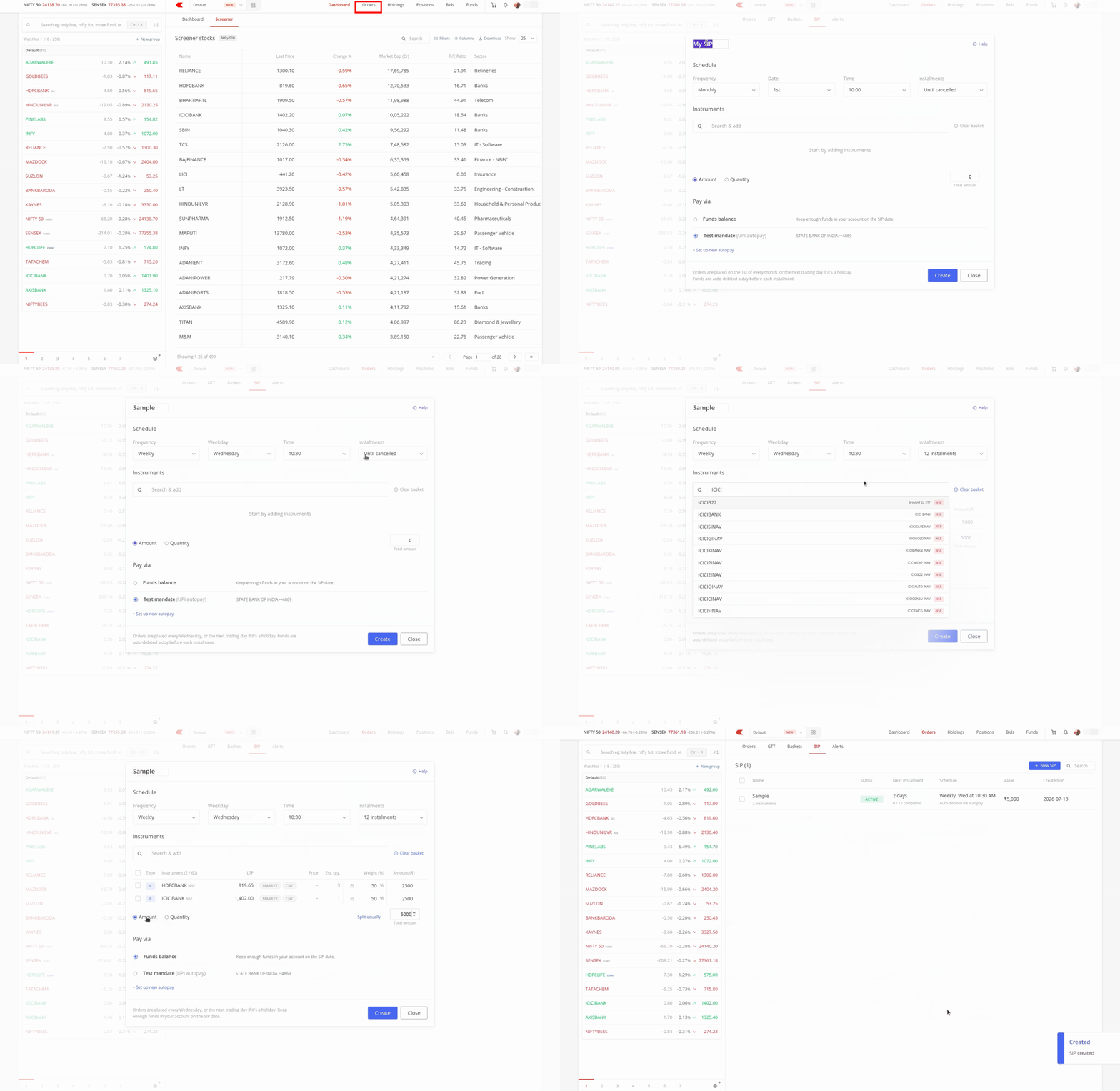
Stock SIPs can be set up in two ways: quantity-based or amount-based.
Quantity-based SIPs
In a quantity-based SIP, you specify how many units of each instrument should be purchased during every instalment.
Kite displays the approximate amount required based on the latest available market prices. Since prices can change, the actual amount required when the SIP runs may be different. You must therefore ensure that sufficient funds are available in your trading account before the scheduled time.
UPI Autopay and the option to lock instrument weights are not available for quantity-based SIPs.
Amount-based SIPs
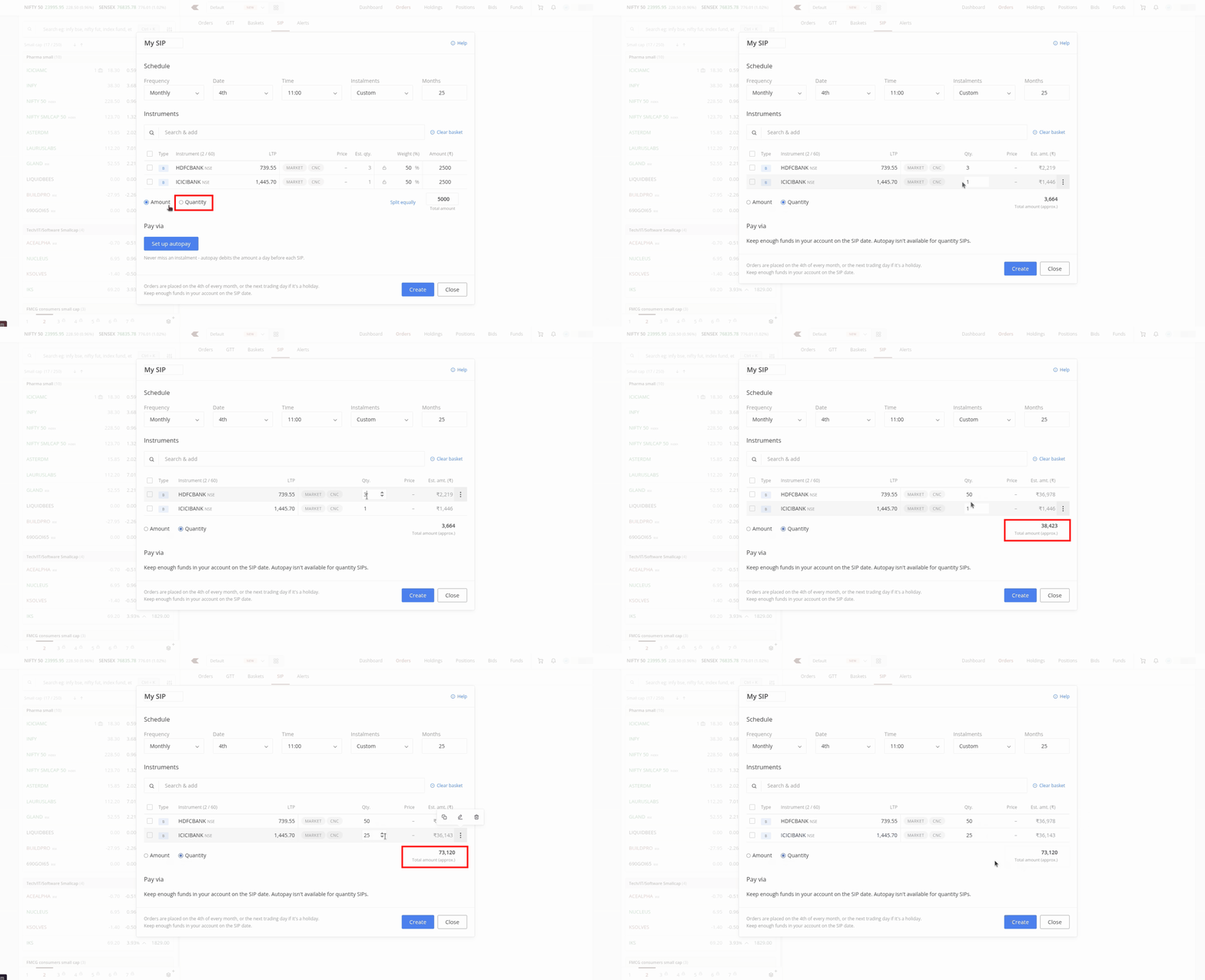
In an amount-based SIP, you specify how much you want to invest during every instalment. Kite then estimates how many units of each instrument can be purchased within that amount.
When you add multiple instruments, you can decide how the total investment amount should be divided among them. For example, you could allocate 60% of the amount to one stock and 40% to another.
You can also use Split equally to divide the amount evenly across all the instruments in the SIP.
The weight assigned to a particular instrument can be locked. Once locked, its allocation remains unchanged even if you modify the overall SIP amount or adjust the weights of the other instruments.
Since fractional units cannot be purchased, the amount invested may be slightly lower than the amount allocated. The estimated quantities may also change based on the market prices when the orders are placed.
Automating SIP funding with UPI Autopay
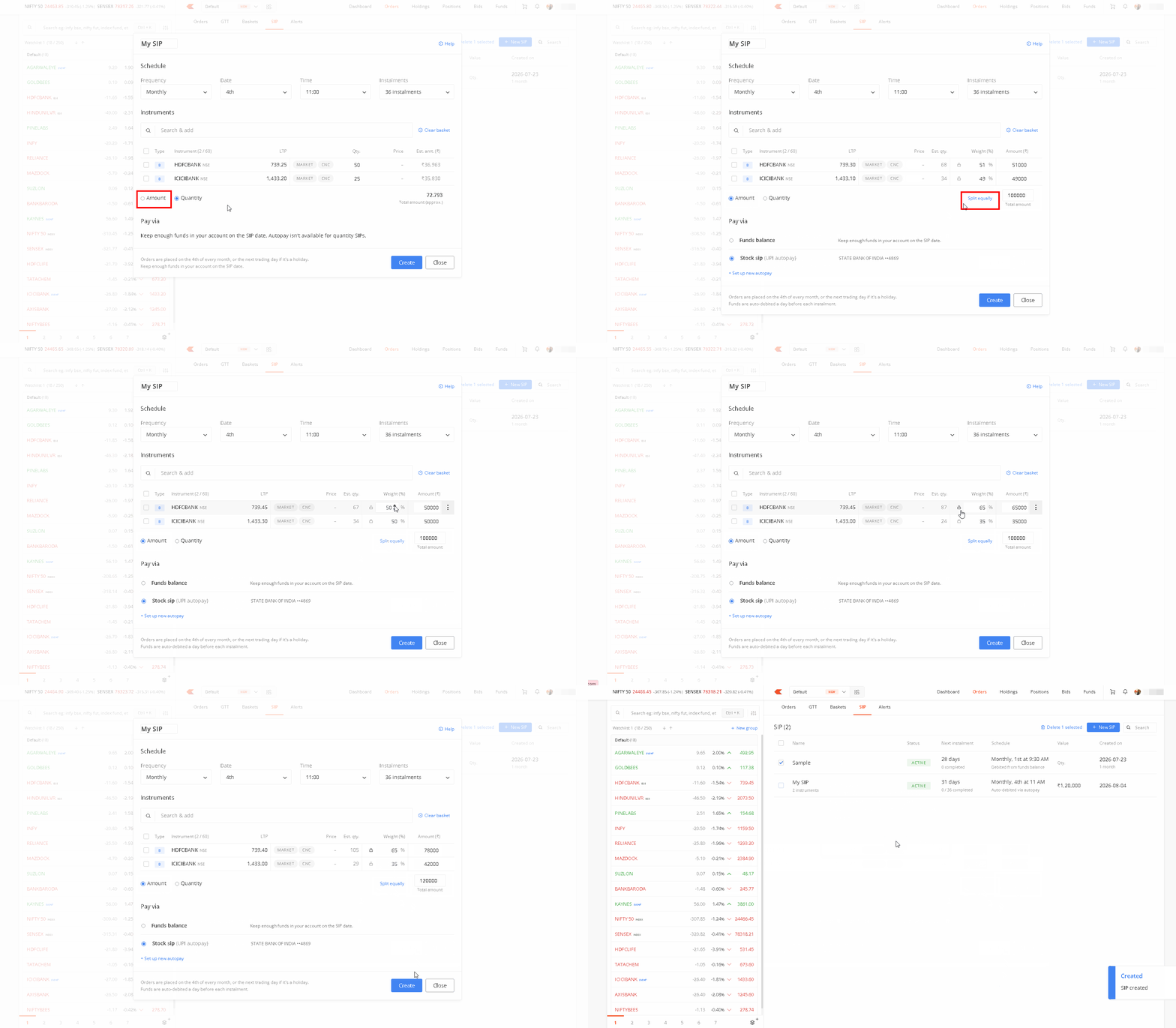
For amount-based SIPs, you can use UPI Autopay to automatically transfer the SIP amount from your linked bank account. This removes the need to manually add funds to your trading account before every instalment.
To set it up, enter your bank and UPI details and approve the Autopay mandate in your UPI app.
Once the mandate is active, the amount is debited from your bank account one day before the scheduled SIP date so that the funds are available when the orders are placed.
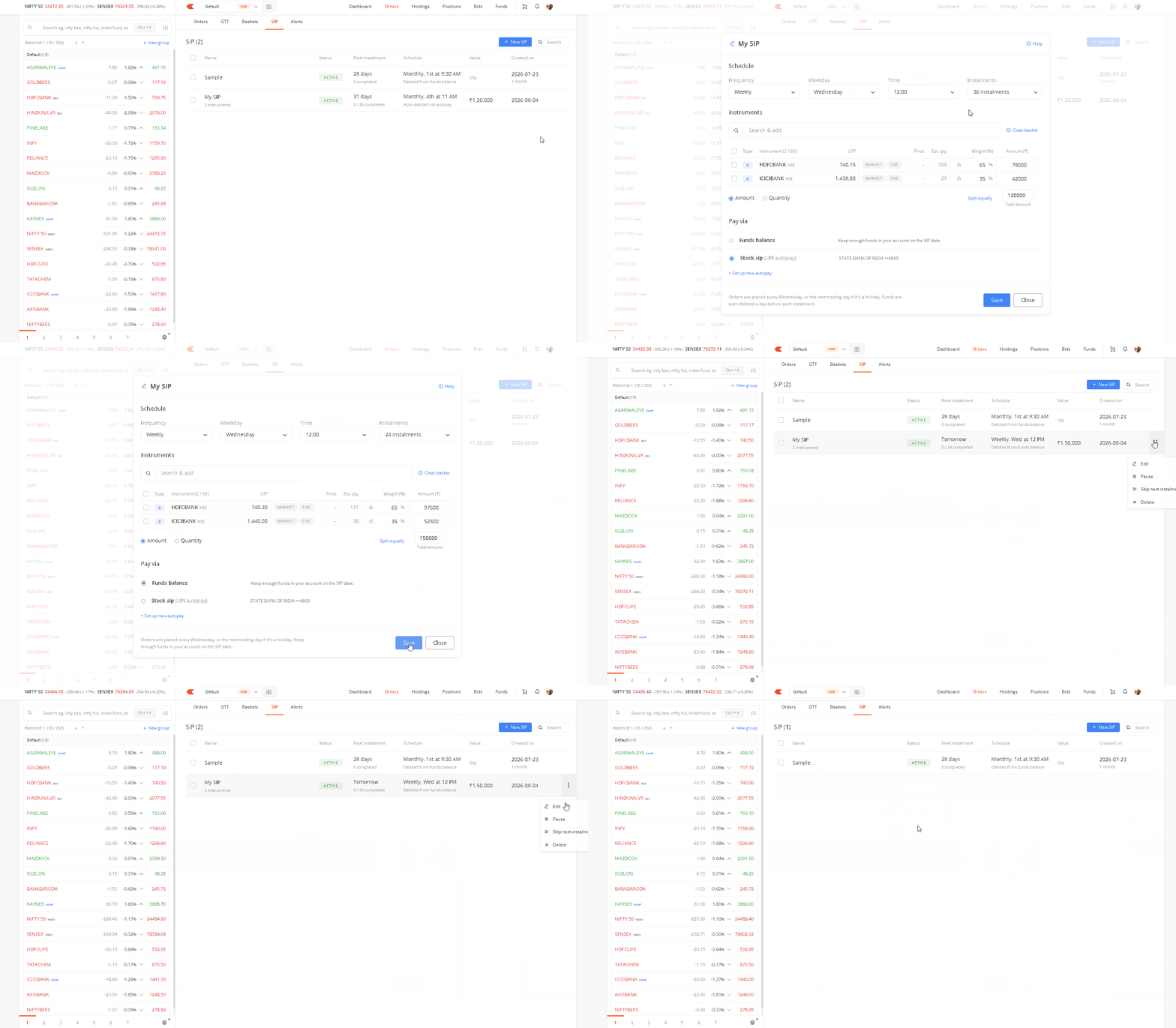
Managing a Stock SIP
You can modify a Stock SIP whenever your investment plan changes.
From the SIP page, you can change its schedule, duration, payment mode, investment amount, quantities, and order settings.
You can also:
- Pause and resume a SIP.
- Skip the next instalment.
- Delete the SIP.
How Stock SIP orders are executed
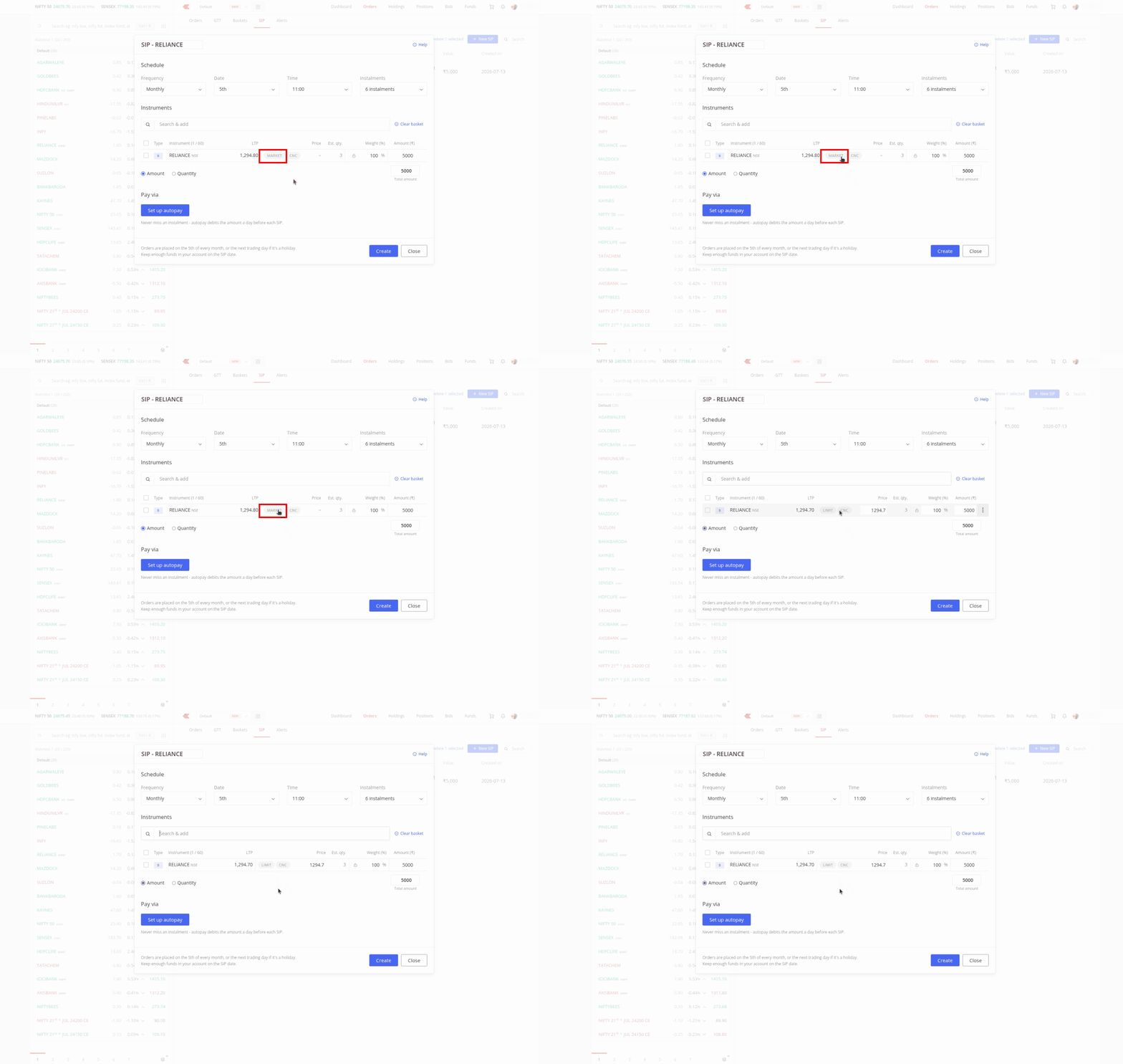
By default, Stock SIP orders are placed as market orders with market protection enabled. Market protection applies a price range to the order to limit the effect of sudden price movements.
You can also choose a limit order. However, the order may remain unexecuted if the instrument is not available at the price you specify.
Stock SIP orders are placed only on trading days. If a scheduled date falls on a trading holiday, the order is placed on the next trading day.
What happens to existing Stock SIPs?
If you created a Stock SIP before this update, there is nothing you need to do. Your existing SIP will continue to run according to its current schedule.
Older SIPs with multiple schedules cannot be modified directly. To make changes, you must first remove the additional schedules.
The updated Stock SIP experience is currently available on Kite web and will be available on the Kite mobile app soon. Until then, SIPs created on Kite web may have limited editing options when accessed through the app.

Hello
Stock price =1000, say
I want to buy this stock when price moves low say on a dip
Is this possible in zerodha stock sip ?? If yes please provide details.
Hi Aparajit, you can automate this using the ATO (Alert Triggered Orders) feature. Just set your desired price, and an order will be placed automatically as soon as that price is reached. You can learn more about ATOs here: https://support.zerodha.com/category/trading-and-markets/alerts-and-nudges/kite-alerts/articles/what-is-alert-triggers-order-ato
Very Good Initiative by your Company
The interface of ’Kite’ is complicated and is not at all easy to use. That is the only reason I want to quit Kite.
Request you to please also release this for kite mobile. Its painful if I have to modify a SIP created on pc, I cant do it thru mobile app which is my daily driver. Any date / time till it comes to mobile app ?
Hi Aditya, this is in the works for the Kite app and will be available soon.
Ok
Start fractional investment
Finally! Zerodha is implementing the feedback.
This way its popularity will skyrocket.
Hi Team,
Please answer the below!
1) If I have some stocks in my secondary demat account and if I setup SIP in them, will the new purchases directly land in the secondary demat account or primary one?
2) In case, if they get listed in the primary demat, is there any option to move them automatically to the secondary demat?
3) Also, can you give an option to create a separate portfolio for different goals in a single demat account? Or at least to filter out stocks based on the tags like how you have provided in the console?
Hi Mahesh,
1. Shares will be credited to your primary demat account.
2. No, the transfer from primary to secondary cannot be automated.
3. This is on our list of things to do.
How SIP works when there is Margin utilised for FnO? Example, when amount automatically transferred from Bank account to Trading account one day prior to SIP, the same funds could be automatically used for existing FnO position & not utilised for SIP.
Hi Jagannath, if the funds are utilised, the SIP orders will be rejected once triggered, since there are no sufficient funds in the account.
Yes, start a condition based SIP.
When we place an order from watchlists before the market opening time at 9:15 AM , there should be one option to send the selected/placed equity to the basket, so that we can place multiple order simultaneously in the pre-opening market time without any delay. Otherwise when we go to the order segment then basket then search the name of the shares/equity it takes much time for a trader.
So make available one option so that we can directly send to the selected share/equity to basket from the watchlists at the time of buy/sell. It will be smooth and easy for a trader.
Another thing, the maximum number of showing share/equity limit should be 500 instead of 250 and the maximum number of showing share/equity limit should be 100 instead of 20
Hi Chandan, this feature is currently available on Kite web, where you can add an instrument directly to the basket from marketwatch, holdings or positions. Have noted this as feedback for the Kite app.
I just created a mandate (State Bank of India) for automating the SIP funding with UPI AutoPay through BHIM app. However, I see a message under the AutoPay mandate in BHIM, ”UPI PIN will required for all the subsequent debits”. Can we still call this as AutoPay if UPI PIN is required for every debit? Is there any process to fix this? I had similar issue with Mutual Funds SIP in Coin app, but moving to Coin UPI helped me in avoiding UPI PIN every time.
Although it is great feature to add amount based SIP but what I have understood is that stocks will be purchased based on the allocation we have given but if the price of one stock moves up or down there is no option to adjust the overall allocation of the portfolio like we used to have in Smallcase.
I think having a Portfolio allocation is a better option then to have a SIP allocation
Would request to introduce coin app STP transfer, especially for MF SIP. Would be great if we can transfer it from Liquid funds on Kite app to Coin app MF SIP.
For this stock SIP is there any charges kindly tell me
There are no charges, Sujatha.
Is there any reporting available? Like what’s the return given by my sip bundle ?
If I withdraw SIP after 5 years, then how much tax is applicable as per current rule. Is it same as LTCG?
And changes on it explain charges?
There are no charges for using this feature. Also, we do not charge anything for equity delivery trades.
Very well decision taken from Zerodha we as a investor was waiting to take this opportunity special in systematic investments day to day basis as well as weekly basis.
Only hindi
I want to build a cash reserve of ₹2,000 every month in my trading account, then decide later whether to invest in stocks, ETFs, or hold cash depending on market conditions.
Is it possible to make such feature in zerodha platform.
Hi Baskaran, you can automate fund transfers to your account using eMandate on Console. You can learn more about it here: https://support.zerodha.com/category/funds/mandate/how-to-set-up-emandates/articles/setup-emandate
However, unused funds are credited back to your bank account every quarter due to SEBI mandated quarterly settlement.
This is nice feature. I didn’t know about it earlier. I prefer e-mandate actually and let the amount for SIP deducted from the trading balance. Thanks.
Thanks, I guess the stocks purchased will be showing within kite holdings. Is there anyway we can group them so that it will not reflect in current view. Like we can filter by smallcase, is there any option to filter by this SIP ?
Please start coin app STP(systematic transfer plan) 1 fund to other fund transaction. This transaction not show in bank a/c.
STP transaction Only fund to fund is better…thankyou
I used to have etf sip and they screwup by debiting amount from bank through mandate and i had hard time following up as it dint credit to my kite account for few days.
I had to follow-up multiple times and escalate but of no use as they don’t listen and help even giving an eta.
As such it got resolve after few days – it made me realise that zerodha is not the platform if you want to do serious long term investment.
So think thousand times before going into this trap.
Now o have cancelled all the mandates with zerodha as i have lost the trust now.
Your services is very excellent
Your services is very good
What time of the day does the kite place the sip order in the market?
Hi Sandeep, execution time depends on the time you have set while creating the SIP. You can set it as per your preference between 9:30 AM and 3 PM.
Hi When will a price based purchase from UPI happen. So if my price comes it should automatically trigger a purchase with amount debited from my accountvia upi. Again helps to keep funds in bank account untill that price comes. Alternatively a liquid ETF within the portfolio can be mapped and gtt purchase set cannot exceed the value of the etf. This can really help.
Is there any sip where zerodha buys the best stocks on dips with a limited amount of money every month for me because i am bad in asscesing the good stocks.
Hi team,
First thanks for the detailed video about the entire process it is just simple and very clear, thanks for the efforts.
I need one doubt in in this stock SIP orders it’s regarding the brokerage, for example if place a daily or weekly Stock SIP orders with 2 to 5 stocks what will be the brokerage charges.
Awaiting for your reply please update as earliest possible.
Regards,
Mahitha P.
Hi Mahitha, we don’t charge any brokerage for equity delivery trades.
What is cost and brockerage of this facility for nri customers
Hi Fasil, brokerage will depend on the type of NRI account you are using (PIS or Non-PIS). We’ve explained the charges here: https://support.zerodha.com/category/account-opening/nri-account-opening/nri-charges/articles/what-are-the-charges-for-nri-accounts
”…To set it up, enter your bank and UPI details and approve the Autopay mandate in your UPI app. Once the mandate is active, the amount is debited from your bank account one day before the scheduled SIP date so that the funds are available when the orders are placed.”
For some strange reason this doesn’t work if your UPI Id is different for the bank you have linked & selected. So one has to manually transfer funds prior to trigger date. Please share if there’s any alternative for this..
I suppose you can first the other bank account from which you need to apply UPI. As per SEBI guidelines, only the user’s registered & validated bank account on trading app is allowed to add funds or do any inbound outbound transaction otherwise there is a risk of people using someone else account for funding and withdrawal and there will be greater issues in accounting tracking and taxations.
I want to do SIP transactions of over 1 lakh but the mandate is only upto 1 lakh. When i attempt to add another mandate, it fails in the upi app.
Hi Elvis, most likely the bank account that isn’t linked to your Zerodha account is set as the default account to send/recieve money in the UPI app. Please check this in the UPI app once. You can transfer funds only from a bank account linked to your trading account. If that isn’t the case, please create a ticket at support.zerodha.com with the details so we can check and resolve this.
What do you mean by UPI app? My Zerodha linked bank is Federal Bank and I have used the upi id linked to Federal Bank. The action gets triggered, but after request approval inside FedNet app, the transaction fails.