
Introducing Trailing Stoploss on Kite web
Trailing Stoploss (TSL) was one of the most requested features from our clients, and it is now available for GTT orders on Kite Web.
A normal stop loss stays fixed at the price you set. That works when you enter a trade, but it can become a problem if the trade moves in your favour.
Say you buy a stock at ₹100 and keep a stop loss at ₹90. The stock then moves to ₹140, but your stop loss is still at ₹90. If the stock reverses sharply from there, you could give back a large part of the move.
The obvious solution is to keep moving the stop loss higher as the price rises. But doing this manually means monitoring the position and updating the order repeatedly.
This is where a trailing stop loss helps.
A trailing stop loss automatically adjusts the stop-loss trigger as the trade moves in your favour and keeps it unchanged when the price moves against you.
For a sell GTT, the stop-loss trigger moves up as the price rises. If the price falls, the trigger stays at the last updated level, and for a buy GTT, the stop-loss trigger moves down as the price falls. If the price rises, the trigger stays where it is.
In both cases, the stop loss only moves in the direction that improves your protection.
How to place a trailing stoploss GTT on Kite Web
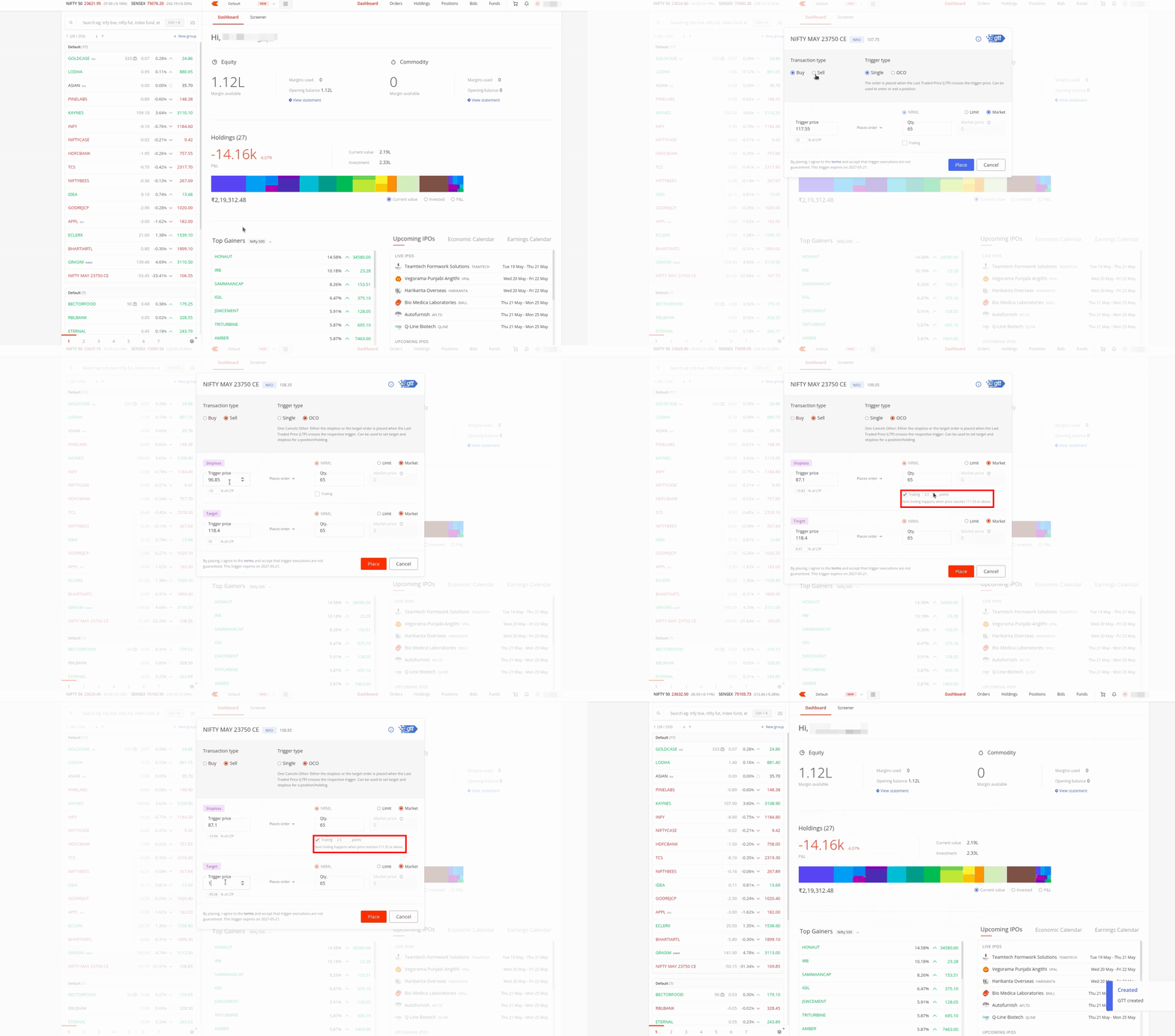
- Go to your marketwatch, holdings, or positions and hover over the stock or contract you want.
- Click on the three dots and select Create GTT.
- Select Buy or Sell under the transaction type.
- Select Single or OCO under the trigger type. OCO (One Cancels the Other) lets you set both a stop loss and a target in the same GTT. TSL is available on both Single and OCO orders.
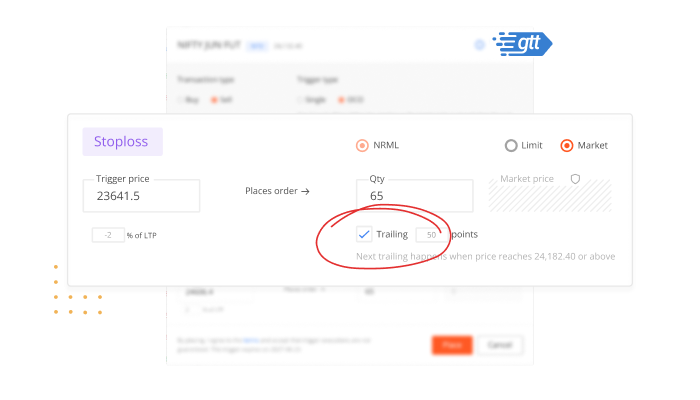
- In the Stoploss section, enable the trailing checkbox and enter your trailing point value in the field next to it. Once trailing is enabled, Kite shows when the next adjustment will happen. This tells you the price at which your stop-loss trigger will move next.
- Select the order type: Limit or Market. For better execution, you can choose Market, which places a market order with market protection once the GTT is triggered.
- Enter your quantity in the Qty field.
- Click on Place to submit the GTT.
How trailing points work
The key setting in a trailing stoploss is the trailing point. This decides how much the market price must move before the stop-loss trigger is adjusted.
For example, if the trailing point is ₹1, the stop-loss trigger moves by ₹1 every time the price moves ₹1 in your favour. It moves in fixed steps, not tick by tick. The minimum trailing point depends on the instrument’s price and segment. You can check these here.
Kite will show the applicable minimum while placing the GTT.
Here’s how trailing point works for GTT sell orders
Say a stock is trading at ₹100.
You place a sell GTT with:
- Stop-loss trigger: ₹90
- Trailing point: ₹1
This means the stop-loss trigger starts ₹10 below the current market price. Since the trailing point is ₹1, the trigger moves up by ₹1 every time the stock moves up by ₹1.
If the stock moves to ₹105, the stop-loss trigger moves to ₹95.
If the stock moves to ₹130, the trigger moves to ₹120.
If the price then falls to ₹125, the trigger remains at ₹120.
So the stop-loss trigger has moved from ₹90 to ₹120 as the price moved in your favour.
This does not mean your exit is guaranteed at ₹120. Once the trigger is hit, an order is placed based on the order type you selected. Execution depends on market conditions, liquidity, and price movement.
Here’s how trailing point works for GTT buy orders
A buy GTT works the other way.
Say a stock is trading at ₹100.
You place a buy GTT with:
- Stop-loss trigger: ₹110
- Trailing point: ₹1
This means the stop-loss trigger starts ₹10 above the current market price. Since the trailing point is ₹1, the trigger moves down by ₹1 every time the stock moves down by ₹1.
If the price falls to ₹70, the stop-loss trigger moves down to ₹80.
If the price then rises to ₹75, the trigger stays at ₹80.
This is useful when you have a short position and want the stop loss to move lower as the trade moves in your favour.
Things to know
- This feature is currently available on the Kite web and will be available on the Kite app soon.
- Trailing Stoploss for GTT is supported on NSE, BSE, NFO, BFO, and MCX.
- It works with CNC, MTF, and NRML product types.
- For equity, trailing is available only on the sell side, and for F&O, trailing works on both buy and sell GTTs.
- When a trailing adjustment happens, both the stop-loss trigger price and the limit price move by the same trailing point.
- If you manually edit the stop-loss trigger after placing the GTT, the trailing reference resets to the market price at the time of your edit.
- Once a GTT has trailed, Kite shows a Trailed tag with an arrow. You can hover over the arrow to see how far the trigger has moved from the initial level.
- In the GTT details, you can see the watermark price. For a sell GTT, this is the highest price reached since the GTT was created or last modified. For a buy GTT, it is the lowest price reached.
- A GTT trigger is valid only once. If it triggers, but the order does not execute, you will need to place a fresh GTT.

When with this feature avaiable in GTT API?
Hi Ragnuram, we’re working on adding this to APIs. We’ll keep you posted.
Hello Zerodha team, I want to let you know that I am a dedicated Zerodha user, but you still haven’t introduced the ’drag and drop’ feature for SL (Stop Loss) and TG (Target). Because of this, I am considering switching brokers. You have disappointed your customers; please do something about this soon, or it will be too late.
Hi Rahul, we just launched Trading from Chart features in the app. This is currently in beta, and you can check them out here: https://tradingqna.com/t/trade-from-chart-tfc-is-now-available-on-the-kite-app/196845
Hi Zerodha Team. When can we expect trailing stoploss to be introduced for MIS intraday? It’s a highly anticipated feature, and it would greatly improve the intraday trading experience. Seeing our profits turn into loss is very heartbreaking😭😭
Hi Aditya, this is on our list of things to do. We’ll keep you posted.
Say i have a Reliance Futures Buy side, not i want to use Trailing feature of GTT but not now, i want to use sell GTT when alteast 3% profit i have got in Futures. I donot want the sell GTT to be activated unless i have 3% profit.
Need GTT Order getting activated based on an alert or Traling feature in ATO Orders.
On 8th July, as I was out of station and enjoying my vacation, the market fell; this feature protected me from a 1 lakh loss in my account.
Thank you for this feature.
When we will have the soploss on entire position ?
For example: I do have couple of option position and want to square off all of them once hit the defined profit or loss (let’s say 5000 on either side).
This is in the works, Vishesh. We’ll keep you posted.
Hey ,..But why on web,, there is no trailing option , when i click on buy buttong on F&O ( Tradingview chart).
Its creates GTT OCO with SL & Target.. but for Trailing SL, i have to CREATE GTT by clicking on BUY option from watchlist panel.. seems weird
Ideally, wherever Order Placement window and GTT (OCO/single ) is coming, GTT input field should be same..
OR
At least set default 5 tick along with all GTT as default, use can change manually if needed or change that default.?
I had placed OCO with trailing, stop loss trailing happened but target price didn’t move up as my stop loss move up.
Is auto target trailing not supported but op loss trailing?
Team Zerodha, can you update on this? OCO was created for the hold equity.
Hi Saurabh, the target price doesn’t move; it stays fixed, only stoploss price moves.
By when TSL feature will be available on kite app
Hi Suraj, it is currently in beta and will be available for all soon.
When are you bringing this feature to MIS/Intraday?
This is on our list of things to do, Uma.
When are you planning to release it for KITE apis ?
Hi Nirmal, yes, Trailing Stoploss will be available on Kite APIs soon.
Please provide drag and drop target and stoploss and trailing stoploss on zerodha chart. Zerodha is falling behind in lack of this feature.
Hi Ravinder, we’ve noted your feedback.
I want to see my live profit and loss on chart.
Do we have it on mobile app
Thanks
I don’t know what response is sought from us. It’s not fair to block our screen like this
…
Is it only for options and futures ? what about equity ?
Hi Vineet, you can use it to place trailing stoploss for equity holdings too.
V good
Sir
When will this feature be available on mobile
Hi Kavita, this will be available on the Kite app soon. We’ll keep you posted.
Awesome
Hopes the TSL will be available for equity buy also .
Regarding the Flag color we request to implement individual color flags with more clear illuminated color if possible
Thanks
For example
If I take trade in Nifty with 5mnts chart,taken trade
Present level – 24000
My sl is 24050 on taking PE trade.
24000ce at 100
My querry is
24000pe in 5mnt chart is 90 is one candle above.
So kept sl at 90.
My trade will hit sl at 24035
So request you to provide sl based on Nifty at 24050 irrespective of premium.
Hi Shanti, you can do this using ATO orders.
With ATO, you can create an alert on Nifty, for example, “Nifty crosses above 24050”, and link an exit order for your option position to that alert. When Nifty reaches the alert level, the linked order will be placed. You can learn more about ATO here: https://support.zerodha.com/category/trading-and-markets/alerts-and-nudges/kite-alerts/articles/what-is-alert-triggers-order-ato
This feature is available check alert facility in zerodha I guess you never used it
Hi,
Is Target also moves along with SL? Please clarify.
No, target remains fixed.
Hi Shubham,
I think the solution is incomplete then or I would say, there are some disadvantages.
For e.g. If the price is 100, SL- 90 and target 120.
If LTP is 115, then SL moves to 105 (I hope so).
What if LTP moves beyond 120, it executes over there. Or I have to move target manually, by looking at the chart.
If the market moves beyond 130 and If I haven’t changed target, then I’ll be getting limited profit only.
I think, moving both SL & Target is available in some other application.
i dont understand if target keeps moving up, it will never be hit. So we can simply put only stoploss without target. Or am i missing something
A sell GTT is a short trade then stop loss trigger should be moving down with the price. How can it be moving up? Vice versa for buy GTT.
Second is what do you mean by ”if you manually edit the stop-loss trigger after placing the GTT, the trailing reference resets to the market price at the time of your edit.”?
I appreciate it
Is it possible to have trailing as per chart pattern like for buy trade SL trailing hits when lower low is formed and for sell trade SL trailing hits when there is higher high
How to apply SL, and trailing SL
Hi Balku, we’ve explained the process in the post above. You can also check the video linked in it.
Why only for GTT order and not Normal Order
much needed feature for long time.
Much awaited feature, thanks to the team
Please always support me for Stop loss
Please provide TSL option in Kite App also…..
This feature is not working for me. Unable to select OCO..its locked ! Also why CNC is getting selected automatically?
Hi Sachin, OCO does not work if you are placing a GTT buy order in the equity cash segment. It will work if you are placing an order in the F&O segment.
Please trading options on kit phone app
Hi Shambu, we’re working on it. Trailing Stoploss feature will be available on app soon.
Please provide GTT option for the currency trade to as like commodity futures..
Day hot movers , Gainer & losers in easy access like today, weekly & monthly..
Hi Krishna, we’ve noted your feedback. Also, Screener is currently in beta; you can check it here: https://tradingqna.com/t/introducing-the-screener-on-kite-beta/193927
excellent feature,many people may Benefit.
This is really a much wished and awaited feature.
Thanks a lot for the constant efforts to ease the trading experiences. and is much appreciated.
Also wish to get added one more simple feature to Kite holdings window .That is in the instrument column.It would be better to add an option to insert short comments of 10-20 characters for a particular stock , It will be easy to recall why that stock has been bought ,weather it was for, long term , short term, medium term, or swing trading etc. Because when we buy a stock ,definitely we do some fundamental and technical studies and upon conviction(may it be suitable for a swing, long ,medium,short period of holding) only we buy it. But on hectic and/or panic market days ,we often tempt to exit some good stocks on small profits or loss, forgetting the actual purpose and fundamental qualities of that stock and also some upward trajectories remain still and regret later.
It can be eliminated, if there a facility to pop up a small message/comment when the cursor is placed on the stock symbol.(Just like in an excel sheet column where a comment is inserted) Though it is simple, It will be relaxingly useful especially we hold several stocks.!!.
Hope I could express the idea.
Thanks again,
These static, number based trailing SLs are not very helpful. If you can offer trailing SLs linked to EMAs (200 day EMA, 100 day EMA etc), that will be the most useful.
hello sir/madam.
Requesting a trailing mechanism for ATO orders to reduce manual intervention during favorable trade movements.
Satish, Zerodha user
Toggle between NSE & BSE in cash market is not there in Zerodha.
It’s a much needed feature.
it will be perfect if you provide both TSL options that is existing points and percentage.
Hi Zakir, we’ve noted your feedack.
Will this TSL work correctly, when some sort of Corporate Action (e.g. Stock Split or Merger) happens in the given stock, which affects the current market price?
Hi Ramesh, in this scenario the GTT order will be cancelled and you will have to create it again.
I hv doubt about the examole provided, you hv mentioned for sell at Rs 100, stop loss is 90. & glory buy ar 100 stop loss is 110…is your explanation correct???
Ah, in those examples, we have taken example of sell and buy GTT. For example, if you have taken long (buy) option position, you will place sell GTT order, and vice-versa for short position.
Great. Please also provide the TSL functionality as a function of ATR multiple.
Hi, we’ve noted your feedback.
Not work zerodha
Hi Team ,
Dono example jo diye vo ek short position and selling ka diya ..but buying side in option ye video nahi banai…ek ye bhi banao ….jab hum buying aur long position
Hi Sanjay, in those examples, we have taken example of sell and buy GTT. For example, if you have taken long (buy) option position, you will place sell GTT order, and vice-versa for short position.
Dear Shubham
Can you elaborate pls. This is confusing. Whether GTT or normal Buy option is entry at 100 SL at 90 . Trailing by ₹1.
Sell option – entry 100 SL 110 trailing ₹1
Can you pls clarify .
Hi Srinivasan, right. When you have buy position, you will be placing Sell GTT. And if you have sell position, you will be placing Buy GTT.
Dear Zerodha team,
Appreciate the efforts in the direction of automation and there by increasing profitable avenues on the investment/trade.
Is this feature available on Kite 3.0 APIs?
Not currently, Roshit. We’re working on adding it.
It is good, but I would have loved more if I had the provisions to move my tailing stop loss only after the price reaching a certain target level or when I start recording the profit in the trade.
Yes
Great work team Zerodha,
Challenge your technical team to have stop based on Moving Averages, hourly, daily weekly or monthly.
You will get the First mover advantage and will help acquire new clients.
All The best!
Hi, we’ve noted your feedback.
Can I call and trade futures with GTT with Trailing stop loss till I get experience
Please percentage option as well.
We’ve noted your feedback, Suraj.
Please add target,stoploss trade at one click on chart iq panel to trade from chart most essential upadate
Hi Team zerodha,
One feature of Zerodha where I feel modification can be done.
Once we place alert let’s say at 10, once stock crosses that level it gives alert and alert get disabled.
If stock again fell below 10 then alert doesn’t work.
Can we have alert which will not disable and keep on updating whenever stock crosses that price level.
It is very difficult to track alerts and keep on enabling them. This feature would be helpful for the entire trader community and small changes will keep zerodha ahead their competitors.
Even i face the problem, But if that is done it would become more difficult, as the alerts would keep coming if stays there, normally it happens like that.
Hi Ashish, I agree with your point. In that case, we can increase the alert price threshold above which we need to buy, to avoid multiple triggers at the same price.
What happens very often is that once an alert gets disabled, we miss the trade when the stock crosses that level again later.
Dear team zerodha please show placed gtt stop loss and target price in holding report also.aisa karne se hame pata chalega ki kis script me gtt lagana baki h.tracking easy ho jayega.
Continual improvement is needed as technology advances day to days!
Pls apply on Kite app.
Please introduced in kite app, because its easy to trading way.. Please do it fastly.. 👍🤝
Coming soon, Dinesh.
Is this feature applicable in existing open position ?
Yes, Usha. You can use it for existing open positions too.
The long waiting feature is available now, and I absolutely love it. Thanks to the Kite team for introducing this!
I have one question regarding stock options.
For example, if I place an SL and TSL with the execution set to ”Market”, will the order be executed successfully? As far as I know, Kite does not allow ”Market” orders for stock options.
Could you please clarify how this works in such cases?
Hi Danalakshmi, market orders in GTT come with market protection, which work for stock options too. You can learn more about market protection here: https://support.zerodha.com/category/trading-and-markets/charts-and-orders/order/articles/market-price-protection-on-the-order-window
Dear Team,
Can you also provide timely execution GTT for options ? To exit the trade on particular date and time?
Hi team, Please introduce the same features in the entry order itself like the super order in Dhan platform
In the entry order itself we can set target and SL like super order in Dhan
Hello, Please help me with below condition.
I placed a ”Sell” order on 55200CE @ 350, with a initial target at Rs 250 and inital Stoploss at 400 . Now if 55200CE moves in my favour of 60points and reaches @ 290, then only I want to trail my stoploss to my entry price which is @ 350. If 55200CE never reaches the levels of 290, then I want to stick with my inital Stoploss which is at 400.
Please help with this condition. Your response will be highly appreciated.
Hi Shrey, GTT Trailing Stoploss adjusts based on trailing points you set. For example, if you set trailing points as 60 for your short position, when option is at Rs. 350, then, the adjustment will happen when option moves by 60 points, i.e, when it drops to Rs. 290. If it doesn’t, the trailing won’t happen.
That’s the great feature that all trader wants.
Currently, the Trailing Stop Loss(TSL) is provided in terms of points. Can you also provide TSL in terms of EMAs or RSIs on (Daily, Weekly & Monthly time frame) at least for equity? you can add same parameters which currently exist for Alert system.
Hi Dinesh, we’ve noted your feedback.
Fantastic. I needed this so desperately and tried this in Index FnO and it works perfectly. Thank you so much, this should have been bought way earlier.
Is it possible to have stop-loss order that triggers only after a candle (5-minute, 15-minute, etc.) closes above or below a level?
TSL APPLYING FOR INTRADAY?
Hi Devaraj, GTT orders are not available for MIS. We’ve noted your feedback.
Thanks…Sir
Nice feature. Thanks. 🙏
COW820, kite app login hot nahi
Also introduce Stoploss based on PnL, also to take profits based on Pnl, like if profit hits 1 lakh and gets down to 50k exit, if loss is 1 lakh exit all, these things should be able to set….
Totally agree, its must required
Hi Harish, we’re working on P&L based exits feature. We’ll keep you posted on it.
Before 9Am pls suggest some incrising shares
It’s a feature I was looking for long ago. It was really difficult to adjust trailing stoploss manually.
Introduce Stoploss based on PnL, also to take profits based on Pnl, like if profit hits 1 lakh and gets down to 50k exit, if loss is 1 lakh exit all, these things should be able to set..
Hi Harish, we’re working on P&L based exit feature too. We’ll keep you posted.
If you provide this feature on regular SL orders
It could be a ”best feature ever”
Please bring Trailing Stop Loss and TP features to be set from the charts.
We’ve noted your feedback, Aditya.
Provide a video for the kite mobile app
Hi Prosenjit, trailing stoploss will be available on app soon. We’ll post a video on our YouTube channel and will let you know once it is available.
Nice future. Eagerly waiting for introduction in mobile version.
Very nice feature, can this be added to the Tagets as well
excellent feature added by zerodha thanx
no trailing in f&o?
Hi Yash, it is available for F&O too.
dear zerodha team,
when we will get running Profit and loss position on Kite app…???.its very much hard for the option trader to manage the position on charts..
Is this feature available on the Kite API side??
Hi Ranjan, we’re working on adding it to Kite APIs.
Currently, the Trailing Stop Loss(TSL) is provided in terms of points. Can you also provide TSL in terms of Percentage(%) as well as Average True Range(ATR) which accounts for volatility in the stock ? And can you provide TSL in MIS Intraday orders also ?
Hi Rahul, we’ve noted your feedback. Thanks.