
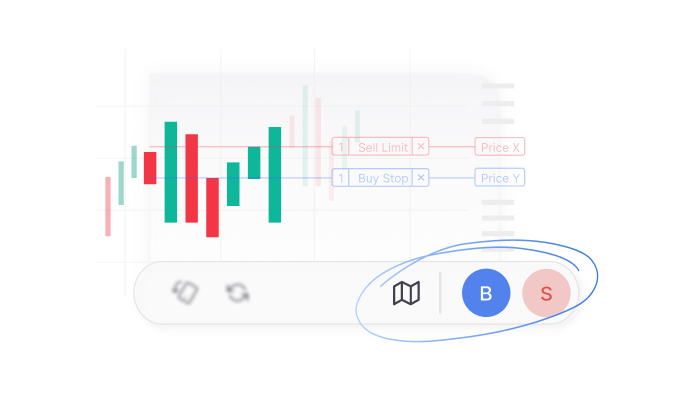
Introducing Trade from Charts (TFC) on Kite app
Trading from a phone often means moving between the chart, order window, orders, and positions while trying to keep an eye on price movement. On a smaller screen, these extra steps can make placing and managing trades cumbersome.
We’ve now brought Trade From Charts (TFC) to TradingView charts on the Kite app.
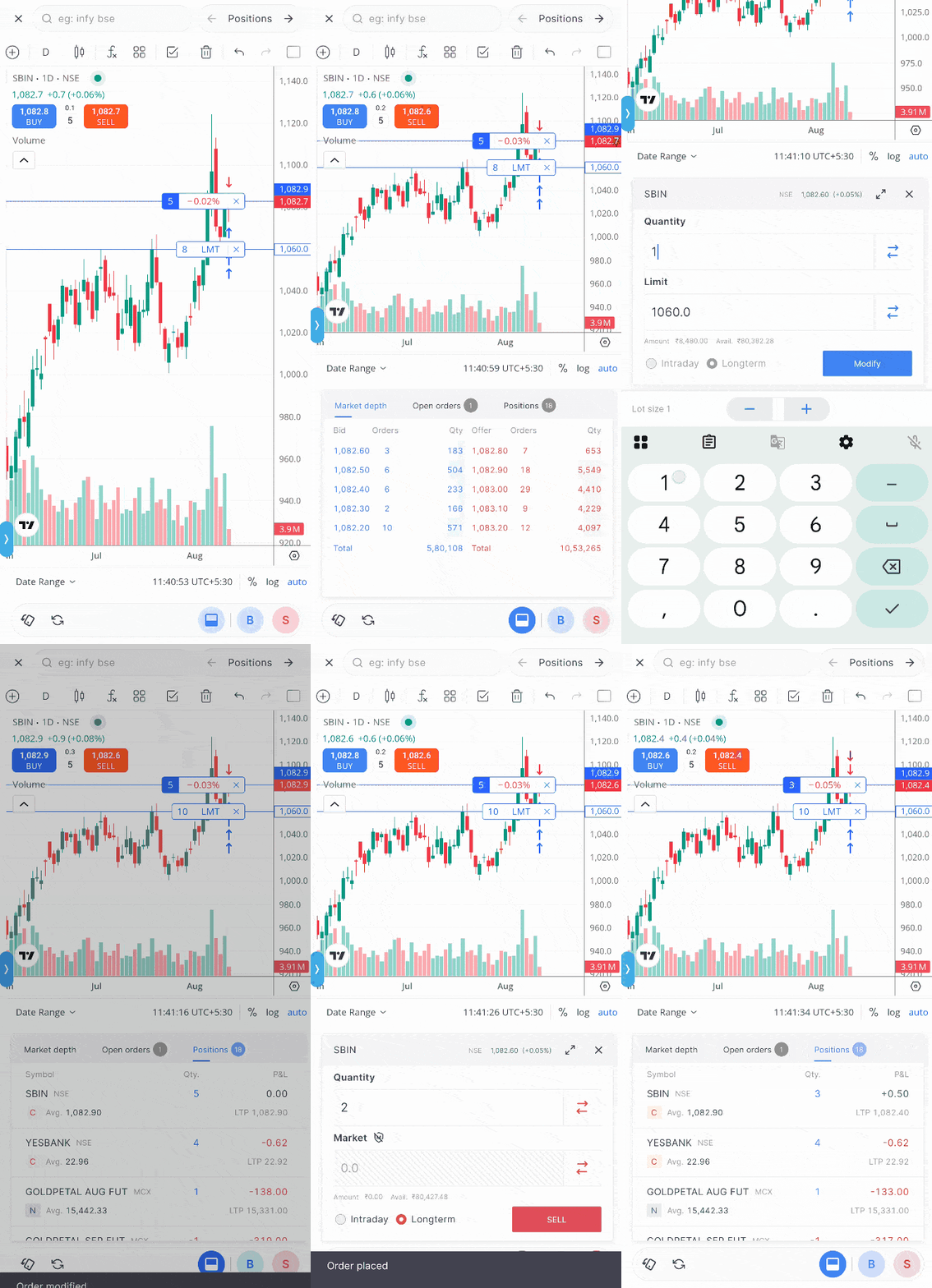
With TFC, you can place and modify orders, manage positions, check market depth, and switch between instruments without leaving the chart. You can also place orders at specific price levels, drag pending orders to modify them, use instant order placement, reverse positions, and more.
If you’re using ChartIQ, you can switch to TradingView in the app settings to use TFC. If you’ve not updated to the latest version of the Kite app, you can do it from the Google Play Store or the Apple App Store.
Here’s a quick look at what you can do.
For a full walkthrough on TFC, you can check out this video.
You can also watch this video in Hindi here.
Place and manage orders from the chart
The Buy and Sell buttons at the top of the chart show the best available ask and bid prices and let you place orders directly from the chart.
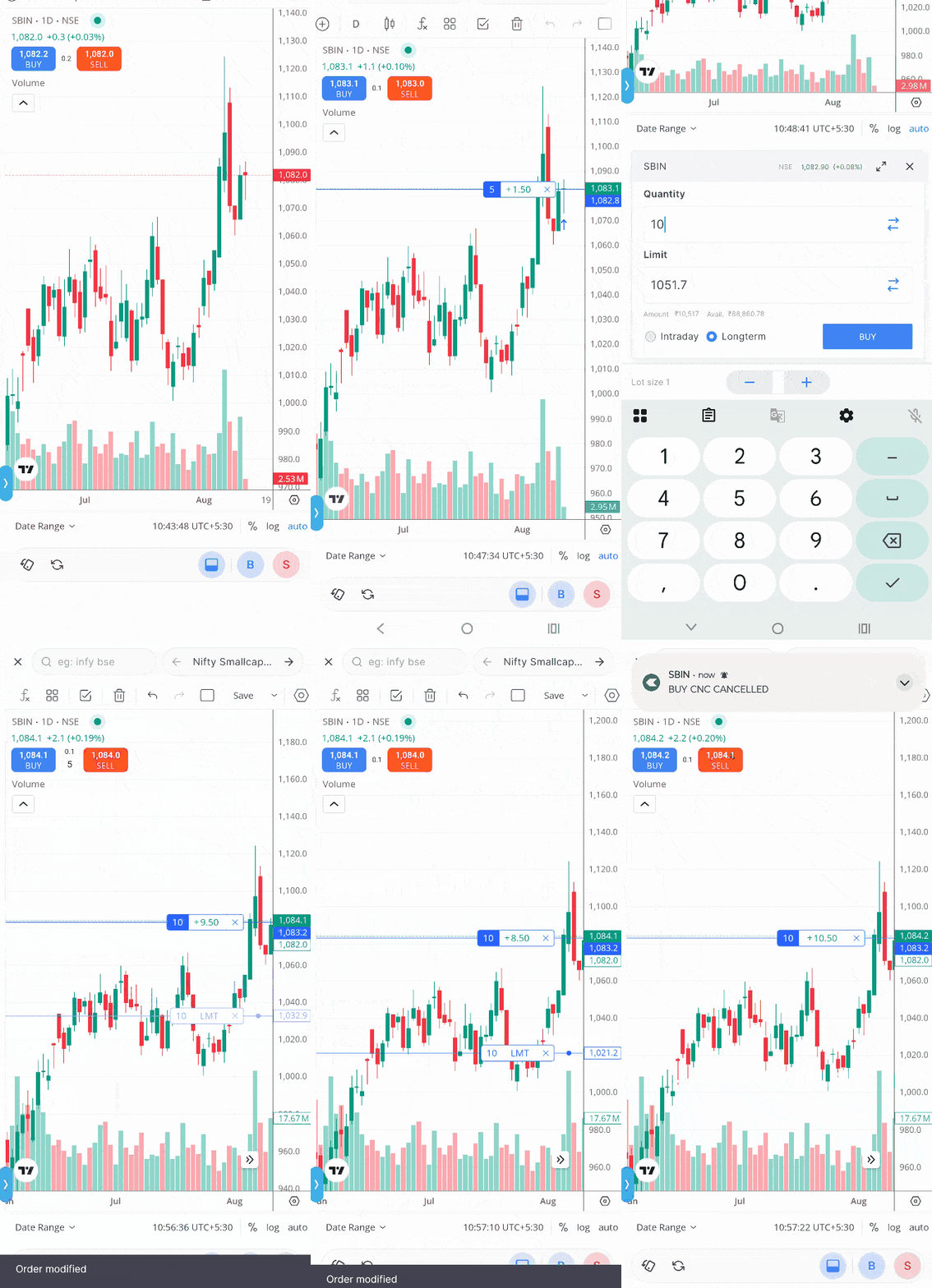
You can also place limit and stop-loss orders at specific price levels. Long-press the level where you want to place the order and choose the order type.
Once placed, pending orders are shown at their respective price levels on the chart. You can modify or cancel an order from there, or simply drag it to a different price level to change its price.
Place orders instantly
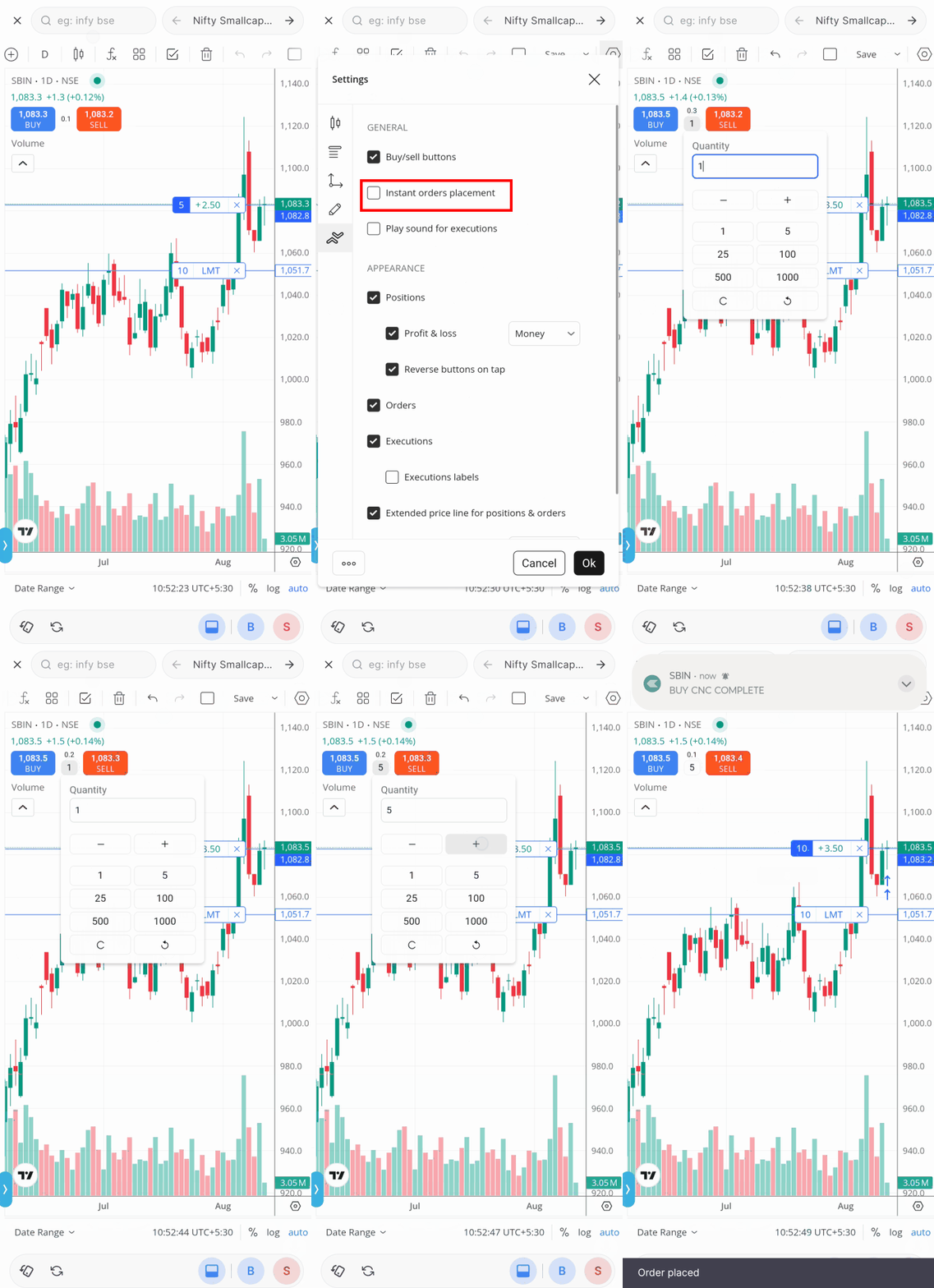
You can enable Instant Order Placement if you want to skip the order window and confirmation step. Once enabled, you can select the quantity directly on the chart and place an order with a tap. Instant placement also works when modifying orders, exiting or reversing positions, and for other supported actions on the chart.
Since this skips the regular confirmation step, check the quantity and other order settings before placing an order.
Manage positions from the chart
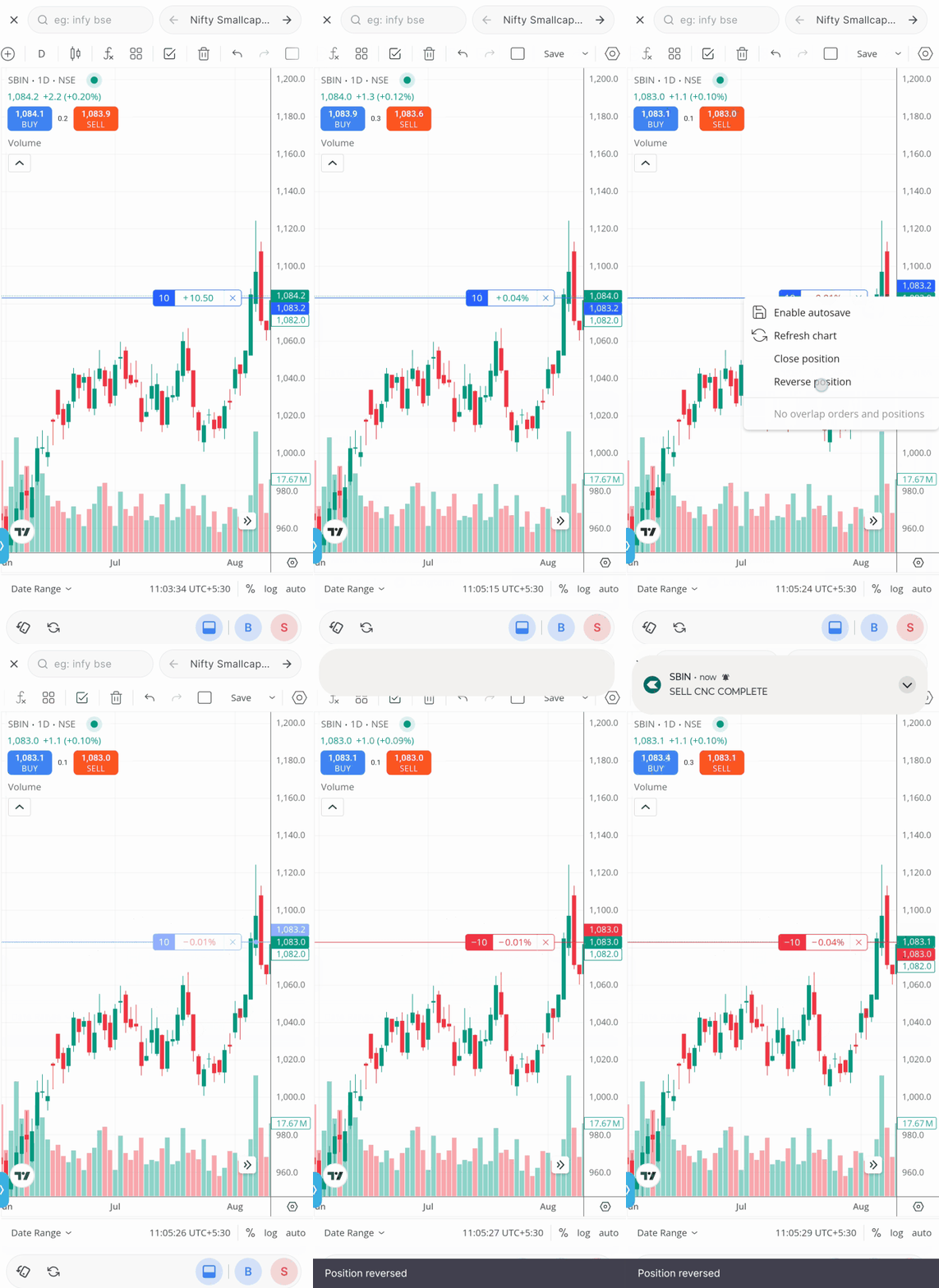
Open positions can be displayed directly on the chart along with their P&L, so you can track and manage them alongside the price movement. You can exit a position from the chart or use Reverse to close the existing position and place an order for the same quantity in the opposite direction.
Reversing a position requires sufficient available margin. If the required margin isn’t available, the reverse action won’t go through, and the existing position remains unchanged.
Orders, positions, and market depth in one panel
The panel at the bottom of the chart gives you quick access to Positions, Open Orders, and live Market Depth. You can modify or cancel orders and manage positions from here without separately opening the order book or Positions page.
You can also switch between the charts of instruments in which you have an order or position without going back to your watchlist.
Control what you see on the chart
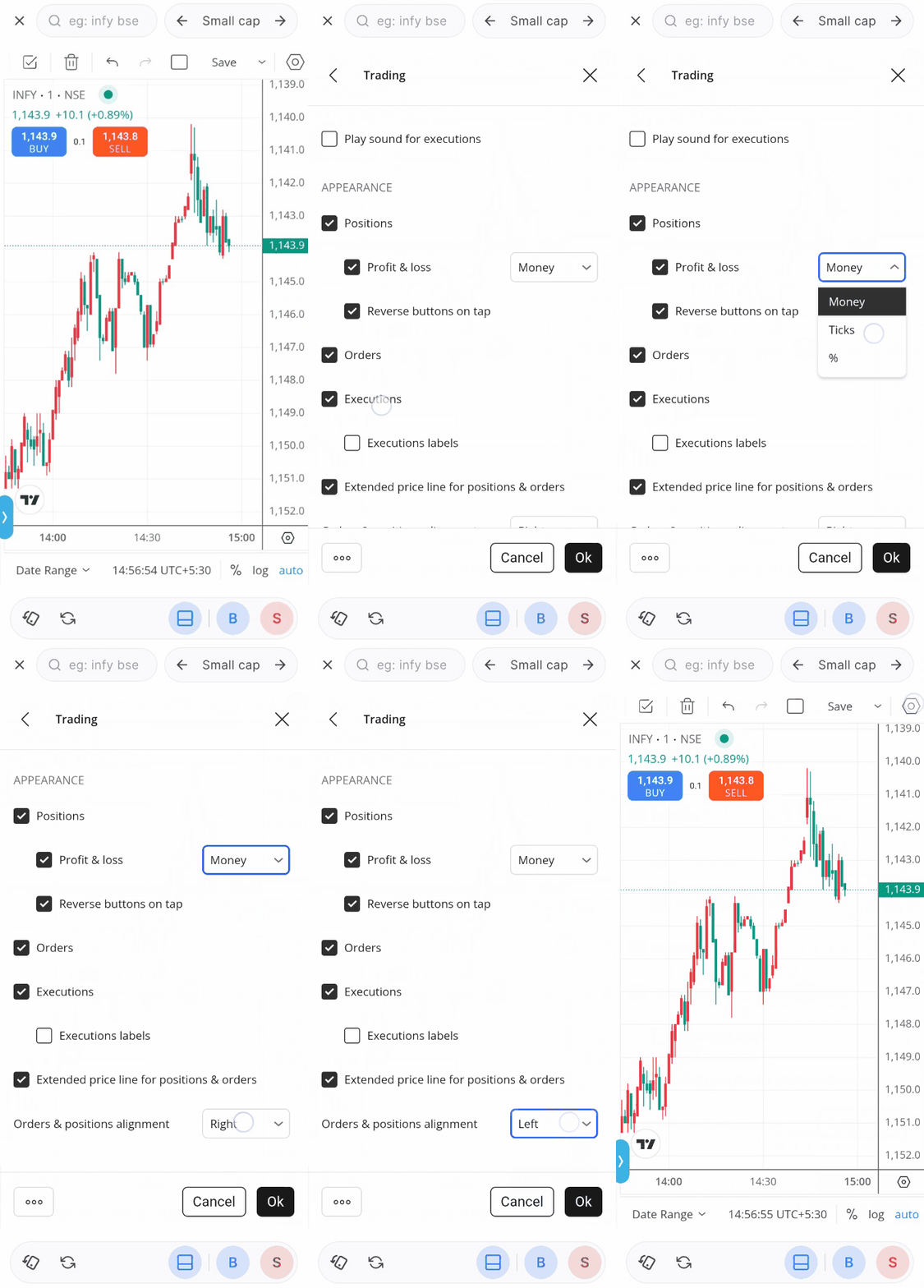
You can customise the Trade From Charts experience from the TradingView chart settings.
You can show or hide the Buy and Sell buttons, orders, positions, and executions; turn Instant Order Placement and execution sounds on or off; choose how P&L is displayed; and control whether reverse buttons and extended price lines appear on the chart.
You can also choose how orders and positions are aligned on the chart. This lets you keep the chart as detailed or as clean as you prefer while trading.
Multiple charts and Compare
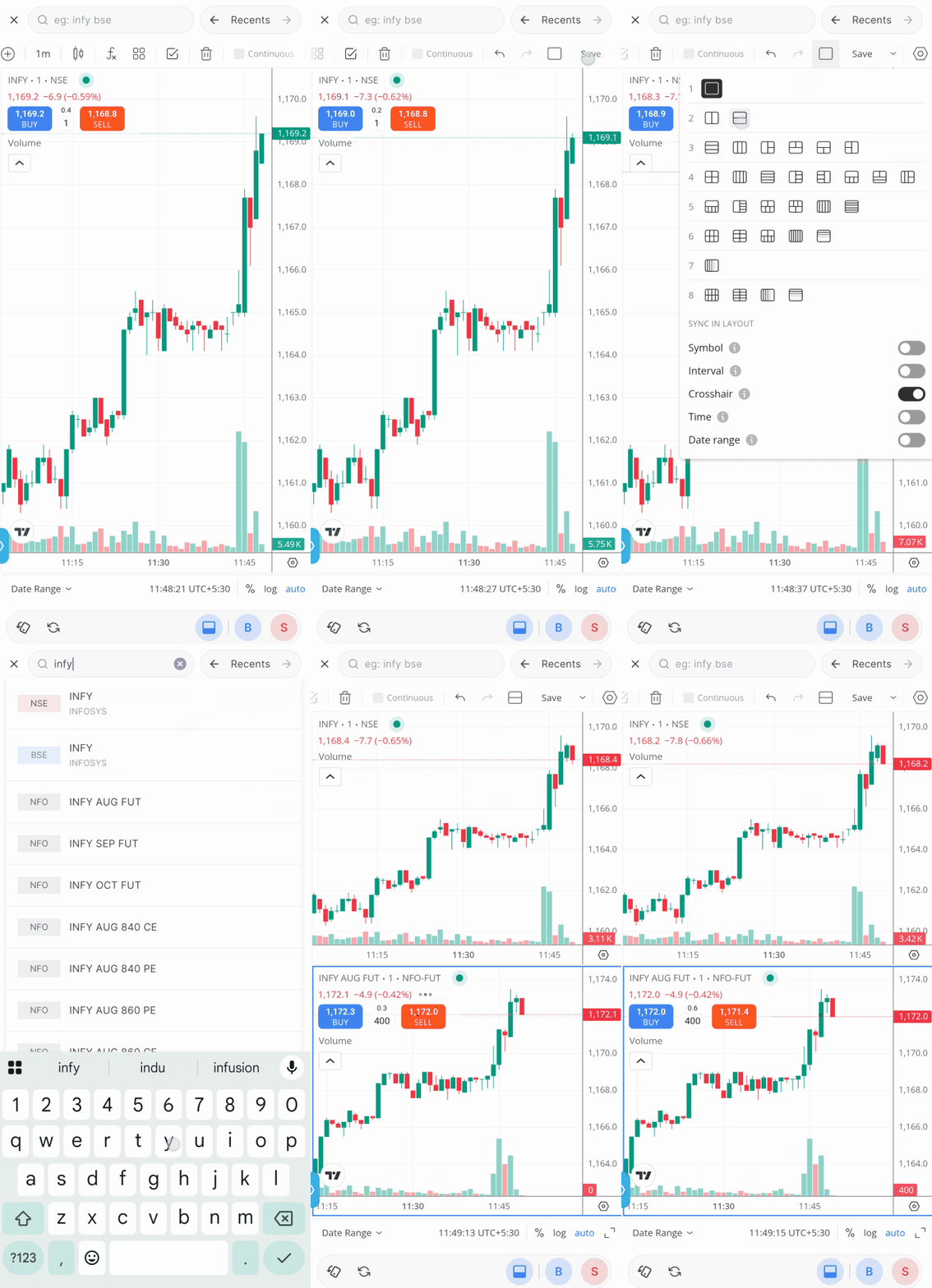
You can also use multiple chart layouts on the Kite app.
For example, if you’re trading an option, you can keep the option contract and its underlying stock or index open on the same screen.
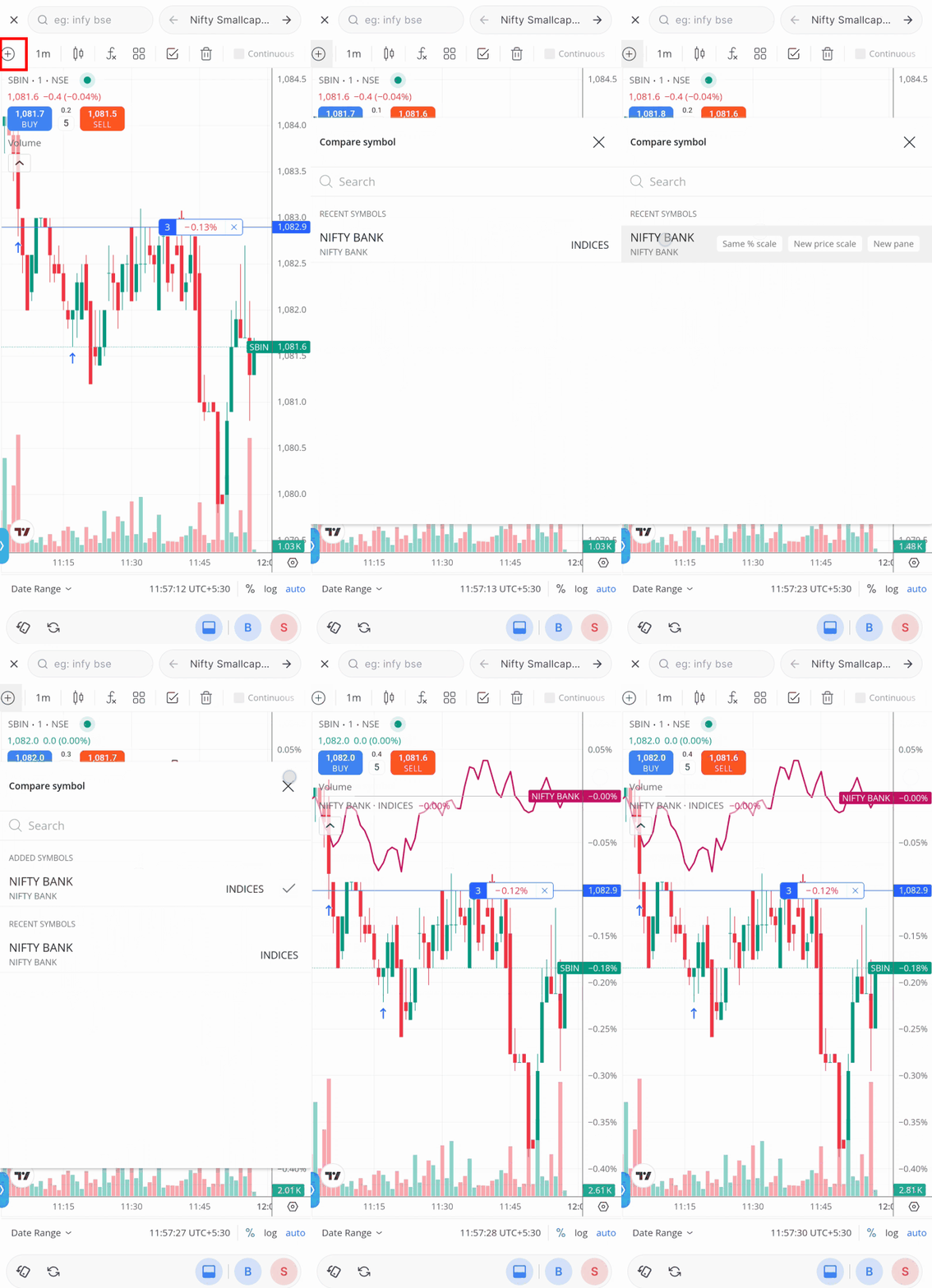
The Compare option lets you compare the relative performance of different stocks or indices on the same chart. You can also save up to 10 customised chart layouts locally.
Trading from Charts feature is also available on TradingView charts on Kite web.

TFC is a good addition, but I feel one important thing is still missing, the option to add Target and Stop Loss while placing the order
For intraday trading this is really important, TradingView already provides this kind of functionality where you can place the order and set the target and SL directly on the chart, and adjust them easily
Because this feature is still not available in Zerodha, I’m currently using another broker for my trades which provides Target and Stop Loss while placing the order
It would be really helpful if Zerodha could add this soon
Hi Kishore, we’ve noted your feedback.
In example video’s speed is very fast, can’t see and identify novice
I had SBI 3 shares i should dispose when & how shall dispose
Hi, please add stoploss or target on charts as soon as possible. Without stoploss or target level on chart it’s difficult to manage trade. This feature are not on zerodha make the trader missing something and the other broker are attracted of given this feature. Because recently I face this problem.
Stocks Grouping in Holding not available on Kite, Please try to give this option.
Hi, this is on our list of things to do.
Very useful update
Hello, Please add stoploss and target adjustment on charts. It’s been pending from long and It’s need of the hour.
Hi Gourish, we’ve noted your feedback.
Kindly add stoploss and target adjustment on chart.
Hi Shiva, we’ve noted your feedback.
A small request.
In Kite Mobile, while going from HOLDINGS to STOCK to VIEW CHART and then for Exiting one has to go back to holdings and then exit. Can we have an EXIT button alongside Buy-Sell below the chart (B-S-E)? This shall facilitate quick checking of charts of stocks from and exiting wherever a chart suggests sell/sell all from the holdings. This shall help those who have large number of stocks in holdings.
OR, may auto -fill the number of shares available in ones holding when one presses SELL button below the chart.
Thanks
Please add drag and drop option of TP and SL on the charts. That’s the need of the hour.
Please add this all featurs on chart iq 🙏🙏🙏🙏🙏🙏🙏
Hi Dinesh, we’ve noted your feedback. Btw, you can switch to TradingView charts in the app settings to use TFC features.
Add thusnfeature to cbsrt iq wenwant it there tooo why to be on just tv chart
Add drag & drop option on chart
One More points
Do it for GTT also
trading view se zerodha me trading karna aasan ho jayega bahut hi best hai
Nice. Now give one more facility, if you really think your customer is invaluable. The facility to create our own indicators. You will be shocked to know that trading view give this facility free of cost . Your pre built indicators are like कद्दू की सब्जी , no one loves to eat. Please publish this comment as it may help other customers too .
Thanks and regards
Pardeep
Hi Pradeep, noted your feedback. Thanks.
Please add drag and drop option of TP and SL on the charts. That’s the need of the hour.
Hi Adithya, noted your feedback. Thanks.
why trading view broker option not listed zerodha
since inception
Is it available for commodity trading especially for futures?
Hi Chundru, you can use the TFC feature for trading commodities as well.
All this is great. But please introduce Bracket Order for Delivery Trades. The app is amazing. No doubt about it . But the only issue because of which me and my friends are going to move to another broker is the absence of Bracket Orders for delivery trades. Right now it is available only to place every day which is not practical. The need of the hour is to have a bracket order where we can specify entry, SL, Target and Qty in 1 single order valid for a year. The entry order gets triggered when the price reaches the specified price and only after the entry order is fulfilled, the SL/Target OCO order gets active. If other brokers can give it, why not the biggest broker in India???? Unless bracket order is implemented, I’m moving to another broker. Will definitely return once this is made available.I have been using Zerodha since 2015. But will be parting off only bcoz of this.
Hi Sunil, you can already do this using GTT orders on Kite. Also, you can place an initial order, along with a GTT stop-loss and target right from the order window. You can learn more about GTT orders here: https://support.zerodha.com/category/trading-and-markets/charts-and-orders/gtt/articles/what-is-the-good-till-triggered-gtt-feature
Will this feature be available on chartIO?
Hi Ajit, we’ve noted your feedback to add TFC to ChartIQ charts. For now, you can switch to TradingView charts in the app settings to use TFC features.
Translate in hindi
Hi, you can watch this video in Hindi here: https://www.youtube.com/watch?v=z2OdvTcw6bU
What about TP
This is great
These are very good updates.
I had requested for increase in number of layouts as this helps to have the underlying and the option charts side by side layouts created for multiple instruments and saves time in calling them again and again.
Please look into the same.
Hi Roshan, this is also added in the new update. Please check the ”Multiple charts and Compare” section of the post.
Is this going to be facilitated for Chart IQ or is the Chart IQ vendor incompetent to cater to these requirements?
Target and Sl ka v do na features
Noted your feedback, Utkarsh.
Please add Drag & Drop option of TP & SL in the chart as it is in original TV chart. It saves time while doing option trading.
Hi Debashish, we’ve noted your feedback. Thanks.
Can this be used for derivative
Hi Prajakta, yes, you can use Trade from Charts feature for tarding F&O as well.
Good update….but features like fixing the target and stop loss in single chart is still not possible……. Kindly provide customised indicators in charts.
Zerodha is one of the best discount brokers, but I think the chart alert experience can be improved.
Whenever a price alert is placed, please show a **horizontal alert line directly on the chart**. The user should be able to **drag the line up/down to change the alert price** instead of opening the Alert List every time.
This would make alerts much more visible, intuitive, and convenient for active traders.
i mean common guys, this is a basic feature
This is a very good suggestion! I too request Zerodha to implement this ASAP.
Hi Shreyas, we’ve noted your feedback and will look into this. Thanks.
How to you TFC to trade call back
Hi Deepak, can you elaborate on this?
What about Stoploss ?
Is it still useless?
Introduce OI also on the chart.
Hi Sandeep, we’ve noted your feedback. For now, you can check the OI Profile on the charts on Sensibull: https://blog.sensibull.com/2023/11/08/view-oi-profile-on-sensibull-charts/
I’m not able to avail this facilities.
Hi Saumyranjan, please update the Kite app to the latest version and check, you can find Google Play Store and Apple App Store links in the post.
How to find this chart
The thing is ,u don’t allow to deploy customised indicators on your trading view chart…
Where is the features nothing compared to new broker born recently, there is no any improvement like nokia company
When trendline alert feature will come on zerodha like tradingview, we are waiting for it. Please work on it.
Yes, i am thinking of moving to other brokers due to this
Hi Ravindra, we’ve noted your feedback. Thanks.
Add bookmap to kite as well…it will be great for seeing liquidity
Noted your feedback, Karan. Thanks.
Badhiya feature hai ek number
Zerodha never disappoint
Why Suggested stocks with B S & SL don’t come on ZERODHA app like other broking apps.
Nice feature
Good
Please add order flow in kite. So user can get more detailed and valuable insight.
Very good features
Thank you
Hi Vishal, your feedback has been noted. Thanks.
Wow,,do same as kite web👍
Can alerts be created on trading view charts? And also Alert creation option should also be available on chart rather than under ’order’ menu options.
Hi Sandeep, currently it is not possible to place alerts from charts on mobile. We’ve taken this as feedback.
Very good features.
Also introduce alerts on indicators
Useful feature – https://zerodha.com/z-connect/business-updates/introducing-trade-from-charts-tfc-on-kite-app
Thanks for this!!
please also add feature to set target and stoploss as well
Please add SL and TP on chart🙏
Add sl and target it will be so easy
This feature is still quite unstable. Even after an order executes, it remains visible as pending on the chart, misleading users into thinking the execution failed.
Is this applicable for index as well?
Hi Pankaj, no, while you can see the Buy/Sell button on index charts, orders cannot be placed as the index cannot be traded directly.
Hi Rahul, could you please create a ticket at support.zerodha.com with the details so we can look into this?
Too lengthy process