
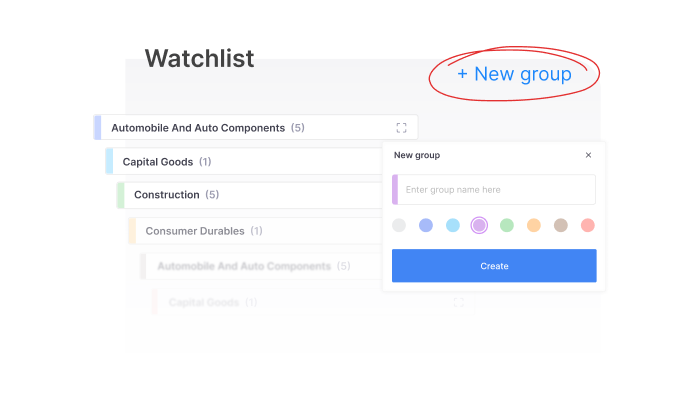
Introducing new marketwatch on Kite app
As traders and investors, we tend to keep adding instruments to marketwatch whenever something catches our attention. Over time, this can turn into a long list of stocks, indices, and contracts that becomes harder to manage. Even if you split them across multiple watchlists, finding the instrument you need at the right moment can still take time.
Last year, we redesigned marketwatch on the Kite web to make it easier to organise and track instruments. We’ve now brought the same experience to the Kite mobile app.
The new marketwatch adds several improvements, including higher watchlist capacity, custom grouping of instruments, easier navigation, and ready-made watchlists to quickly track different market segments.
If you’d like to see how everything works, watch the walkthrough below.
Track more instruments with higher watchlist limits
MarketWatch now supports significantly larger watchlists.
You can create up to 25 watchlists, and each watchlist can hold up to 250 instruments, allowing you to track far more stocks, indices, derivatives, or ETFs than before.
Navigation has also been improved. You can scroll seamlessly across watchlists, and the list loops back to the beginning once you reach the end. Jumping between watchlists is also easier through the My Watchlists section.
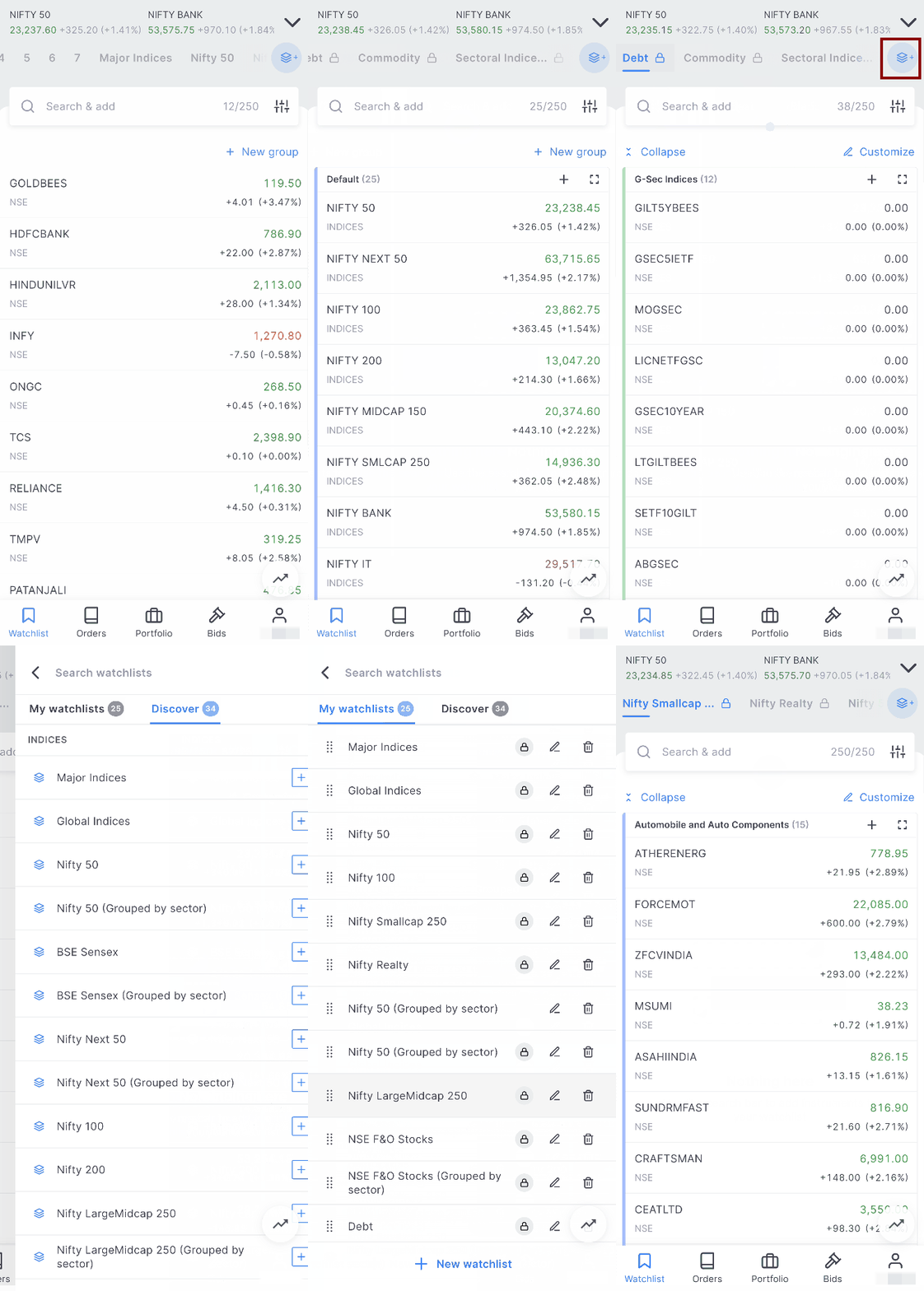
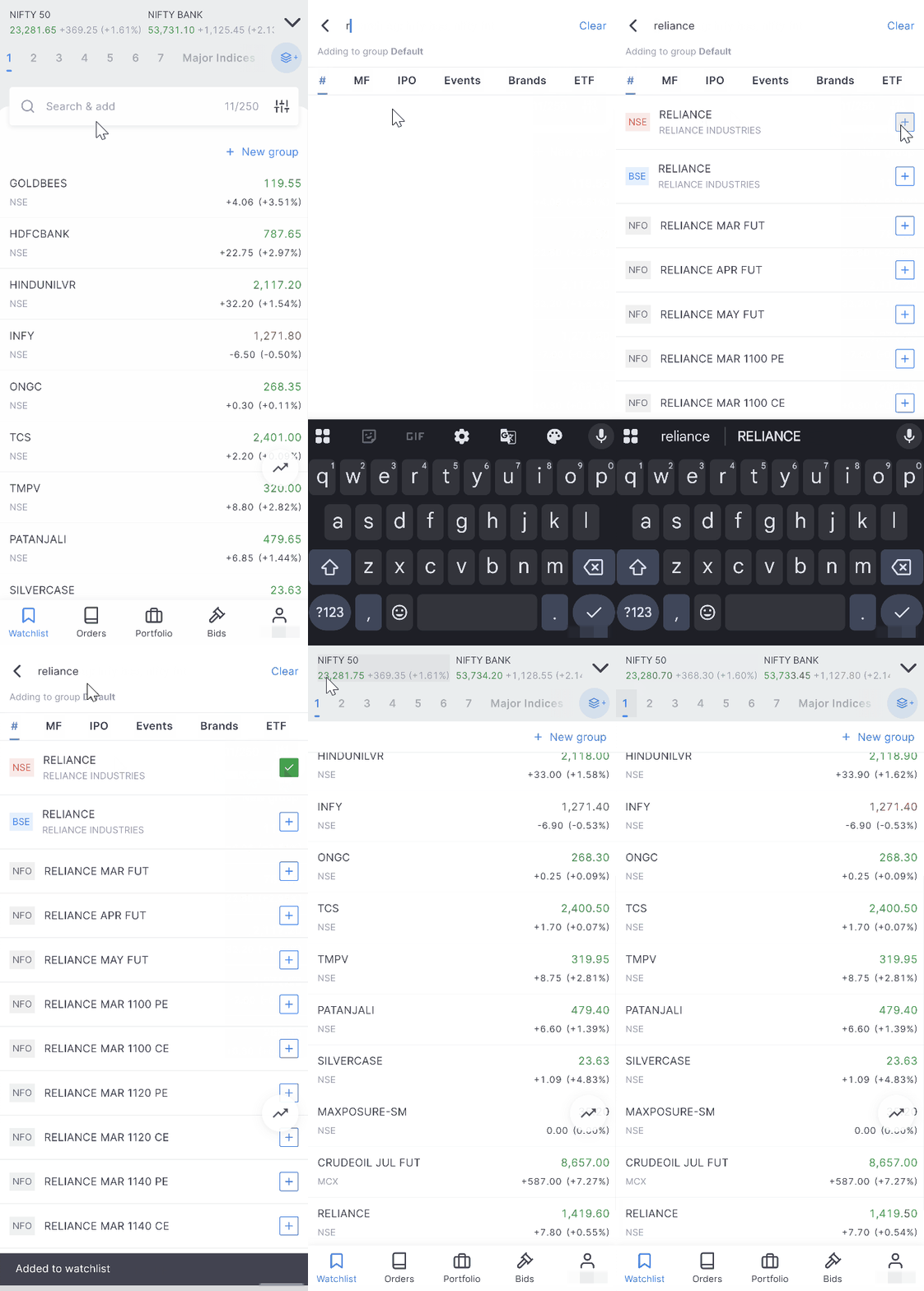
Small usability improvements make the experience smoother as well. When you add a new instrument, the list automatically scrolls to show where it has been added.
Organise instruments using custom groups
A major addition to marketwatch is custom grouping.
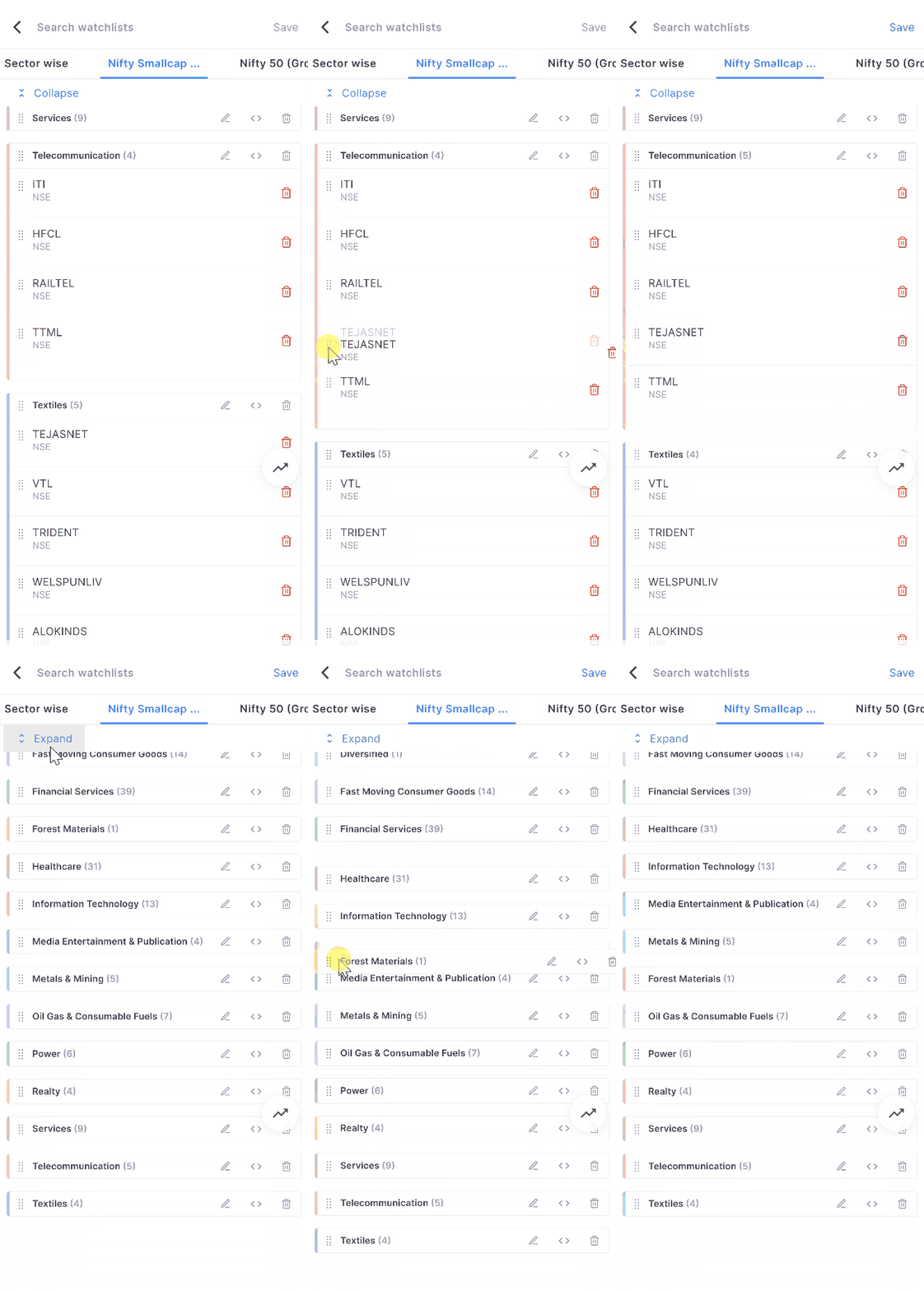
Groups allow you to organise instruments within the same watchlist based on themes that make sense for you. For example, you could separate banking stocks from IT stocks, keep short-term trading ideas apart from long-term investments, or group instruments by strategies or sectors.
You can create multiple groups inside a watchlist, name them however you prefer, and assign colours to make them easier to identify at a glance.
Groups can also be expanded or collapsed to reduce clutter when you’re focusing on a specific set of instruments.
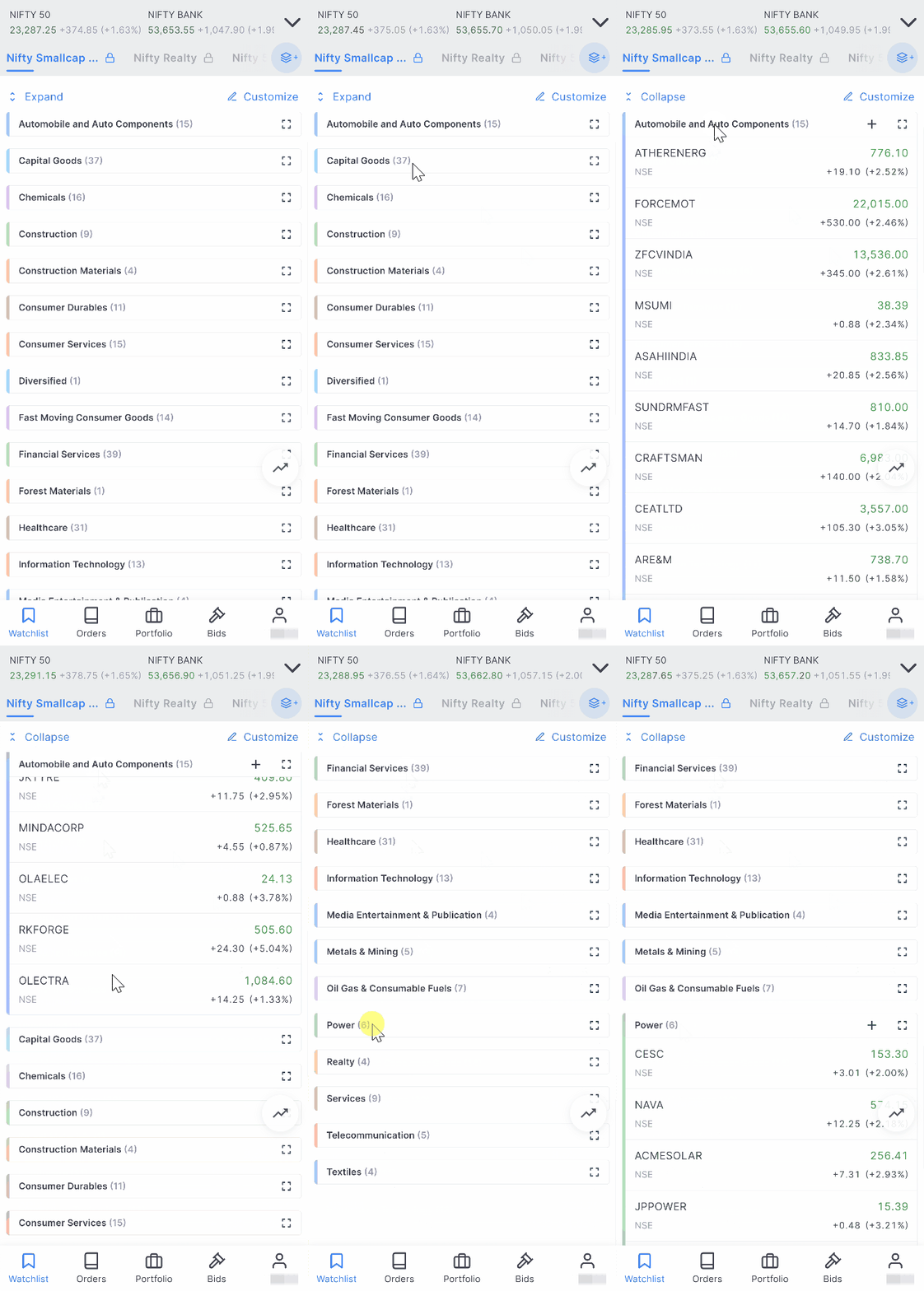
Instruments can be moved between groups simply by dragging and dropping them, and groups themselves can be reordered or even moved across watchlists.
Introducing new marketwatch on Kite app
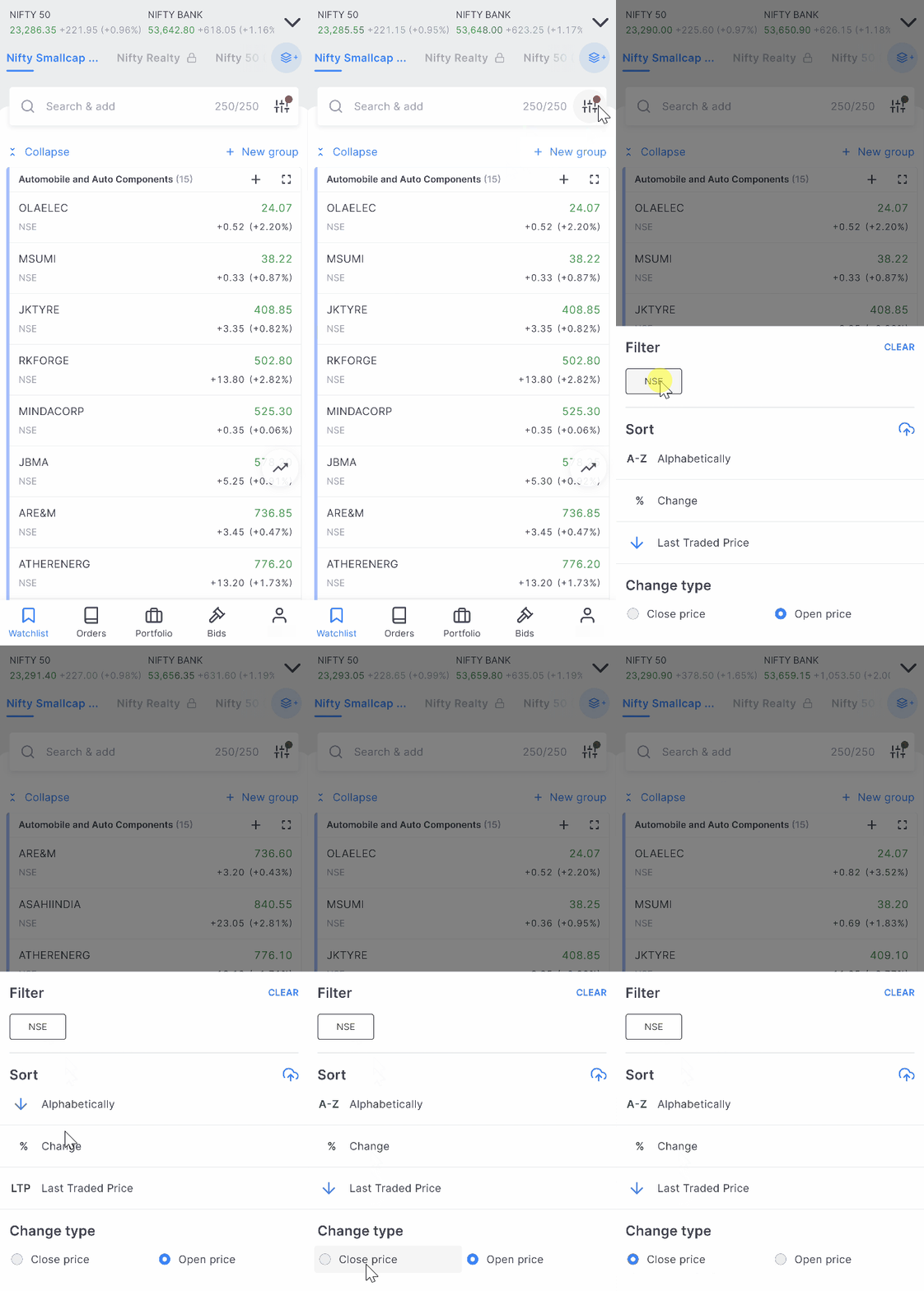
Sorting options are available within groups, allowing instruments to be arranged by price, percentage change, alphabetically, or by exchange.
Discover ready-made watchlists
Marketwatch is now divided into two sections:
My Watchlists: watchlists you create and manage
Discover: ready-made watchlists curated for different market segments
The Discover section includes commonly tracked groups such as:
- Nifty 50 stocks
- Sector indices like Auto or Bank
- Global indices
- F&O stocks
- ETFs and other market segments
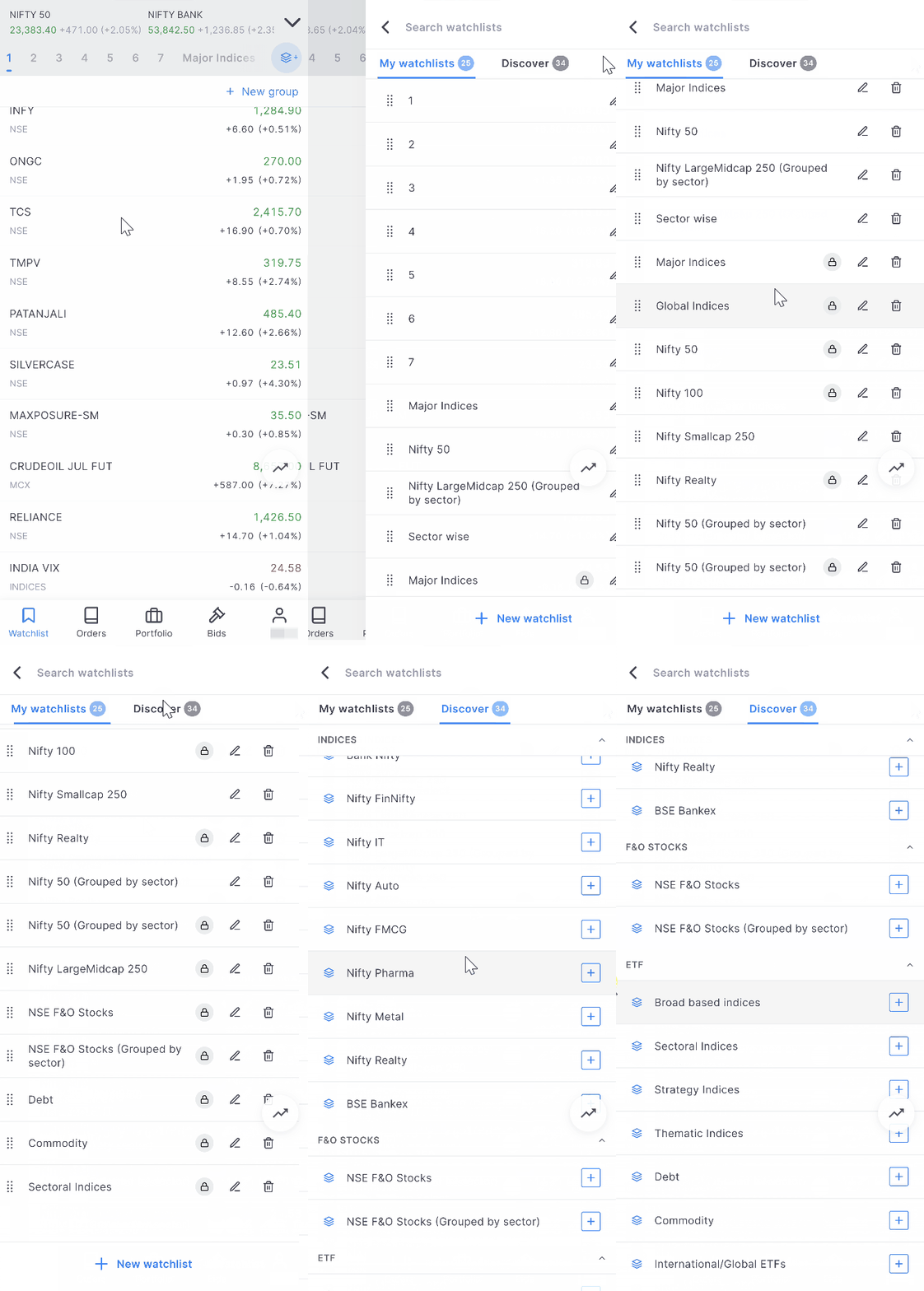
You can add any of these watchlists to your marketwatch instantly.
Some of these are pre-built watchlists that update automatically. For example, if you add the Nifty 50 watchlist, it stays updated whenever stocks enter or exit the index.
If you customise one of these watchlists by adding or removing instruments, it stops updating automatically and behaves like a normal watchlist that you fully control.

During the earnings season – need a ready watchlist of companies releasing earnings on that day and the next few days. Allow users to choose companies belonging to an index or at least for F&O companies
Hi, we’ve noted your feedback. Thanks.
Hi, It’s too late but good work by Z Team.. I requesting to pls add new equitys (seperately) year wise like FY ,2020,21,22,23,24,25
FIRST ADD TRAILING STOP ,ENTER OR EXIT F&O POSITIONS BASED ON SPOT, ONE BUTTON TO EXIT ALL POSITIONS
Hi Maheswara, we are continuously working on adding more features to make your experience better. Thanks for your feedback. Btw, you can use ATO feature on Kite to exit positions based on stop price. You can learn more about ATO here: https://support.zerodha.com/category/trading-and-markets/alerts-and-nudges/kite-alerts/articles/what-is-alert-triggers-order-ato
If you can add features mentioned below,may be more beneficial –
1 By clicking on sell button how much profit/Loss will be at mentioned price of a stock in portfolio.
2 Nifty 50 and/or stocks in portfolio can send alert when they cross R1,R2 and S1,S2 on that day.
3 Stocks in portfolio can send alert when golden cross occurs in any stock from portfolio.
4 While buying or selling a stock price from both NSE and BSE of that stock be present at one place.
5 During placing an alert is time consuming and writing every time the name of stock at two places,it should be easy.
If you can add these features it will be good for investors.
Thank you
Hi Adil, we are continuously working on adding more features to make your experience better. Thanks for your feedback.
I modified watchlist 5 that had NSE F&O stocks. Is there any way to revert back to the default setting? This feature would be useful. Thank you.
Hi Rahul, you can delete the watchlist and add NSE F&O stocks list again from discover.
Very excellent enhancement
It looks as a added advantage. Regarding the Group Colors ,I have the follwing request
1-The colors are faded if it is more illuminated shade ,it would have been better.
2-The number of color shades may increased to more than 8 ,if possible
3-Instead of white color ,any other color will be more useful
4-More important ,Now the color code are only for groups,If possible please introduce the color code to individual scrips
as in Trading view and some other apps ,So Sorting will will be easy on the basis of color in the same list
Hi, we are continuously working on adding more features to make your experience better. Thanks for your feedback.
Suggestion : –
This is a good feature. Please see if you can add watchlist for MFs also. By adding a fund, the underlying stocks will be displayed. One can understand how the movement in the underlying stocks going to affect the NAV for the day and can decide to invest. Let the underlying stocks be displayed based on their weight in descending order.
Thanks for New Watch List with group in kite app
Few suggetion
1. In kiteweb ”+” button like Kite mobile app in group header to add instrument in selected group
2. add new instrument above / below selected instrument in watchlist, presently new instrument added below last instrument in selected group.
Regards
Hi Harsh, we’ve noted your feedback. Thanks.
While searching for a stock provide option if someone is searching for futures, options, equity or commodities as well…
When does the Trading from chats comes in kite aap
Advance trade from chart at chart iq platform is issential Please team zerodha provide it.
Need to group my HOLDINGS. I want to divide my holdings into short term, Long term, Swing, Intraday, Life long, child Eduction, Marriiage, Dividend, Defence, ETFs, REIT, Invit, Liquidation, Exit like this…
This is the most-needed thing. I also need to GROUP my HOLDINGS. Short-term trades with separate p&l, long-term trades with separate p&l, ETFs with separate p&l. You can let people customise the dates, for example, stocks bought on Mar 23, 2026 and Mar 30, 2026 in one group.. let them choose the dates and all stocks/etfs bought on that date becomes a separate SUB-HOLDING with its own p&l.. let people title this sub-holding as per their wish. OR you can do this by activating a CHECK BOX besides every stock/etf and people can click their desired check boxes and then click a button like ’Create New Sub-Holding’ and a new sub-holding is created containing only the stock/etfs they had selected via check boxes. Let people create MULTIPLE Sub-holdings like this. This way one can exit a short-term trade quickly with clear idea of how much profit or loss one is making in a group of stocks/etfs bought only for 3-4 days.. and the long-term stocks/etfs are in their own sub-holding, undisturbed, and we can easily track our p&l in them exclusively.. usually on a profitable day along with short-term trades i also tend to sell long-term stocks/etfs too by mistake, or because of momentary greed.. Sub-holdings will stop that, or at the very least remove the temptation. Of course, the main Holdings will remain the default and people can always click on it to see the complete list and total p&l as they have always seen. Will be really really great if you manage to make something like this…
This feature I am waiting from ages. This feature is available in US stock brokers. In NO one is giving this
Please add a section for gap up or gap down on daily basis for nifty 50 stocks
Hi team,
When CPR indicator will be added in charts?
plz add screener,
top gainers and loosers,
Plz gave referred brokerage as others pay
Great
Ema indicator kab aad karoge
Hi Sachin, EMA indicator is already available on both ChartIQ and TradingView charts. In ChatIQ charts, when you add Moving Average indicator, you get open to chose from different types. And in TradingView charts, search for Moving Average Exponential.
Tankup
Moving averger ribban indicator kab aad karoge
Everything perfect sir but while drawing lines not saving in chart please solve that
Hi Eswar, we’ve explained how to do it here: https://support.zerodha.com/category/trading-and-markets/charts-and-orders/charts/articles/how-do-i-save-tradingview-chart-drawings-on-kite-3-mobile
1. Your New additions are great for tech savvy young investors. But for older generation you have made this too complicated.
2. We need some way to Combine our own 2 to 3 watchlist in one manageable list.
3. Now that you are improving the watchlist feature, how about mutual funds watchlist here also copied from Coin App. If Possible, please consider it.
Hi, we are continuously working on adding more features to make your experience better. Thank you for your feedback.
Wonderfull.. for next additon kindly add swithching charts with the help of a arrow key within the watchlist. If this is added i can totally forgo the tradingview website.
Isn’t there an arrow in top right corner for switching charts in same watchlist?
Hi Vishwanath, you can use the up/down arrows to navigate through scrips in marketwatch and the ”C” shortcut to quickly open a chart: https://support.zerodha.com/category/trading-and-markets/general-kite/others-kite/articles/keyboard-shortcuts
Please give 2 mobile authentication,
Mobile & tablet
Useful to search chart.
Great addition to watchlist features. 👍👍
If it is possible then add function for filtered stock list from trading view or other scanners directly into watchlist.
Thanks.
Hi Santosh, this is currently not possible. However, we’ve noted this as feedback.
Great improvement, but for advanced traders, it would be nice to filter stocks meeting certain criteria, say any stock whose short term moving average cross over long term MA, etc.,
Hi Prakash, you can use Streak Scanner for this purpose: https://streak.zerodha.com/scanner
Zerodha used to be my trading platform.please don’t invest money on this useless features. Please try to avoid frequent glitches which incurred good losses to us. Please improve that
In sector watch, why Pharma not there?
Hi Suva, Pharma sector is also there.
Ok…its too easy and in organised manner.
Please change patern
it seems greet BUT actually its useless feature for retailers. Whos gone Trade or Invest in a 10+ stocks in a sector. As a retailer, I think max. 10 stocks are enough for trading and investing. for example. 2 from PSU bank, 1 or 2 sugar, 1 or 2 from financial service, 1 or 2 from cement etc. it goes max 10 or 15 stocks.
Starting, I felt this missing feature, But now I really do not need. Those retailer who search stocks among 1000 stocks, USKO PAW CHHUKE MERA PRANAM :).
So those have a list of 40+ stocks list in Excel/CSV, allow them to import in watchlist.
Well said.
Max 20-30 stocks are enough.
Ok
Along with this excellent feature can you please provide features available in Tradingview – Quarterly, 6 month, yearly charts, corporate actions (dividend, splits, bonus) on charts?
Hi Sandeep, we’ve noted your feedback.
If possible, enable us to save marked charts. Currently we can only mark 20-25 charts. After that marking is not saved.
you seem to add everything but the ability to import from csv file !!
Add feature of adding multiple stocks at once either via CSV or pasting stocks name directly.
This is an important requirement that every customer is demanding , that to add a bunch of stock or lost to be uploaded in watch list. Adding each and every single stock every day in watch list is really annoying. If Zerodha is looking for customer satisfaction this is the first thing you should have to take an action.
If possible introduce copy paste facilities in watchlist section. If I found a list from a screener in excel or CSV
Which add to zerodha kite with copy paste facility
Hi Hiralal, this is currently not possible. We’ve noted your feedback.
Is it possible to modify marketwatch via Zerodha MCP server or API? Can ask LLM to custom sort my list. So much potential.
Hello sir please check the details and update you too much sir please check the mail id h
This is not possible, Shivansh.
I am using zerodha now. Earlier I was using another platform which now also I am using. In zerodha unlike other platforms I find there is no option to place SL and Target simultaneously while taking entry. Only after entry is made, the options for SL and Target need to set manually. If it is possible please make necessary upgrades so that customers would be able to set atleast SL while making entry in any stock. Balance features are okay.