
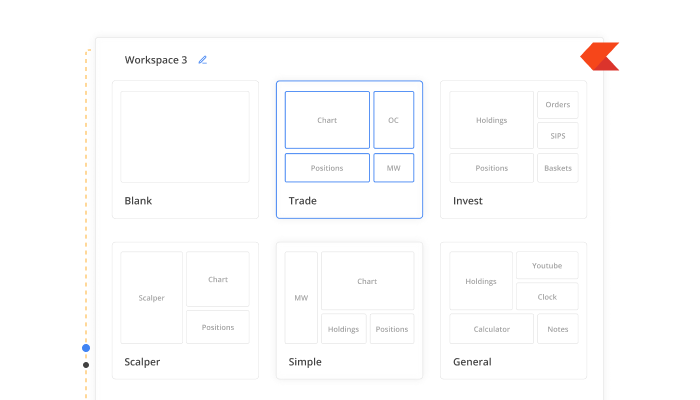
Introducing Kite Terminal Mode
Most trading platforms look the same for everyone. The same layout, the same widgets, and the same workflow, whether you place one trade a month or fifty trades a day.
But each trader works differently. Some prefer having charts and the order window side by side; others track multiple watchlists and the option chain simultaneously, and many want their positions, P&L, and orders visible without constantly switching tabs.
Kite Terminal Mode is designed to solve this by letting you build a workspace around how you trade. Instead of adapting to a fixed layout, you can arrange charts, watchlists, option chains, orders, and other tools to fit your workflow.
If you’d like to see how it works, watch the walkthrough below.
Start with a layout, or build your own
Terminal Mode allows you to create multiple workspaces, each designed for a different workflow.
You can start from a blank canvas or choose a preset layout:
- Trade: A balanced layout with charts and order tools
- Scalper: Built for speed and quick execution
- Invest: Designed for long-term tracking
- Simple: A minimal layout
- General: A workspace with informational widgets
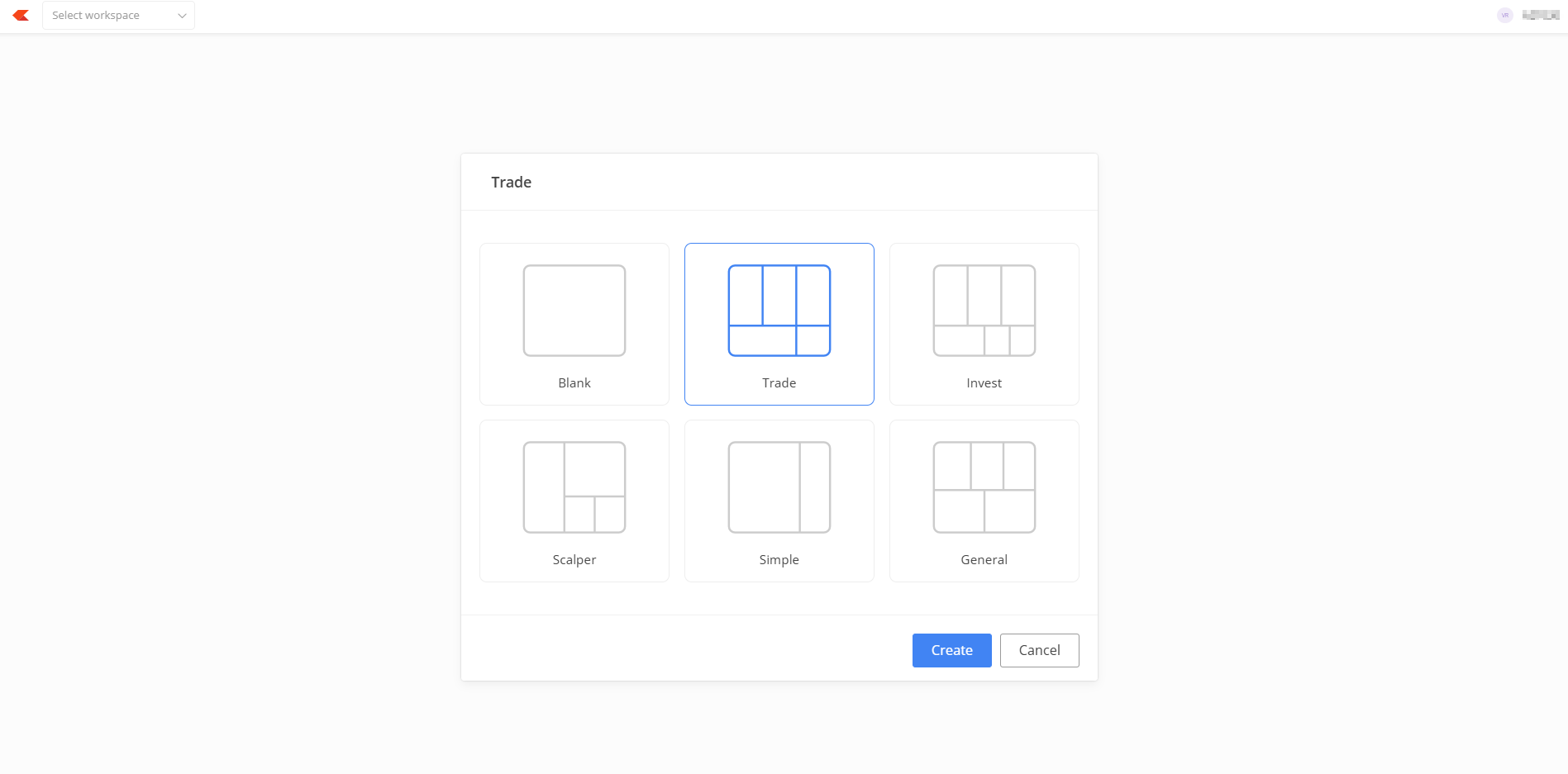
These layouts are only starting points. You can rearrange panels, resize widgets, or remove anything you don’t need.
Keep everything you need in one view
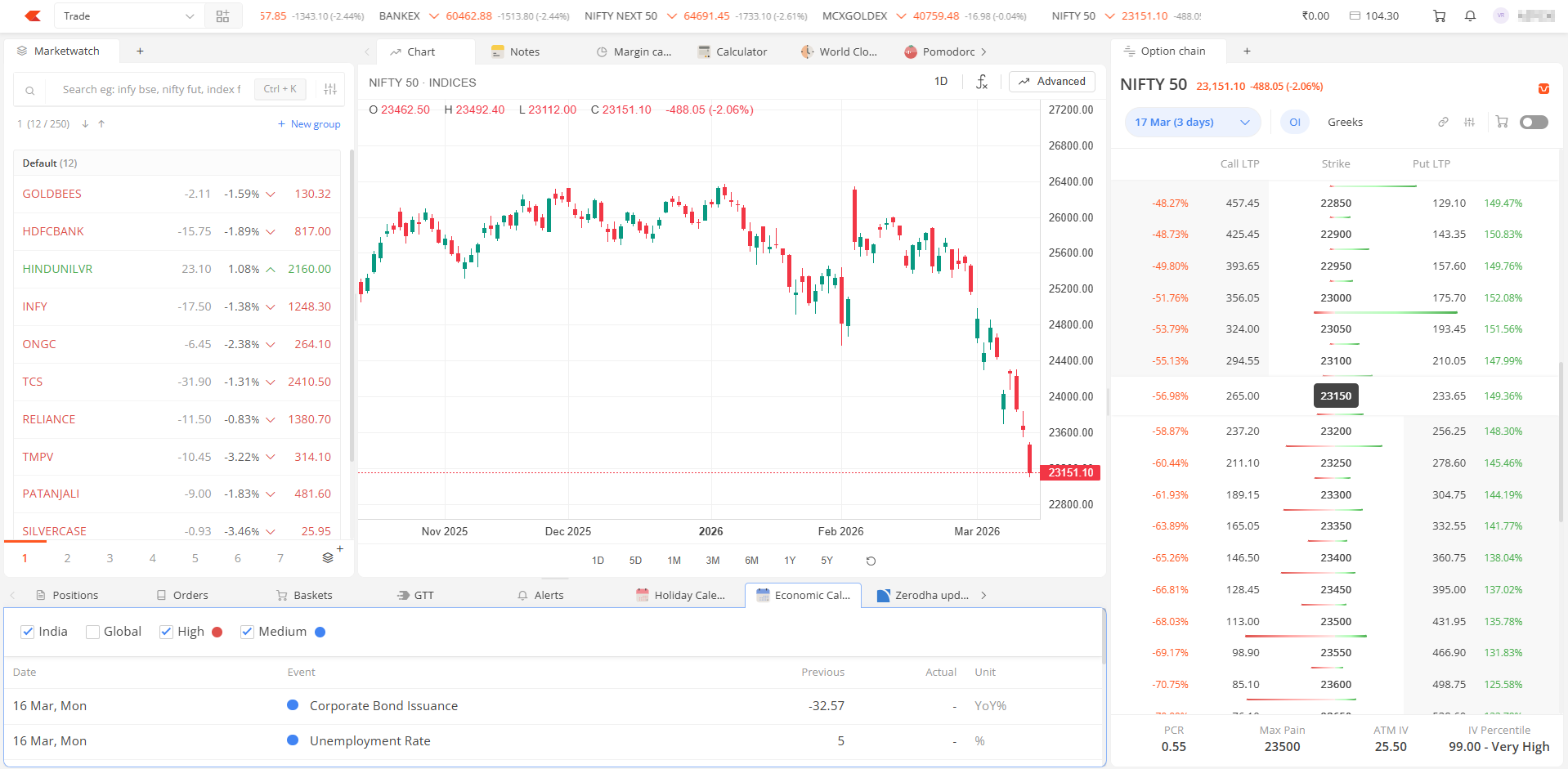
One of the biggest advantages of Terminal Mode is that it allows you to keep multiple parts of your trading workflow visible at the same time.
For example, you can place charts in the centre for analysis, the option chain beside it for strategy building, market watchlists on the left, and orders or positions at the bottom. This makes it easier to monitor markets and manage trades without switching between tabs or opening multiple windows.
Built-in tools for trading and analysis
Terminal Mode includes a wide range of widgets that help with market tracking, analysis, and execution.
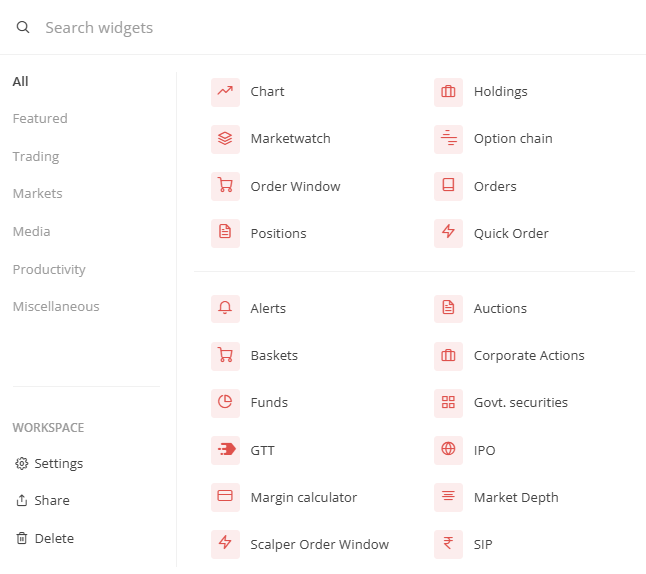
Core trading tools include market watch, charts, the option chain, orders, trades, and positions. You can also create baskets for multi-leg strategies, place long-validity GTT orders, and set alerts based on price or volume movements.
All these widgets can be placed anywhere in your workspace, depending on how you prefer to track the markets.
In addition to trading tools, Terminal Mode also includes several utility widgets that traders often need during market hours. These include the margin calculator, brokerage calculator, economic calendar, corporate actions tracker, and notes for maintaining trading journals or recording trade ideas.
There are also widgets like the world clock for tracking global market sessions and timers that help structure trading sessions and breaks.
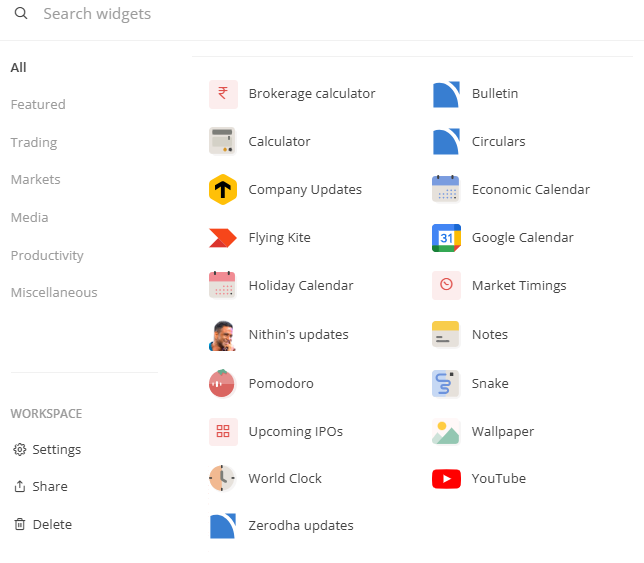
Keeping these tools inside the workspace reduces the need to switch between apps or browser tabs.
Create different workspaces for different strategies
Terminal Mode lets you maintain multiple workspaces, allowing you to organise your setup around different strategies.
For example, you might create one workspace focused on intraday trading, with charts taking up most of the screen, another for options trading, with the option chain at the centre, and a separate workspace for tracking long-term investments and alerts.
You can also generate a shareable link to your customised workspace so other traders can access it. The link can be disabled at any time if you no longer want it to be accessible.
Terminal Mode is designed to make Kite more flexible. Instead of adapting to a fixed interface, you can build a workspace that reflects how you analyse markets, track positions, and execute trades.
If you have any feedback, do let us know in the comments.

Is there a list of shortcuts that can be used in this mode?
Thank you.
The Chart obtained from Kite Terminal Mode , doesn’t have a Pop-Out Chart feature where we can get a single chart on the whole screen. The Pop-out chart is available in Default mode but it has a smaller screen on my MacBook, hence I am requesting this feature. Hope you understand and provide the same at the earliest.
We need a separate tab/pane for the indices heatmap like in Trading view.
I request you to please provide us a platform from where we can invest directly in US stocks.
For most of the people last two years investment in Indian equities would have given either no return or negative return, so I sincerely urgent you please do something & provide us a platform for global investing
Hey, I have changed chart to Tradingview but I need to rechange it to ChartIQ, but I did not able to find any way in terminal mode, so can you plz let me know how can I change it ?
When will get PDH and PDL indicator..most important one .. otherwise please suggest any work around
So many updates are getting released this one getting not added every time..
Hi Madhusudhan, we are continuously working on adding more features to make your experience better. Thanks for your feedback.
Would like some keyboard shortcuts to toggle through different panes & their subsequent tabs, and multiple actions like buy sell can be integrated as in the default mode. Toggling through the entire screen using mouse is menial.
HI,
Terminal mode is very nice, much useful feature. but during order placement or chart changing , it freezes
In terminal mode , after few mins page getting freezed. goes into unresponsive mode , after 10 to 15 seconds its responding back.
i am running in chrome , processor apple mac m4. 16 gb ram. Lan cable internet with 60 gbps speed.
please fix the issue, it will be very useful feature.
Thanks
Hi Vignesh, we’re sorry to hear this. Could you please create a ticket on: https://support.zerodha.com/ so we can check and resolve this at the earliest?
Really good update to the platform. One thing will be of great benefit will be on Fonts and colors being used. Can you guys at Zerodha make them bit more brighter and sharp looking fonts? Even better will be the colors suited for color blind people like me.
ok
Very excellent application for those who interested in investing share market.
When we set an alert your system does not give any sound after the alert is met as in the Trading view chart . Just displaying the alert does not serve the purpose.
So please provide sound alert .
Hi Rajashekar, we’ve noted your feedback. Thanks.
Very late Zerodha catching up on this.
Most of the Zerodha Alerts & Notifications doesn’t work on time.
Stocks in Watch-list groups automatically and sometimes looks different in Web and looks different in Kite App.
Lots of scope to improve for customers, but looks like they have got exhausted and are very slow catching up the market.
-> They can include a lot of indicators, but all they have is the default that you see in other competitors
-> Notes options can be included in Stock Holdings. It is available only in Watch-lists.
-> Kite App solves basic purpose, but difficult to navigate with different screens, stocks, evoting etc…
Good
Pls add OI indicator , dhan and fyers already have it . Pls add this in indicator section that helps easy to trade looking in chart
Why can’t Zerodha show alerts that have been put on the chart of the stock itself as it is in Trading View app.
Kite still doesn’t have basic things like alerts on EMA on weekly, daily basis and alerts on them
Is there a option where i can see 52 week high column added to my present portfolio view
Zerodha team
One simple request why a order placing for market, limit SLoorder on chart along with stoploss and target is not provided in which we can just click on chart and also to add more lots or reduce or sto0loss trailing just like in exness terminal or like in mqcharts… it would help a lot
I am also missing this feature
When will get chart iq on terminal mode ..
Ok
couple things to confirm –
1. Does market watch allow to import the list of symbols ?
2. Does hover over the symbol shows chart like chart ink with a provision to add indicator on the chart ?
3. can i add a indicator/ indicators to the marketwatch list?
Add candlestick & chart pattern indicator
excellent kite app
Hello sir
This is Ramesh Govindarajan,Chennai.
After login after some time Charts updating is slow.
Check and solve this sir
ITS LIKE ZERODHA HAS WOKE UP FROM A COMA. FINALLY BUILDING SOMETHING.
thats good 👍🏻
Is continuous time window made available like Trading View ?
Ok
Sir in kite app version scalping is not possible due to interface we are unable to look positions chart and exit position option same time plz update it sir
Hi Giridhar, we’re working on bringing Trade from Chart features on the Kite app. We’ll keep you posted on it.
It’s really good one and more user friendly
Will start using Kite now for the Snake and Kite games 🙂
Hi, we require Chart Iq Charts back in the new terminal which is ideally familiar to or eyes for many years. TV which is lacking and badly hope you bring Charts iq charts at the earliest.
Also earlier Web Nifty Strike Price rates are little Bold and very much visible which is missing here, can you make Bold and Big Strike Prices in both dark and Lite modes.
Agree. Chart IQ is alot better compared to the TVC. Need that update badly to use this new version.
How to make custom indicator
Sir I don’t know about this. I have to learn more.
G. Baskaran
This is a great move by Zerodha. Terminal Mode is exactly what serious traders needed for better screen utilization and focus.
One suggestion that could take this even further: consider providing an official lightweight ElectronJS-based launcher for Kite. This would allow users to run Kite in a frameless, distraction-free desktop window, eliminate browser UI overhead, and better manage multiple trading screens across monitors.
For high-frequency or multi-instrument traders, every pixel matters—and a dedicated desktop wrapper could significantly enhance productivity and execution speed.
Would love to see Zerodha explore this direction 👍
it should be possible to link the order window to an open order – so that modification can be done easily. Now for modification, the order has to be selected in open orders and menu opened and modify selected, and then a new order window opens for modification and then after input it goes off. So next time for modification, again the whole process needs to be repeated. Instead if the pinned order window can itself be used for modifying open orders it will be helpful.
Also, can you not provide a desktop application with support for windows and linux? it will be faster and smoother instead of relying on browser and refreshing, etc.
Excellent update ! One suggestion for an improvement – Adding support for arrow keys. This will be useful especially when holdings & charts widgets are placed side by side and someone would like to see the charts of his / her holdings one after the other by just moving up / down using arrow keys. Currently, one has to click on Chart against each holding name and that is not a great UX
recently you gave the utility to separate positions based on underlying and expiry. However the layered positions do not appear in order of expiry but in a simple alphabetical way. for eg April expiry positions appear above June expiry positions which appear above march expiry. Kindly make the expiry layer follow monthly ordering. Thanks
Sir mere ollcargo global ke share abhi tak credit nahi huye
Support level lines and restriction lines, pivot line, how to make please tell
Nice improvement.
I fail to understand why indicators does not include ”multiple open interest” as in Upstox. It is a very important feature. Hope it will be included soon.
Sir please add flag option to short favrate stock or trading stock by many colors like Dhan broker or Angel one
IAt present I don’t know about this. I will learn shortly
Is this feature available on the Kite mobile app as well? If not, will it be available in the future, or will it remain limited to the web version permanently?
Amazing stuff.. waiting for long time…
Add P&L base Exit Order is very important… please add🙏
And add Straddle chart on widgets
One feedback or bug not sure — Even if the tab is there for say option chain or graph, but when we click on any stock to open its chart or option that should get be added the respective place, though that is visible or not, as we can switch to that tab.
Currently its failing. Hope you get my point, please reach out to me if you need further clarification.
ChartIQ isn’t available . only two modes of charting – Lite and Advance – are there. Lite doesnt hav enough indicators. I am used to ChartIQ which is better than TradingView(Advanced) charting. Could you indicate how to activate ChartIQ?
This is exactly what I needed.
One feature needed for the different windows to ”Auto – hide” or ”Minimise” so that screenspace can be optimally used.
Again, thank you for the Terminal. It is the best upgrade.
It would be really useful if you could have a feature on kite to graphically show the percentage of fall/ rise of each of our holdings from 1) all time high , 2) all time low, & 3) monthly, daily, weekly, yearly, 3 yearly, 5 yearly highest & lowest. Would be even better if selected stocks in the portfolio or watchlist can be simultaneously compared graphically for percentage of fall & rise.
If added, this feature could be unique to Zerodha and would attract many subscribers.
Yu are hizam
Unable to save time frame in different layouts and whenever I go to notes tab and back to chart then the time frame is getting set to day from 1 Minute.
Hi Preeti, in Terminal Mode, after adding drawings or making any changes to the chart, please save it as a layout. Also, you can enable Autosave from the chart settings to automatically save any changes.
Sir Good Afternoon, Bracket order laga sakte hai kya and order placement on chart suvidha hai kya
Hi Shubham, saved it as a layout as well as enabled autosave but still it’s not working,please help
Hi Preeti, please create a ticket at support.zerodha.com with details of the issue you are facing, so we can check and resolve it at the earliest.
The previous day and high low indicators not available. This would be available then it’s a great
PLZ ADD LATEST MARKET / COMPANY RELATED NEWS
These is already GTT order
This is the best time saving tech implementation by zerodha. In reality, zerodha has to add new feature but problem is where to put it on screen. If you put anywhere then user have to waste time for finding that option required, this was my earlier complaint that don’t change layout. Now we have our customised layout, so that zerodha keep on adding and we keep on using without wasting time. This is very required feature for faster management of trades.
Please payoff add in option trading
OK
Is the way if we want to go back to your default layout?
Hi Kushal, you can just visit kite.zerodha.com or click on the workspace name in the top left corner and select Default.
Thank you.
If I change the layout on 1Pc and if logged in from another will the same layout will be seen?
Yes, Kaushal.
Is it possible to split open positions into different strategies so that it will be very helpful in monitoring. We can easily exit a strategy or combine strategies, add legs to a strategy or remove a leg from a strategy etc. Thanks.
Hi, currently, positions can be grouped by Underlying and Expiry on Kite web. This will be available on the Kite app soon. Regarding custom grouping, we have noted your feedback.
Thanks.
I am facing problems in loading option chains every day. Guys just a request to not using vibe coding to build zerohda. It is already good, I just want it to be safe for my money.
Hi, sorry to hear this. Please create a ticket at support.zerodha.com with the details of the issue so we can resolve this at the earliest.
Your sell buy sell transaction are not fast moving please do for it something.
Hi Dinesh, please create a ticket at support.zerodha.com with the details of the issue so we can resolve this at the earliest.
You are doing all good. Still, give🔥advice or make system to yield profit to us, whether AI spreads OR War happens!!!!
Excellent! This is what is needed by a trader. It is almost complete. Adding a widget for watching important international indices like US500, DJIA, Nasdaq, DAX, FTSE, CAC, NIKKEI, XADUSD etc will make it more user-friendly for a regular trader. Please add another widget for watching Indian ADRs, if possible. Thanks.
Please provide a direct option to open the chart in your default window so that the chart opens with just one click. Thanks
Hi Praneet, you can use the up/down arrows to navigate through scrips in marketwatch and the ”C” shortcut to quickly open a chart: https://support.zerodha.com/category/trading-and-markets/general-kite/others-kite/articles/keyboard-shortcuts
My quetion is that the shortcut to the direct chart option is not showing in our holding page. I want the direct open chart shortcut option to the in-holding instrument. C keybord shortcut is not working in our holdings page.Thanks
The chart should open on direct clicking. The chat option comes after following many steps and then the chat opens. It’s time-consuming. Please consider this comment as the most important and improve it. Thanks
Hi Zerodha team,
The transition from Beta charts back to normal charts has resulted in loss of all user drawings.
There seems to be no syncing or export/import mechanism between versions. For active traders, this is a critical usability gap.
Request you to consider adding:
Drawing sync across versions
Export/import functionality
Backup options
This would significantly improve reliability and trust.
how to set terminal mode as default when logging in?
Please add direct option to open the chat, like when we click on the name of the stock, the buy and sell window opens. The chart should open on direct clicking. This is very difficult to open direct chart. The chart option comes after following many steps and then the chat opens.When we have to check our holdings and we have to open the charts of all the stocks in a hurry, but you did not give us direct access,option to the chart.Please consider this comment as the most important and improve it.Thanks
Terminal Mode Upgrade is fine, But that should be fit and drag and drop on multiple computer screens. Currently it fit to One Computer screen which is more compact that i see.
Good
I have applied layout settings on Chart-1, but when I go to Chart-2, all the layout on Chart-1 gets removed. How can I save it
Hi, in Terminal Mode, after adding drawings or making any changes to the chart, please save it as a layout. Also, you can enable Autosave from the chart settings to automatically save any changes.
Eager to practice and realise the comfort and efficacy
Holdings should show previously booked losses and profits as well whether belongs to years ago so that we may check overall position. Profit harvesting option should also be available on each eligible stock.
Very good
Nice improvements. One thing that could be improved is – every time you change the tab the sorting order changes in holding. Sorting order should remain same.
Kudos!!! This is something I had been waiting for. In fact, I was about to request Zerodha to introduce something truly customizable. Would be nice to have some customizable shortcut keys as well for switching between widgets, going to full screen mode etc.
Another humble request:
It would also be great to have a feature similar to the Super Order on the Dhan platform, where one can place a limit or market order along with the target and stop-loss in a single order. While Zerodha’s OCO order feature is useful and serves a similar purpose, its allowing only percentage-based inputs, instead Zerodha should provide the option to enter absolute values as well.
We need a way of modifying a SL order to change SL and Price quickly to adjust to new LTP and reorder with new prices.
there is no console widgets which is important
Trailing Stop loss @Team_Zerodha
Hi, we’re working on bringing Trailing Stoploss feature. We’ll keep you posted.
Hi,
Can you get the ATH data of stocks please ?
If we can see that,will be good.
Pls provide the chart auto saving options when ever I draw lines whole saving it is not saving pls this is most important one
Hi Eswar, in Terminal Mode, after adding drawings or making any changes to the chart, please save it as a layout, and then you can enable Autosave from the chart settings to automatically save any changes.
I want ChartIQ chart in trading layout. How do I do that?
Pivot camrilla is lagging when shifting to another ticker or any instruments
Daily amount of mtf not showing , charges not showing on daily basis
In charts, it would be better if there is provision for user defined scale on Y axis.
Awesome decision taken by Zerodha. It will make trading so easy… Thanks 😊
Zerodha wants you to trade alot 😉
Very good
Interesting matters discussed here. Welcome Zerodha
Very good
When we get the option to connect trading view to execute the trades directly from Trading view.
Drag and drop to group, stocks and ETF’s better
Whan i open this prise action will hang no movement after reloding this hapend 5 or 6 time
Any additional charges ( present / future)to me for this option .
No charges, Kishore.
What I have been wanting for long is the customized display of stocks in hand. There must be a provision to list only the required stocks, that is, we must have a filter to display the stocks , like ”Daily” ”Long Term” etc..
Please add customised indicator feature in chart and very simple Auto Trading for non technical trader if possible.
Kite Web is not working
Everytime refresh
Everytime indicator deleted
Solve this problem
Jaruri hai kya
Bakwas
Hi Arumugam, in Terminal Mode, after adding drawings or making any changes to the chart, please save it as a layout. Also, you can enable Autosave from the chart settings to automatically save any changes.
I had request one simple thing to bring on terminal mode. Group or customize terminal at user level. I have to group ETF’s,Sectorwise Ticks in my portfolio at terminal mode. So i can see the investments i made in that particular sector.
Thank you
looks like you heard my suggestion in improving, and i see it implemented. Thnks
I request you to show stocks and etfs separately in trading platform in line with DHAN app. This is highly needed. Please consider
Is there sector wise groupby also?I mean can we seperate same sector stocks to one group, like that?
Is this facility available in Kite also?
Hi Arun, if you mean Kite app, then no. Terminal Mode is available only on Kite web.
It would be good, if we have a family section too so i dont have to go to console again to chekc the family holdings
Really loved it, feels like I am using the kite pro. Now I can place my orders easily while keep an eye on the chart
I request you to arrange/allot the RM for immediate response (not cc Computer response)by RM to Zerodha Demate Account holder on trading,investment issues
Very good and secure platform for trade.
U HAVE GIVEN OPTION TO BUY 50000 QTY AT SINGLE CLIQ …. BUT WE CANT PUT SL OR MODIFY 50000 QTY AT SINGLE CLIQ….
Been requesting
1. Enable Hiding of curve information in tracks for cleaner chart visibility
2. Flexibility to switch individual track axis to log scale
Is there any extra charges to avail this…
Hi Ravi, there are no charges.
How to see in mobile app
Hi Chetana, Terminal Mode is available only on Kite web.
I LOVE ZERODHA
Income growth
Good 👍
Offline version like this much better….
Update was useful but without ”DarkmodeTheme” in setting it is useless, Pls update.
Hi Imesh, you can access option to toggle between Dark and Light mode by clicking on your Client ID in the top right corner.
Hey Great Initiative!,
I am writing to provide feedback regarding the trading workflow for Index Options.
Currently, when trading Nifty or BankNifty options, I analyze the underlying spot chart to identify key support, resistance, and breakout levels. However, to execute a trade based on these spot levels, I have to constantly switch from the index chart to the option chain or individual option charts. This process is inefficient, increases the risk of slippage, and disrupts technical analysis.
I would like to request a feature that many modern trading platforms are now adopting: the ability to trade options directly from the underlying index chart.
Here is how I envision the feature working:
Viewing the Underlying: I am looking at the Nifty Spot chart
Placing the Trade: I see Nifty approaching a key level (e.g., 22,500). I should be able to right-click or use a hotkey on the chart at that level to bring up a ”Trade Options” widget.
Execution: The widget should allow me to select the expiry, strike price (ATM/OTM), and option type (CE/PE) and place a buy/sell order without ever leaving the index chart view.
Managing the Trade: If I have an open position, I should be able to see my entry level on the index chart and drag a line to set/modify Stop Loss and Target based on spot price movements, with the system automatically converting those spot levels to the corresponding option premium price.
This feature would align perfectly with how price-action traders think. Since key levels (like Swing Highs/Lows and EMAs) are derived from the underlying index, being able to trade options directly from that source would greatly improve execution speed and accuracy.
Thank you for considering this feedback. I look forward to seeing Zerodha lead in trading technology.
Best regards,
Giridhar.M
Ex – Angle one is already provided same feature.
Nice to hear that u r upgrading trading experience. I would request you to continue with existing trading window with little addition on watch list window from where buy/sale trades done that pl provide Face value in bracket and equity) so that investors can take informed decision. Most of the time investors are under illusion that Face value is 10 but infact it is 1 or 2 because of split of share. Therefore to avoid confusion it would be of great help if on Watch list window if Face value and Equity is provided
I hope u appreciate the suggestion and will get it customise accordingly. Regards T M.GARUD
Actually its great addition and easy to trade for options if provided. Along with stoploss and take profit levels which can help with easy drag and drop
Hi Giridhar, we’ve noted your feedback. Btw, with Terminal Mode, you can now open multiple charts side by side, along with the order window for quick order placement.
I appreciate the update you have provided. However, it would be even more convenient for scalping if you could add a feature that allows traders to set the target and stop loss directly from the chart using a simple drag-and-drop option. This would greatly enhance ease of execution and improve overall trading efficiency.
I agree. This makes more sense doing this
Hi Dinesh, you can already place orders from charts using TradingView charts on Kite web, here’s how: https://support.zerodha.com/category/trading-and-markets/charts-and-orders/charts/articles/trade-from-charts-on-tradingview
What is the point of this ”functionality” if Kite still has a limitation on chart layouts ?? Window shopping ?
Dear sir buy / sell button with target / stoploss button not available at chart like as trading view and other terminal provide
I also agree with this point. The Buy/Sell button along with Target and Stop Loss options is not available directly on the chart, whereas platforms like TradingView and other terminals provide this feature.
Having these options on the chart with a simple drag-and-drop functionality would make trading—especially scalping—much more convenient and efficient. I strongly support adding this feature.
trader mode is also hanging & some time price not updated… please fix it asps..
Hi Mamta, sorry to hear this. Please create a ticket at support.zerodha.com with the details of the issue you are facing so we can resolve this at the earliest.
Trailing stop loss option may be added. It is very helpful for all
ADD WIDGETS doesnt seem to work on BLANK mode ?
Hi Naveen, you need to drag the widget to add it. Please check out the video shared in the post for a walkthrough.
why countdown bar to close option is not available in the terminal mode??Its very disappointing..Please improve that..
Hi Rajesh, we’ve noted your feedback.
working fine but when I switch to another widget like positions or funds the sorting resets to default. Needs to update this alone.
Hi, we’ve noted your feedback and will look into this.
Scalper mode is hanging.
Kudos!!! This is something I had been waiting for. In fact, I was about to request Zerodha to introduce something truly customizable.
Another humble request:
It would also be great to have a feature similar to the Super Order on the Dhan platform, where one can place a limit or market order along with the target and stop-loss in a single order. While Zerodha’s OCO order feature is useful and serves a similar purpose, its allowing only percentage-based inputs, instead Zerodha should provide the option to enter absolute values as well.
Hi Ashish, sorry to hear this. Please create a ticket at support.zerodha.com with the details of the issue you are facing so we can resolve this at the earliest.
WE HAVE NOTED THIS ✅️ AND WE WILL TRY IT SOON. THANKS 😊