
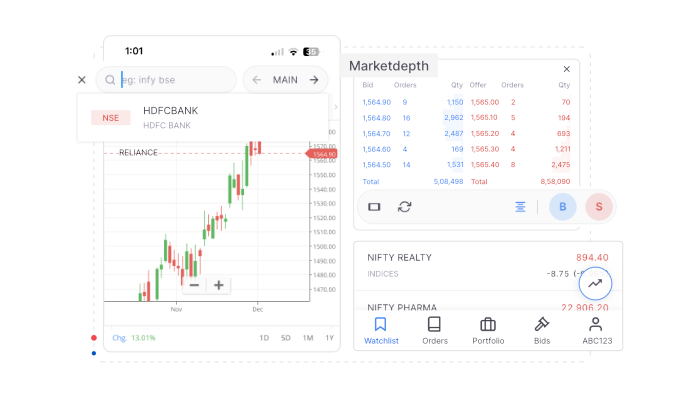
New charting features on the Kite app
We’ve rolled out a set of new improvements and features to charts on the Kite app to make charts load faster, analysing markets easier, and switching between charts more intuitive. Here’s a quick look at what’s new.
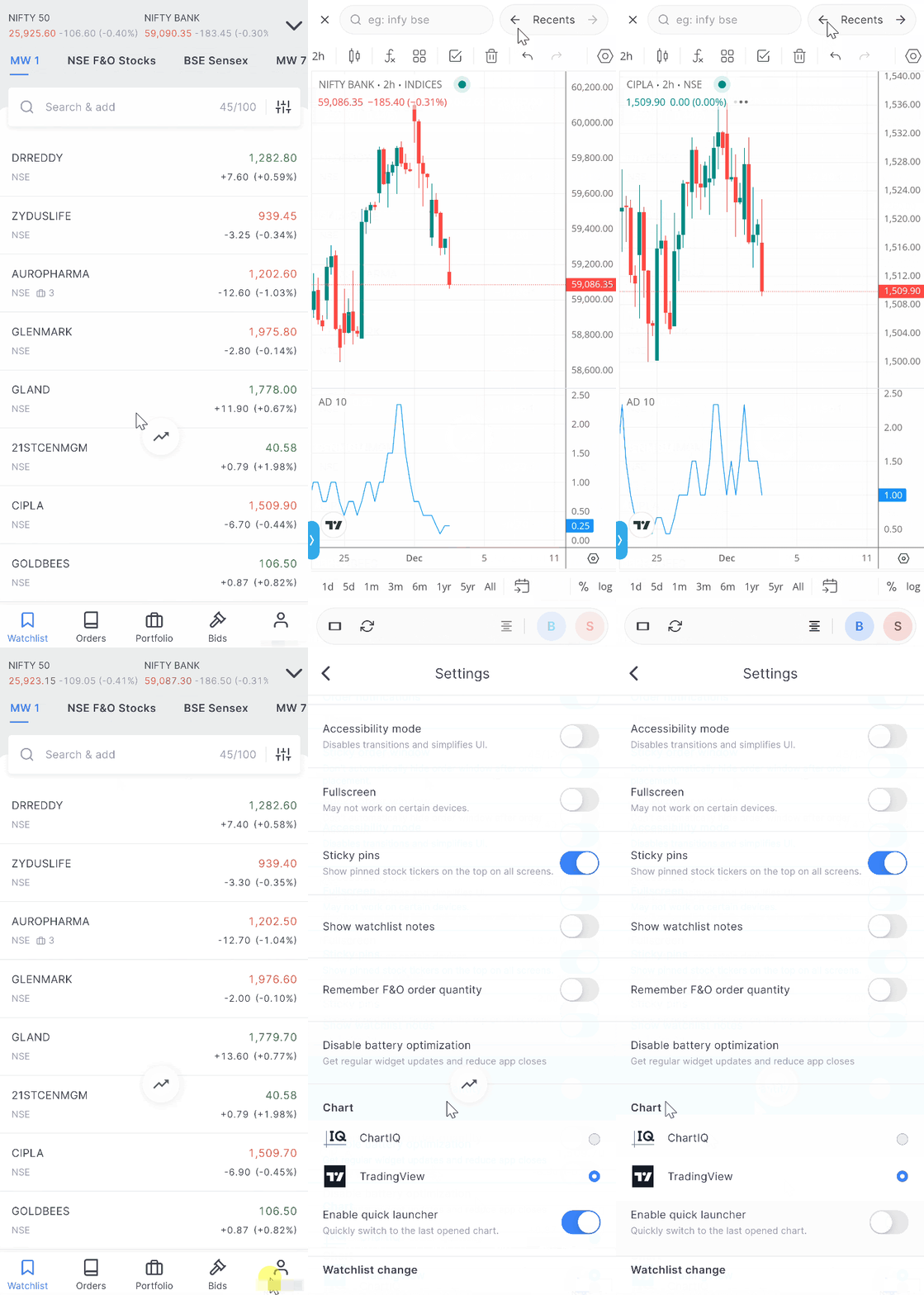
Quick launcher: open charts from anywhere
We’ve added a floating icon called the quick launcher. It stays on every screen, and you can move it anywhere you like.
Tap it once to open the last chart you viewed. For example, if you were looking at Bank Nifty, one tap brings you right back to the Bank Nifty chart.
You can also switch between your recently viewed charts using the arrows next to “Recents.”
If you don’t want the quick launcher, you can turn it off from app settings.
Search for charts, right inside the chart
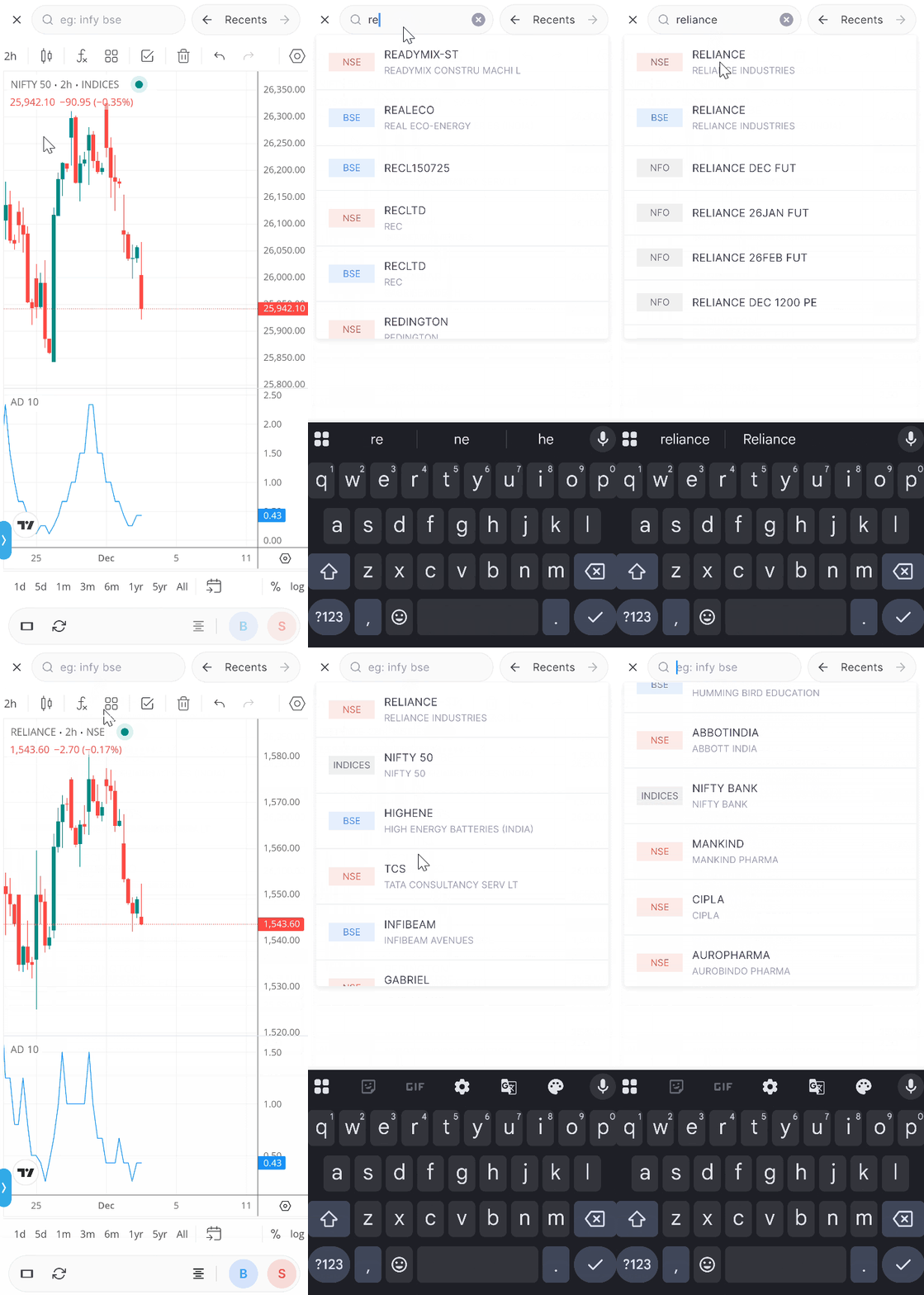
Until now, switching charts meant going back to the marketwatch. Now, you can switch charts directly within the chart interface. At the top of the screen, tap the search bar, type the name of any stock or contract, and open it instantly. For example, if you want to view Reliance, simply type “Reliance” into the search bar and select it from the results.
The search bar also displays the last 20 charts you viewed, allowing you to switch between them quickly.
Move between stocks with one tap
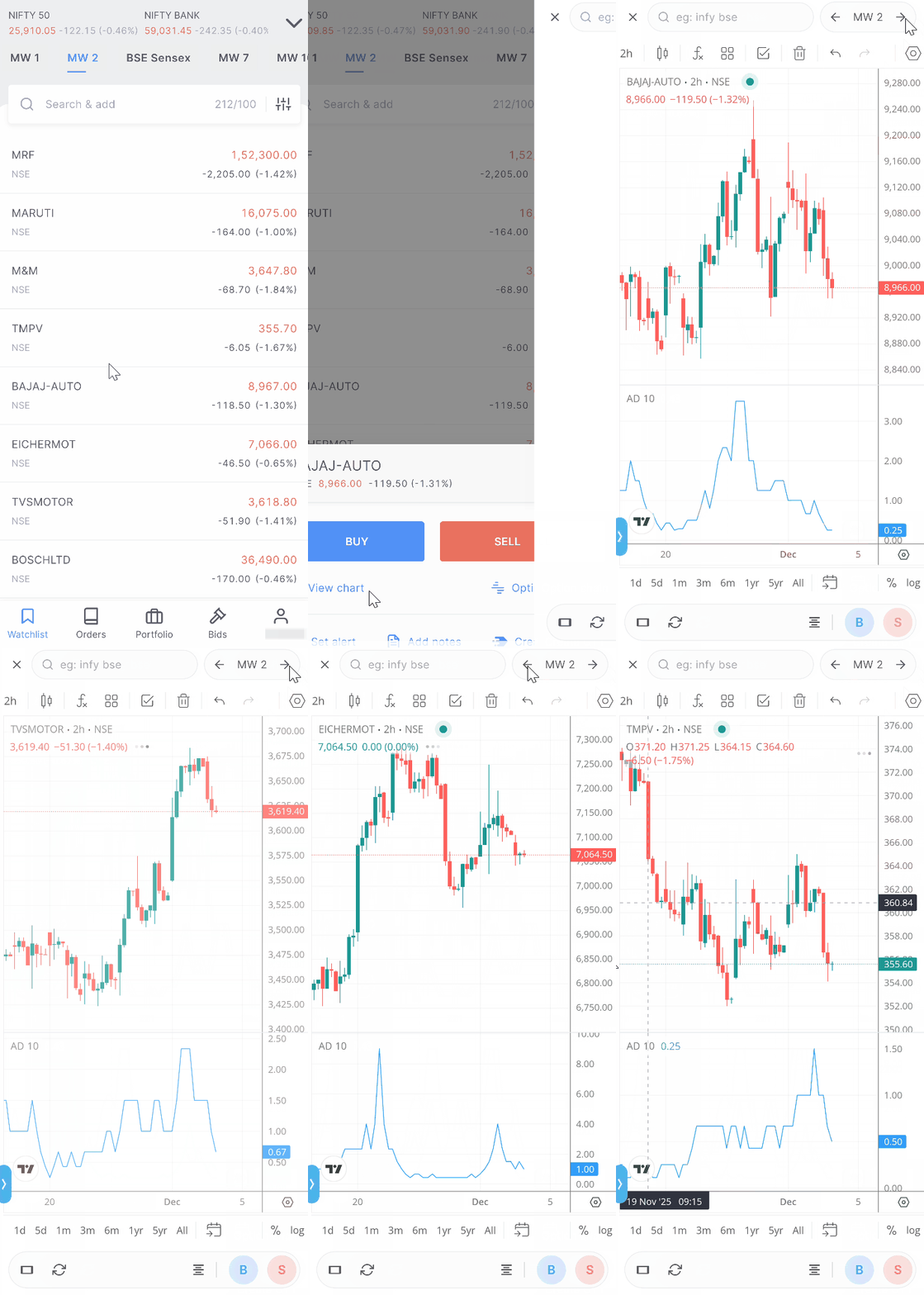
If you open a chart from your marketwatch, the marketwatch name will now be displayed at the top, along with left and right arrows. Tap these arrows to navigate to the previous or next stock in the list. For example, if your marketwatch includes Nifty, Reliance, Infosys, and TCS, you can scroll through all of their charts without leaving the screen.
The same navigation features are available even when you open charts from your orders, positions, or holdings.
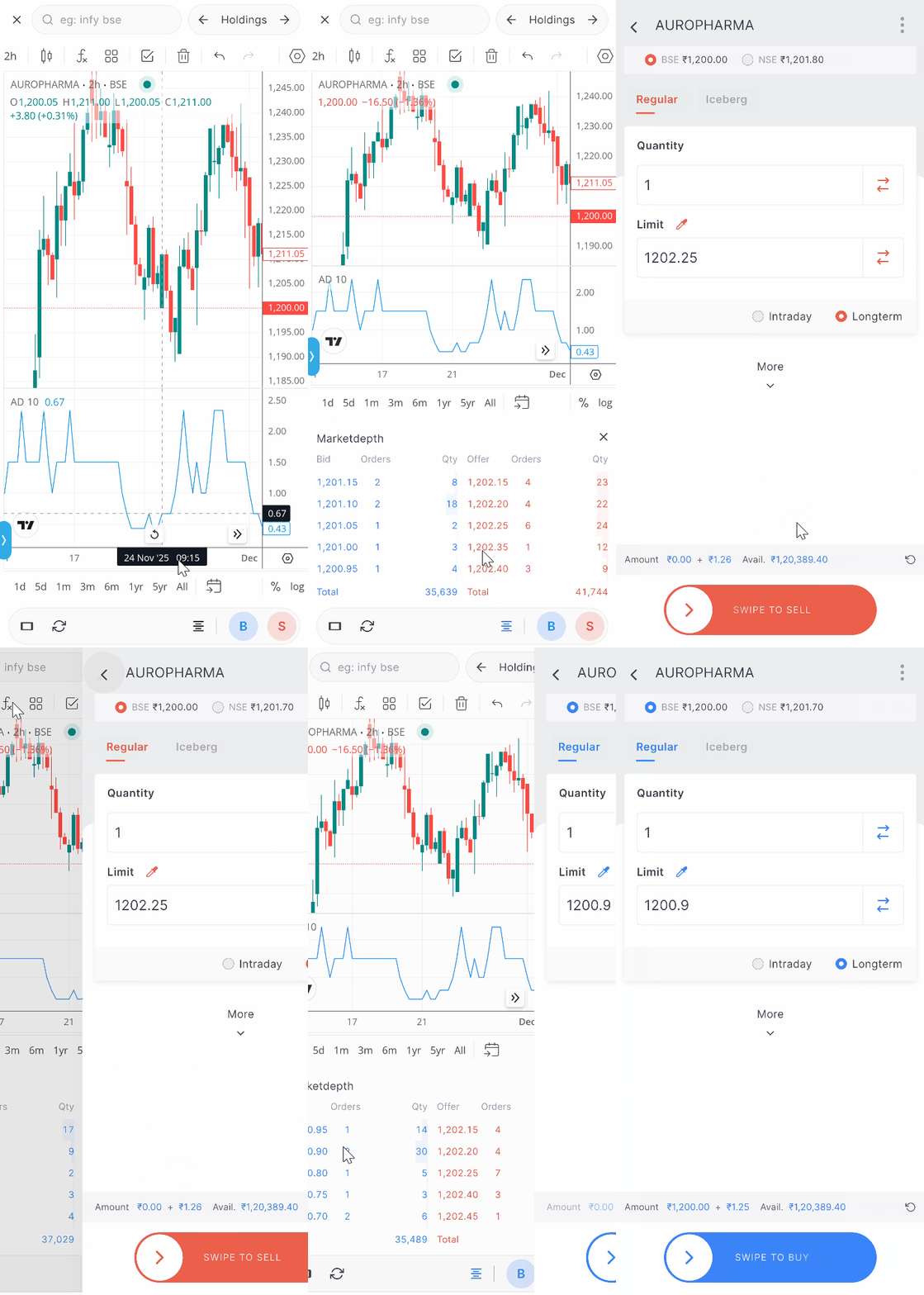
Market depth inside charts
You can now view market depth directly within the chart.
Tap the market depth icon to view the bid–ask window. If you tap on any bid price, a buy order window will open with that price filled in. Tapping on an offer price will open a sell order window.
Swipe to close charts on iOS
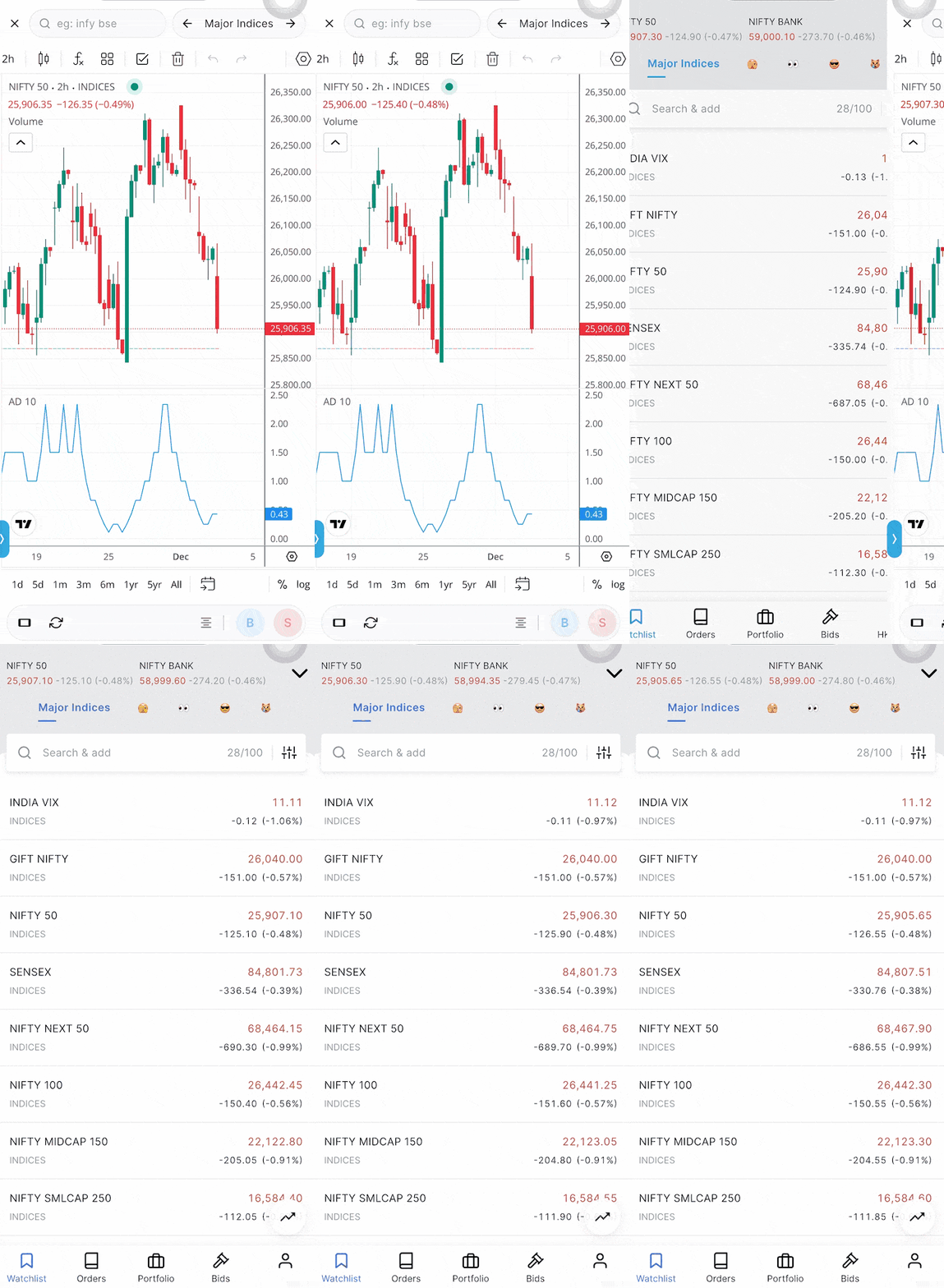
If you’re on iOS, you can now close charts with a simple swipe from the left edge of the screen.
Buttons moved to the bottom
The reload, rotate, and buy/sell buttons are now located at the bottom of the screen, making them easier to reach while holding your phone.

All these updates are designed to make charting faster and trading simpler. If you have any feedback, do let us know in the comments.

shall we set custom rules or tools in charts
I’ve been a loyal customer and appreciate your services. I wanted to suggest improving the mobile app and adding more TradingView chart features to match competitors. Some features I’d love to see:
– Customizable chart layouts
– More technical indicators
– Advanced drawing tools
– Assign target and stop-loss directly on the chart
– One-click trading from charts
– Multi-timeframe analysis on a single chart
Other brokers are offering better mobile platforms, so I’d love to see these enhancements.
Hi Zerodha Team,
I want to mention one thing: if multiple views are saved on the chart, the currently selected view should be highlighted.
Hi Abhijeet, we’ve noted your feedback. Thanks.
Hello Team,
I have using kite since 5 year. But now i noticed that if in portfolio we can give the tag like red green to the perticular stock or add note like in excel to view.
Sometimes it happen we watch and analysis the stock for adding or selling the quantity but we are not regular trader but as a investor. We can not do everytime analysis the stock etc. so whenever we free we do it. So it might very help full for eveyone.
DEAR SIR,
Kindly provide an option for using Desktop Ticker to view all the holdings prices or commodity price as selected, it will be much helpful, thanks
Hi- I need daily intraday chart for Eternal since its IPO- i.e July 23, 2021. 1 hour time frame is also ok but I need to check whether it hit high or low first every day. Is this possible.
Once I buy or sell a put or call of options, usually I watch chart of that particular strike price. It would be helpful, if the Nifty 50 figure displayed on each window of the charts of index option or stock options and the price of buy or sell and the P&L position on the same window of the chart.
Hi Krishna, we’ve noted your feedback and will check on this. Thanks.
Once I take a trade in mobile app there is no way I can see or manage my position by staying on chart . I have to close the chart and then go to position to see. There should be an option in the chart to see the current position .
Hi Vaibhav, we’re working on providing trading from chart feature on the app. We’ll keep you posted on it.
Also please make changes so that we are able to access option chain directly from chart . May refer to any other broker apps like example fyers mobile app have all the things that a person require to trade from app. You can access option chain and manage your sl or target directly from chart. May also include feature like smart exit where positions are automatically exited based on certain profit or loss .
Hi Vaibhav, we are continuously working on adding more features to make your experience better. Thanks for your feedback.
Shubham, by when Zerodha is coming up with Smart exit? Because u guys have updated that it is in top priority on May 2025 and its beeen more than a year
We require different funds for trading commodity.In angelone it is not so same money use for f&O equity trading is used in commodity trading.please resolve otherwise i have to switch my account
Hi please add previous high low indicator and while keeping stoploss thru app, need to scroll down and it is not visible at all
Wonderful .. kuddos to the team .. I had one more request , currently saved Charts on one system can not be open on another system and also on i-pad chart analysis can not be done through pencil . Suggest if this functionality can be developed .
Regards
Hi Team, Good features but also add CPR Indicator to on your Trading View Chart platform as the same is missing not sure why such a basic Indicator is not given to customers on Trading view where as your Chart IQ still provides this Indicator please look into it. thanks.
Good
Hi
I expect a simple feature
Notes to be displayed even in holding.
Notes are seen in watch list but when i hold a stock they aren’t displayed.
(For example note in gail :
gail accumulate below 150, dividend yield at rs 150 is 5%)
This is displayed in my watchlist but not in holdings, for me it becomes very easy to decide what to do with holdings when the notes are easily accessible.
Currently i need to see where in my watchlist is gail then see its notes then rethink …….too tough when i dont keep on looking at it everyday.
The new feature work only in portrait mode. It will be great if they work seamlessly in Landscape mode too especially on iPad. Thanks
Add the option chain button to the market depth option icon for index because It’s not clickable for index right? There is huge space in bottom so please add P&L reflection there. all in one chart. Thank you!
If you could add a feature to set a price alert directly from the chart by drawing a horizontal line, like in TradingView, it would save a lot of time.
Great Job! These features will make more user friendly.
I have stopped doing trading and from last 4 years sold only few shares. I wish if Console gets features like Annualized returns for each FY vs Nifty, so that I can compare and decide if I should work to make any changes in case I am underperforming.
Facilitate buttons for 1M, 5M, 15M, 1H, 1D, 1W and 1 Month timeframes on the chart itself so that we can navigate to any timeframe with a click of a button.
Very fruitful information.
Hmm 2 alag alag spread lagate h to wo ek hi position page pr dikhte h manually calculate krte krte profit wala spread loss m chala jata h iska koi solution de please
”Thank you for all the new features in app, Can we have all those in a web version on PC?”
Rgrds
Nothing
These features are little helpful, but the main feature I’ve been looking forward to having is cloud storage for many layouts. Unable to save more than 2 chart layouts currently. You may add cloud storage for many layouts (not just default layout) which help access the charts from any devices with same trendlines and indicators saved. You may fix a specific MB for each user, at least to be able to save at least 10 different layouts with all indicators and trendlines.
In zerodha tradingview charts are using.. so u can give login access of tradingview login in zerodha charts or zerodha login in tradingview app.. that’s help to work in single app.. no need to switching apps .
Ur tradingview charts working is slightly lower comfortable than tradingview app .
And also autosave of charts need.. how to save everytime
Hi Anwar, we’ve noted your feedback and will look into this. Thanks.
Tq
Please provide Trailing stop loss for delivery stocks, it is available in intraday but not for long stocks.
Hi, we’re working on providing Trailing Stoploss feature and will keep you posted on it.
Please add a button for opening the option chain in the buttons strip.
Test
Login Here
Great set of updates. Here are a few things I hope to see on iOS.
– Ensure the clock is visible while using the app.
– Similar to TradingView it would be great if I could see a marker on chart that shows my buy/sell position + profit calculated based on where the price has moved.
– Similar to above, controls to extend a SL and target control.
These three would make my experience extremely wonderful.
Hi Ajay, the phone’s status bar will be hidden if you have enabled fullscreen mode; you can disable it from app settings. Regarding other two queries, we’re working on adding the trading from chart feature on the Kite app.
Hi,
Would you please include XIRR feature in portfolio tab itself as like other stock brokerage platform.
Hi Balasubramaniyam, we’ve noted your feedback. Thanks.
Good
Please add volume table in option chain.
PLEASE PROVIDE THIS ALL UPDATES TO KITE WEB/IN PC ALSO,WE EAGERLY WAITING OF THIS, I SAID MANY SUGGESTION IN PAST THAT SOME OF THE UPDATE NEEDS IN KITE WEB,
1-WATCHLIST(QUICK LAUNCHER) IN KITE WEB WITH SPACE KEY TO CHANGE THE CHART ON OUR CURRENT WATCHLIST
2-SMALLER TIMEFRAME LIKE 1s 5s 10s 15s 30s,
ALL OF TOP BROKER IN INDIA PROVIDE THAT TWO UPDATES IN TRADINGVIEW ZERODHA CHART…PLEASE TAKE THIS ON TOP PRIORITY ON RECENT DAYS OF UPDATES…
WE ARE EAGERLY WAITING….
Hi Rutvik, we’ve noted your feedback and will look into this. Thanks.
Exactly. Why is the timeframe shortcuts not working, even though the chart is of TradingView. Pressing 1 gives me changing symbol and not the timeframe which is stupid. All other keys bring up symbol change, why can’t you have 1 bring up the timeframe window. Basic tradingview feature which is not working.
Not able to save the studies on the charts is the biggest drawback of kite..
In trading view we can see our study which we have done since it gets saved automatically
Kindly enable this on kite too
You can save actually you need to turn on auto save
Hi Umesh, you can have any drawings, etc., added to the charts as the default layout. This is saved on the cloud and available across all devices. Please check out this article for more: https://support.zerodha.com/category/trading-and-markets/charts-and-orders/charts/articles/tvlayout
Excellent information about to trading
Loved these updates. Search bar atop of charts, directly moving to previous charts or charts of stocks into the lists-these updates are real convinient for investors.
Switching charts is the greatest feature i wanted to have from a long. Thanks kite-Zerodha and Team. I can use it only on App, but How to enable it on kite web on my desktop.
sir i want to tell you pls bring CPR indicator and do one thing is that if i use trding
view chart, but i also need some i chart feature ,how can i do this quiquely
Hi Pravin, currently CPR indicator is available in ChartIQ charts. We’ve noted your feedback to add it to TradingView charts. Regarding your second query, it is not possible.
Please provide separate buy/sell buttons for cnc and mis orders on charts views . This will save time in placing the orders. Thanks
Hi, all features are good and excellent work done. i would like to suggest some simple requirements for kite web…please look in to the requirements..
1. CPR indicator
2. Trailing Stoploss facility on Option Premium Charts
3. bracket order for option trading.
i hope other platforms which started after zerodha they are giving these facilities and zerodha is lagging.
Hi Abdul, we’ve noted your feedback. These feature are on our to do.
Please kite aap put in trading option on the chat.
The refresh chart arrows are visible only in portrait mode and disappear when the chart is viewed in landscape mode. Please rectify.
Hi Balachandran, when charts are in landscape mode, it is considered focus mode; hence, options to search and switch between charts are not available.
Kindly introduce clock (watch) on the screen.
3.8.3 is my Kite ver. I could not see, Quick launch under SETTINGS. How to get app update thru’ my manual initiation?
I find all these features are nice.
Hi Bhasgaran, you can update the app from Play Store if you are using Androind or App Store in case of iOS.
Dear Zerodha Support Team,
I am facing an issue with the TradingView chart layout linked to my Zerodha account.
I had saved my chart layout (with multiple indicators and settings) while logged in on one computer. However, when I log in with the same Zerodha account on another computer, the saved layout does not load — all the charts appear blank, and no indicators or studies are visible.
Kindly investigate the following:
Why the saved TradingView chart layout is not syncing across devices under the same Zerodha login.
Whether there is any specific step or configuration required to access saved layouts from multiple computers.
If the saved layout is stored locally instead of on the cloud, please confirm how to back up or transfer it.
Please look into this issue and advise me on how to restore my saved chart layout.
Hi Satish, layouts are saved in the local memory of your device and cannot be accessed on other devices. You can, however, save any drawings, etc., you add to charts as a default layout; this is stored on the cloud and can be accessed across devices. Please check this article for more: https://support.zerodha.com/category/trading-and-markets/charts-and-orders/charts/articles/tvlayout
Please could you do adding different option contracts to a basket a dast process ?
Like i have to create a basket very rapidly and i have to add all of them by typing on the search bar .thats the fastest way currently.
There is no option of adding contracts directly from options chain to basket.
How come its not there?
Also have to type indices on option chain search bar .. there should be click amd select common indices on the search bar.
That way it can be faster.
For this sole reason i am not able to use zerodha for my trading.
Hi Paras, on the Kite web and app, we have a quick baskets feature using which you can quickly add option contracts to a basket from the option chain. Please check out these two articles.
For web: https://zerodha.com/z-connect/featured/quick-baskets-on-kite-web
For app: https://zerodha.com/z-connect/business-updates/easily-place-multi-leg-option-trades-using-quick-add-to-basket
Very good features.
This too helpful for trading,thanks lot
Not upto standard
IT SEEMS COIN USERS ARE OUT OF FAVOUR RIGHT NOW, SINCE NO UPDATES FOR LAST 3-4 MONTHS
Why not Multiple Screens/Charts akin to kite web on kite app?
Great feature on chart, liked it very it 😊
1. Can buy/ sell can be place similar place as market dept?
If user clicks on any market depth price then hide karket depth and show buy/sell window instead. That will enable user to tale action without moving away from this window.
2. If similar can be done by clicking on some key averages to place order. That has not formed on chart yet but may occur. If occurs the place buy/sell orders.
Hi Pankaj, will bounce this off our team. Thanks for the feedback.
Excellent features keep it up great work
In Smart phone version I can’t find the CPR indicator in tradingview.
Hi Subrata, the CPR indicator is available on ChartIQ charts on Kite. You can search for ”Central Pivot Range” under studies. However, it’s not yet available on TradingView charts, but we’re working to include it in future updates. Thanks.
Kite app must update on indices with stocks display inthe app and secure wise istocks also must display for easy identify that,which sector is performing during the trading
Is it possible to see my historical trades on the charts itself? At what levels were my entry and exits in the past?
Much needed update. Great work.
Add stoploss and target price option on chart drag and move ST and TP
This upgrades are very good & useful, which makes analysis fast and trading easy & quick, this type of upgrades make difficult for others to overtake the Zerodha which is Number one trading app in the trading world…
This upgrades are very good & useful, which makes analysis fast and trading easy & quick, this type of upgrades make difficult for others to overtake the Zerodha which is Number one trading app in the trading world…
Please add 2nd chart option in the bottom in kite.
EXCELLENT THANKS FOR THE UPDATE
Please allow custom indicators and auto trades based on that
Buy and sell option should be at top rather than at bottom as when we back the screen some time buy sell orders are executed accidentally
Please add features where in you can change SL or TP by just dragging it on the charts.
It is js Nice Feature.
Also we would liked to have in chat itself move target and stoploss by dragging in easy way.
chart is not work smothly see once resolve the problem immediatly
Hi Suresh, could you please create a ticket on: https://support.zerodha.com/ so we can check and resolve this at the earliest?
If we place the order in ato but can’t order Exit in ato please do this
Hi Ghanshyam, you can exit existing positions in ATO too. To do this, if you have buy position, you will need to add a sell order to ATO and vice versa if you have a sell position.
Help us connect to trading view account
Request you to kindly consider adding instant exhibition of different indices like Sensex, Nifty etc on kite app. Thank you
Please add stock navigation option in landscape mode. I always used this to study charts.
Hi, when charts are in landscape mode, it is considered focus mode; hence, options to search and switch between charts are not available.
Please add the features in landscape mode as landscape is always better then potrait mode…
Dear lovely team members
Is there available Volume profile while seeing charts?
Hi Venkatesan, the Volume Profile feature is available in both TradingView and ChartIQ charts.
THANK YOU so much for reply
Before you guys request NSE to bring the weekly bank nifty
We need,
Automated Trailing stop loss (You can also set a note it may not hit due to volatility of the instrument)
Alert on chart drawings
Basket order required margin for OPTION says 1.5 lahks, account has 2 lahks. Still it rejects the sell order. Only option buy pass through.
When web lost connection, through a pop up immediately. Don’t let us watch the price thinking it’s not moving. Help us with this.
Please add stock navigation option in landscape mode. I always used this to study charts.
Can ”Chart” option be accessed through ”Alert”?
Hi Vinod, on app, you can enable Quick launcher, which allows you to open charts from anywhere within the app.
Hi
Nice to see new Look,
Suggestion to provide Target and Stop loss within the Chart which can be adjusted or Changed within the chart just by swiping top or lower side
Regards
Sachin
We’ve noted your feedback, Sachin.
Please add chart navigation feature in kite web also
Hi, we’ve noted your feedback.
Super addition. Very useful feature. Thank you
This update is really time saving. Effort is really appreciated. I was waiting for two features in zerodha one is bracket order as it helps working people to do intraday trading more efficiently if they planning there trades in advance. The second is the risk management and position sizing tool. As a broker the team knows best that it is a business of risk management still they don’t provide the position sizing tool in the platform is quite surprising. Some discount brokers provide that but i don’t like that much. Sharekhan has nice interation of position sizing tool, trade from charts and order window but the problem is you have to pay for it. If you can provide the exactly same in the platform it will help the traders.
Excellent
There should me more filter in watchlist section by which we can sort the stocks
Why I cannot move stocks with one tap in landscape mode.
I always used landscape mode to view full chart of stock and I can’t have all these in landscape(full view mode)
Please add all these options in full view mode or landscape mode in charts.
Trade from chart with sl and target feature is missing in this update.
Hi Santosh, these feature are on our list of things to do.
When?
Can you people add trading from chart directly on zerodha kite app
If not tell why
Zerodha people are so reluctant that they also don’t want to add trading view collaboration like dhan n give irrelevant n irritating answers of why they don’t want us to make money by connecting chart with Trading view
Zerodha people also not making app stable n sometimes chart stops moving
Despite all this they think they are the best
Grow up zerodha
Groww is leading due to all this lack of development n irrational reasons you people give
exactly I face the same issue that’s why I switched to dhan trading. I need zerodha collabrating with tradingview just like dhan trading.
Very nice and useful to understand chart
Pls add
1. Volume in the Indices chart, will be very helpful
2. Just like Gift Nifty and Global Indices, pls allow adding spot prices of Gold, Silver and Crude in INR and USD
We need a missed profit % Indicator on holdings.
Stock ABC bought at 100
after few months it reaches 150 (50% unrealised profit)
again after few weeks it reached 120 (30% missed profit)
Please do the needful. Happy to discuss and provide you system logic. You may consider day closing and opening instead of exact purchase price to create a base.
Good 👍
Please add set alert option in the opened Chart itself. We have to navigate back from the opened charts and set alert when we want.
Earlier used to draw support resistance line just by clicking on arrow. Now it’s not there. Also , it would be much better if we can place order of buy along with expected sale price
since this update the settings of the tool bar like retracements and extensions do not scroll down…..
What should be done to get the old features …so that the settings of the tools can be re accessible…
Thank You
Is it available on mobile only or lap top also ? I could see on Mobile app but not on lap top ?
Option chain on chart miss
Please p&L pr safe exit
Hi Sunil, we’re working on this. We’ll keep you posted.
Please update that we see our positions with chart and also we can see
Spot chart and premium chart together
Order position cannot be closed within charts window. (Quick exit button ). When are you introducing this
New chart scroll button is not available in landscape orientation of the mobile device. It is a pain to rotate phone to get the chart scroll button.
Hi Sandeep, when charts are in landscape mode, it is considered focus mode; hence, options to search and switch between charts are not available.
Please add volume to indices: nifty, bank nifty and sensex, so it will be useful for dra strategies like avwap, vwap based volumes
Can you add alert feature inside the chart,
Currently we have view chart come back and then add alert… This sucks instead can’t we just have alert inside when we are viewing chart…
Gud one gud thinking
The features are good, but when we draw support and resistance lines on the charts, they are not saved permanently. Having this option would save a lot of time since we wouldn’t need to redraw them each time. Other brokers provide this feature, so it’s unclear why Zerodha is still lacking it.
Yes it’s helpful
Please make the order window as a floating one inside the chart window itself.
when you are starting feature to trade/invest in american or other country markets
Ewguikbbfoiff5cccy u77vycyvyv7vyvyvyvyvyvy
Please add feature like…currently is not possible to add multiple stocks at once. Please add this feature.
It becomes hectic to add stocks manually and also time consuming.
I would like to request the addition of a Chart Replay feature in Zerodha, similar to the one available on TradingView. This feature is extremely helpful for practicing price action, reviewing past market movements, and improving trading skills without real-time pressure.
Add feature
% change in the stock from the day I added in the watchlist
what is the meaning of broker? when one places buy order then give features like SL trigger, SL limit order, Target trigger, Target Limit Order.
What’s the use of broker if such facilities itself not provided by broker. other brokers has much better features.
sir give us function hide button.secondly when are you going to add sl target both in same button.
US market microsoft office Apple. Nvidia stock search in &buy
Please add Vega in figures like market depth.
please make provision of viewing charts while scrolling scrips like in trading view.
or its available in kite, i may not know
hi Zerodha Team,
pls add ORB indicator.
We don’t need like feature you give past 1-3 month that doesn’t matter please make one terminal or tool for screener Good
We don’t need like feature you give past 1-3 month that doesn’t matter please make one terminal or tool for screener Good
Lovely, kudos for all your updates.
Please add notes for holdings. And in watch list please add starting price for tracking when I started watching
Request you to add new indicators
2
Yeah please make terminal or better tool for screener and other thing for your app is good but for tool I have to download other broker and his software terminal for use so please make one
Introduce all mutual funds, etfs, international stocks, in single app. That would create very big impact.
Not a good idea.
Is it possible to create ratio charts? Like Nifty50/NiftyNext50
Landscape mode par work nahi karta hai usme bhi chart switch ka option aana chahiye
On desktop app, please give option hide the watchlist, so that more number of charts can be added on the screen
I agree with that. The watchlist takes a lot of screen real estate. I use the pop out chart to view multiple charts.
Hi Pankaj, you will be able to do this and lots more with upcoming Terminal Mode on Kite.
Nice, In case of Options, it would be helpful if Delta could also be displayed on the Charts.
This is awesome I like it, Thanks.
Great
Hey ! Appriciable update. requesting you to provide the trading from index charts it self of options. for your reference Angle one is providing the same.
U R UPDATES MADE CHART SMALL.Y U ALWAYS WAT TO DESTROY A GOOD ONE.WATS THE ITCH????
INSTEAD OF THAT U CAN INTRODUCE HIGH LOW INDICATOR WHICH CAN BE HELPFULL.STOP DOING THESE STUPID THINGS.
Love these changes. Do something new with Kite Web
I really appreciate the zerodha response to customer request
Always refreshing the chart while switching any tab on Android phones
Add option chain in your chart this is most using feature in charts but you can’t provide this feature how you so late for this feature
Why don’t you guys work on your website portal to trade it will be very helpful