


November 16, 2026
How to Check Your EPF Balance and Passbook on WhatsApp
Satya Sontanam | Personal Finance
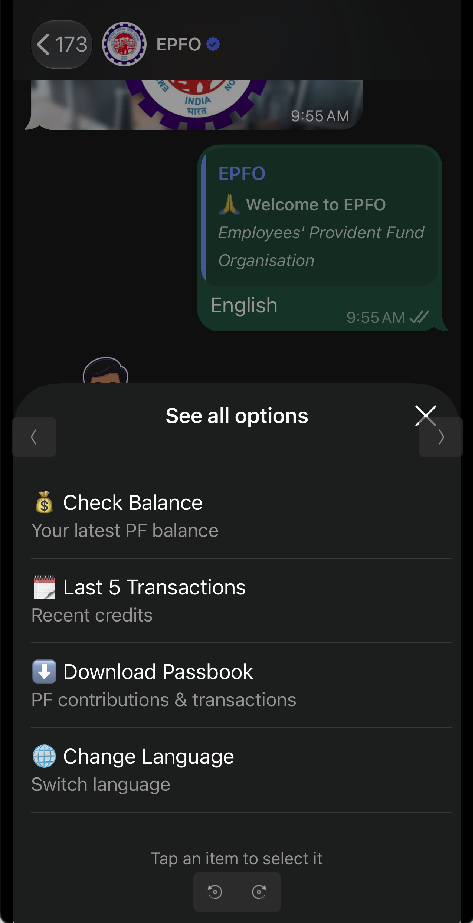
On 1 November 2026, the Employees’ Provident Fund Organisation (EPFO) launched a WhatsApp service that lets members check their PF balance, view their last five transactions, and download their passbook. We can now get these details through a chat, without logging in to the EPFO website.
Before getting into the steps, it helps to understand the different amounts shown in our PF account.
For most employees, 12% of the wages used for calculating PF is deducted from their salary every month. The employer contributes another 12%. This does not necessarily mean 12% of the entire salary or cost to company.
Our contribution goes into the Employees’ Provident Fund (EPF), which builds our retirement savings. The employer’s contribution is split: for employees covered by the Employees’ Pension Scheme (EPS), a portion goes towards pension benefits and the rest goes into PF. That is why the employer’s share shown in the PF balance can be smaller than the employee’s share. To check these details on WhatsApp, start by sending “Hi” to +91 8796441800, the number published for EPFO’s WhatsApp service.
Choose your preferred language from around 10 options. Then select the option to check your PF balance and follow the prompts.
If you have changed jobs, you may see multiple PF accounts to choose from. This can happen when the PF accumulated with an earlier employer has not been transferred to the account with your current employer.
Select the account you want to check and complete the one-time password (OTP) verification. Keep your Aadhaar-linked mobile handy to receive the OTP.
Once verification is complete, the chat shows the details for the selected account:
- Total PF balance
- Employee’s share
- Employer’s share
- Pension contribution
- Latest contribution date
Remember that you are checking the selected account. If money remains in accounts from previous jobs, you may need to check those separately. The amount displayed should not automatically be treated as the combined balance across all your PF accounts.
Also, the pension contribution is shown separately because it funds pension benefits. It does not work like the employee and employer shares that make up your PF savings.
Apart from checking the balance, the menu lets you view the last five transactions and download the passbook. The passbook gives a more detailed record of contributions and other entries, which can help you check whether recent payments have been recorded.
The service does not always work smoothly. You may see a “Something went wrong” message or have trouble receiving an OTP. If that happens, try again after some time. The EPFO member portal and the UMANG app remain other ways to access your account.
Before entering any information, check that you are chatting with the verified EPFO account on the exact number above. Do not share your UAN password or banking PIN.